
April 22, 2015
Answered

Adobe Reader DC has errors and crashes with Windows Server 2012 R2

  • April 22, 2015
  • 15 replies
  • 115882 views

We recently installed Adobe Reader DC version of Adobe on our Windows Server 2012 R2 servers and are having issues since the launch. Few of the issues we have seen are as follows:

  1. This version is a bit clunky and hangs.
  2. Has a lot of pop-up boxes that appears each time I open a document.
  3. Each time I open a document there is a Welcome pop-up box
  4. It is a bit slow to respond between clicks
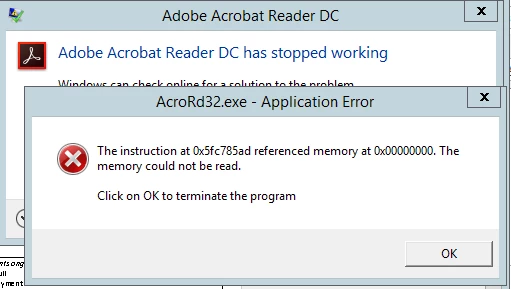
  5. If I click on any options like File. The application hangs and then crashes. (see attached crash message)

Any help to resolve this would be helpful.

Thank you

This topic has been closed for replies.
Correct answer ashutoshmehra

Questions to the users facing this issue:

1. Do you have the Preview Pane enabled in File Explorer? If so, can you disable it temporarily to see if the problem goes away? On Windows 8, in Explorer go to the View tab, and if the "Preview Pane" button is pressed, un-press it. On Windows 7, towards the top-right (towards the left of the help icon) there's a "Show the preview pane" button; un-press it.

2. Make sure the following directories exist on your machine. If not, please create them:

C:\Users\USERNAME\AppData\Local\Adobe\Acrobat\DC\ToolsSearchCacheAcro

C:\Users\USERNAME\AppData\Local\Adobe\Acrobat\DC\ToolsSearchCacheRdr

replace USERNAME with your user name.

Does doing 1 and/or 2 resolve this issue?

15 replies

AnandSri
Community Manager
Community Manager
January 30, 2019

Hi All,

I am sorry for the delayed response and inconvenience caused , I have shared the steps to collect the log files by private/direct message, please check email inbox and share the logs in the same direct message.

Thanks for your time and patience thus far.

Regards,

Anand Sri.

AnandSri
Community Manager
Community Manager
January 24, 2019

Hi Sold,

The issue is addressed in the latest available patch of Adobe Acrobat/Reader 19.010.20069 Out of cycle update, January 03, 2019 — Release Notes for Acrobat DC Products

But as you mentioned that you have the latest version of Adobe Reader and still crashes.

Please collect the crash logs of the machine on which you are facing this issue. I have shared the steps to collect the log files by direct/private message, please check your email inbox and share the logs in the same private message How Do I Send Private Message

Thanks,

Anand Sri.

January 25, 2019

Hello AnandSri,

Could you please share with me how to extract the crash log files or where is it located.

Sincerely,

Sol Dumago

[Personal info removed by Mod: Phone number, email id, address]

December 19, 2018

I've tried all suggested solutions and we still have users experiencing the issue, are there any more potential causes or suggested fixes?

Windows Server 2012 R2

Please help

Adrian

AnandSri
Community Manager
Community Manager
December 19, 2018

Hello Adrianl,

We're sorry for the trouble you had, the issue is already reported to the Engineering team and they are working on a fix on high priority, a fix has been identified and undergoing internal validations. We will share an update as soon as it is publically available.

Thanks for your time and patience on this.

Regards,

Anand Sri.

January 2, 2019

Hi,

Has there been any updates on this, my users are experiencing regular crashes.

Regards

Adrian

Participant
May 21, 2017

I am not as Tech Savvy as this post implies...  Every time I attempt to edit a signed document, the signatures become unreadable, which does me no good.  How do I edit a signed page without this occurring??  Thank you!

Participant
May 16, 2017

where do I go to create these files?

Known Participant
February 28, 2017

My issue is similar, but not exactly the same. On a host of Windows 7, 8.1, and 10 machines, Adobe Acrobat Reader DC crashes immediately when attempting to launch Acrobat Reader DC, whether it's launching the application directly or via opening a PDF...

The corresponding application event log entry shows:

Source:  Application Error

Event ID:  1000

Level:  Error

Description:

Faulting application name: AcroRd32.exe, version: 15.7.20033.2203, time stamp: 0x5507d7da

Faulting module name: unknown, version: 0.0.0.0, time stamp: 0x00000000

Exception code: 0xc0000005

Fault offset: 0x08012688

Faulting process id: 0x31e0

Faulting application start time: 0x01d2920fde354398

Faulting application path: c:\Program Files (x86)\Adobe\Acrobat Reader DC\Reader\AcroRd32.exe

Faulting module path: unknown

Report Id: 1c2596e4-fe03-11e6-82d0-7446a091a280

Faulting package full name:

Faulting package-relative application ID:

I have gone through the process of uninstalling and reinstalling and utilizing the cleaner tool as well, but always end up with the same results...a non-functional application.

Please advise.

Thank you.

Participant
December 6, 2015

I Found the solution for the problem. Same problem on Windows Server 2012 R2 RDS, sam crashes... The solution is to add registry entry. This entry disable Adobe Reader Sandobox protection.

1. Open Registry Editor - Regedit

2. Find Key: HKEY_LOCAL_MACHINE\SOFTWARE\Policies\Adobe\Acrobat Reader\DC\FeatureLockDown

3. Create new DWORD Value:

          Value Name:  bProtectedMode

          Value Data:  0

4. Close Regeditor

Voila there no more crashes!

ael818
Participant
February 20, 2016

THANK YOU! After trying all of the fixes listed in this and one other thread, your solution worked. Thanks so much.

Known Participant
December 4, 2015

You would think Adobe would have solved this problem with so many complaints.  

I thought it was a problem with Windows 10.   Not. 

I made one change and it did solve the problem.  Simple.  Change windows explorer view to "details" not "view."   That worked.  Why? I  have no idea.   

When you see a lot of work-arounds and patches, it is rarely the answer.

Adobe, fix the program.

carriet18448031
Participant
September 30, 2015

My Acrobat DC keeps crashing and I tried uninstalling it and it won't go away, it won't let me update, I go into program files and it doesn't even show up there. Now I have no acrobat at all and I cannot seem to find out how to fix it

ashutoshmehra
Adobe Employee
ashutoshmehraCorrect answer
Adobe Employee
July 21, 2015

Questions to the users facing this issue:

1. Do you have the Preview Pane enabled in File Explorer? If so, can you disable it temporarily to see if the problem goes away? On Windows 8, in Explorer go to the View tab, and if the "Preview Pane" button is pressed, un-press it. On Windows 7, towards the top-right (towards the left of the help icon) there's a "Show the preview pane" button; un-press it.

2. Make sure the following directories exist on your machine. If not, please create them:

C:\Users\USERNAME\AppData\Local\Adobe\Acrobat\DC\ToolsSearchCacheAcro

C:\Users\USERNAME\AppData\Local\Adobe\Acrobat\DC\ToolsSearchCacheRdr

replace USERNAME with your user name.

Does doing 1 and/or 2 resolve this issue?

dp.arno
Participating Frequently
July 24, 2015

Hi ashutoshmehra!

I have checked on 2 PC at work.

Users always use preview pane. Both had the issue.

I create the ToolsSearchCacheRdr on both and everything is fine now. They already have ToolsSearchCacheAcro.

Both AcroRd32.exe thread live and died properly.

On your next update, you can check if this folder exist

Thanks!

Arnault

edit:

I made this correction on Windows 7 SP1 Pro x64.