


Participant
January 12, 2017
Answered

Windows cannot find 'c:\.....\AcroRd32.exe'

  • January 12, 2017
  • 31 replies
  • 92938 views

Every time I try to launch Acrobat reader from the start menu I get this message:
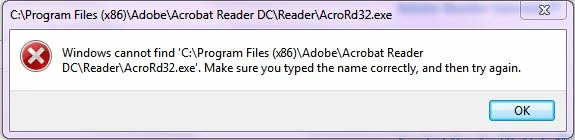
When I browse to the folder and double click on the AcroRD32.exe icon - I get the same message

When try to open a .pdf file by double clicking on it - I get the message that the file can't be found - even though I can open these files within a browser
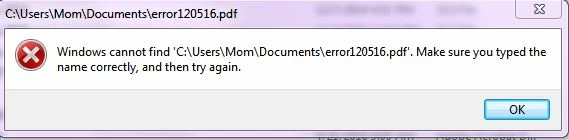
Again - I can open these pdf files (with or without acrobat?) in my browser but it doesn't seem to work independent of an HTML browser

I have uninstalled and reinstalled Acrobat Reader - please don't tell me to do that and let you know how it worked - it didn't

Thanks

Natasha

Correct answer Adorobat

Still doesn't work.


Could you please try the following steps:

1- Close Reader

2- Hold down Windows key and press R on your keyboard, this will bring up Run dialogue box.

3- Type regedit in the run dialogue box and hit Enter, click Yes when User Account Control pop-up appears.

4- Navigate to HKEY_LOCAL_MACHINE\SOFTWARE\Microsoft\Windows NT\CurrentVersion\Image File Execution Options, delete the key AcroRd32.exe

5- Relaunch Reader

31 replies

Participant
June 2, 2020

There is no Current version there. Alternative solutions? Windows 10 64-bit

Participant
June 2, 2020


You are a darling. I have been facing this problem but could not find find a solution. Out of sheer frustration I had installed some other reader. Could you pl explain why that unwanted key which you suggested to delete got in there on a working machine? I mean Reader on my laptop was working fine and one fine morning it just stopped working. Would love to know. Thanks a lot for the solution.

Participant
June 2, 2020

Ok. Now I think I know the source of problem. I had AVAST antivirus installed. To speed up the machine it has a feature where it puts Reader to sleep and then wakes it up on demand ( when you want to read a pdf file ). It puts Reader to sleep again when you close the file. It must be playing with this key to achieve this. I had uninstalled AVAST recently. It seems unistallation did not remove the key. Hence the problem. If anyone has AVAST installed and decides to remove it, my suggestion would be that first yoy should siwtch off that feature of AVAST where it wakes up the applications on demand and then uninstal AVAST.

Participant
May 20, 2020

THANKS SIR I AM SATISFIED AND VERY HAPPY

Participant
April 20, 2020

Great!!! It is working again now! Thanks a lot!

Participant
March 31, 2020

it worked! Tks!!!

Participant
March 7, 2020

Natasha... you are a goddess!

Participant
February 21, 2020

These steps work 100%. Thanks!

Participant
February 20, 2020

Thank you! Thank you! Thank you!

Participant
January 13, 2020

It worked. Thanks!

chinogut
Participant
April 25, 2019

This worked!!!!!!!!!!!!!

Tried other things that didn't, but THIS WORKED!!!!!

Thank you ever so much!