Participant
November 14, 2016
해결됨

Change the font color and thickness of Freehand in Adobe Acrobat iPad app.

  • November 14, 2016
  • 2 답변들
  • 11053 조회

I'm wanting to change the font thickness and color (it's red by default) in the Adobe Acrobat app for my iPad Pro.

I own a business and we just recently started doing forms that have to be e-mailed instead of faxed... and I'm wanting to use the "freehand" option as a way for my customers to sign the purchase order so I don't have to print, let them sign, scan it... and then e-mail it.

If anyone has suggestions on how to make this work, that would be greatly appreciated!

Thanks!
이 주제는 답변이 닫혔습니다.
최고의 답변: MobileDeveloperCK

Hi haleyh08​,

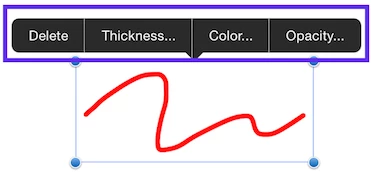
To change the properties of Freehand drawing

  1. Tap the existing Freehand drawing.
  2. Select Color, Opacity, Thickness from the menu that pops up.
  3. Change the value of the property.

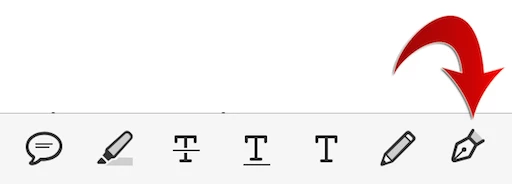
Alternatively, you can use the Signature tool in Acrobat Reader for iPhone and iPad.

Please tap the Fountain Pen icon (instead of the Pencil icon) to activate the Signature tool

The default color of a signature is black.  So the Signature tool may better fit your needs.

Acrobat Reader Help for iOS: Creating Signatures and Signing

Please let us know if you have any other questions.

Thank you.

2 답변

Legend
November 19, 2016

Hi haleyh08​,

To change the properties of Freehand drawing

  1. Tap the existing Freehand drawing.
  2. Select Color, Opacity, Thickness from the menu that pops up.
  3. Change the value of the property.

Alternatively, you can use the Signature tool in Acrobat Reader for iPhone and iPad.

Please tap the Fountain Pen icon (instead of the Pencil icon) to activate the Signature tool

The default color of a signature is black.  So the Signature tool may better fit your needs.

Acrobat Reader Help for iOS: Creating Signatures and Signing

Please let us know if you have any other questions.

Thank you.

try67
Community Expert
Community Expert
November 15, 2016

[Question moved to the Acrobat Reader for iPhone and iPad forum]