
Participant
December 1, 2023
Question

Conversion from Excel to PDF ignores locale settings for number and date formats

  • December 1, 2023
  • 1 reply
  • 766 views

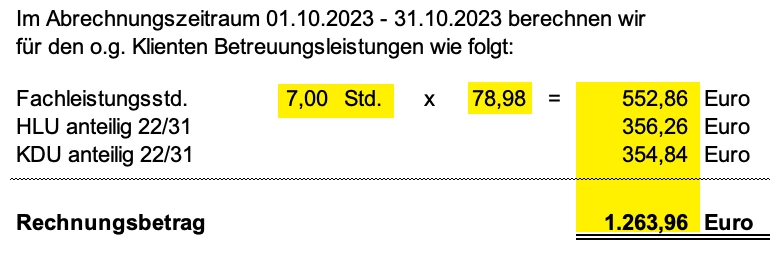
German numbers use a comma as decimal separator and a dot as thousand separator.

When converting Excel files to PDF, numbers and dates are stubbornly displayed in US style, with a dot as decimal separator and a comma as thousand separator.

Furthermore, Excel allows various formatting variants for numbers and dates.

These, too, are ignored in the conversion process.

For invoices this is an important issue.


Original:


Conversion Result:
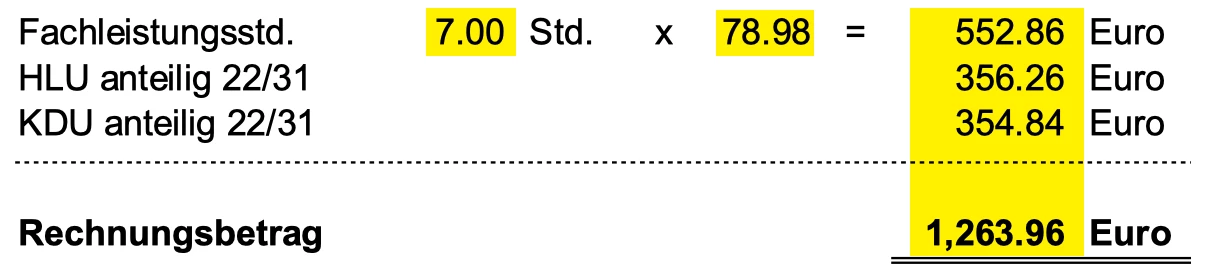


Is there a way to keep the original display formats of number and dates?

This topic has been closed for replies.

1 reply

Raymond Camden
Community Manager
Community Manager
December 4, 2023

Are you using the SDK or REST APIs? The Create PDF operation has a language attribute. Try that?

Participant
December 5, 2023

Hi Raymond,

we are using the SDK. Are you referring to CreatePDFOptions.withDocumentLanguage() and CreatePDFOperaration.setOptions()?

We use these, but to no avail, like so:

CreatePDFOptions createExcelOptions(ConversionServiceSupportedDocLanguages docLang)
{
  com.adobe.pdfservices.operation.pdfops.options.createpdf.excel.SupportedDocumentLanguage documentLanguage = null;

  switch (docLang)
  {
    case DE_DE:
      documentLanguage = com.adobe.pdfservices.operation.pdfops.options.createpdf.excel.SupportedDocumentLanguage.DE_DE;
      break;
    case EN_US:
      documentLanguage = com.adobe.pdfservices.operation.pdfops.options.createpdf.excel.SupportedDocumentLanguage.EN_US;
      break;
    default:
      documentLanguage = com.adobe.pdfservices.operation.pdfops.options.createpdf.excel.SupportedDocumentLanguage.DE_DE;
      break;
  }

  CreatePDFOptions pdfOptions = CreatePDFOptions.excelOptionsBuilder()
                                                .withDocumentLanguage(documentLanguage)
                                                .withCreateTaggedPdf(false)
                                                .build();

  return pdfOptions;
}

With the resulting pdfOptions object following method is called:

public void convertToPdf(String inputFilePath,
                         String outputFilePath,
                         SupportedSourceFormat fileFormat,
                         CreatePDFOptions pdfOptions)
{
  try
  {
    // Create a new Operation Instance.
    CreatePDFOperation createPdfOperation = CreatePDFOperation.createNew();
    createPdfOperation.setOptions(pdfOptions);

    // Set operation input from a source file.
    FileRef source = FileRef.createFromLocalFile(inputFilePath, fileFormat.getMediaType());
    createPdfOperation.setInput(source);

    // Execute the operation.
    FileRef result = createPdfOperation.execute(executionContext);

    // Save the result to the specified location.
    result.saveAs(outputFilePath);

  }
  catch (ServiceApiException | IOException | SdkException | ServiceUsageException ex)
  {
    LOGGER.error("Exception encountered while executing operation", ex);
  }
}

This produces a pdf file alright, only that US locales are being used instead of the original ones for numeric values and dates.

Have we made an error somewhere?


Best regards

Raymond Camden
Community Manager
Community Manager
December 5, 2023

I don't believe so. Can you email me your original file? I'm jedimaster@adobe.com.