

Extracting data from PDF to build HTML
Used the PDF Extract API to extract info from PDF and build an HTML. Would be helpful if you can answer the following questions regarding the API:
1. Can you share details on how to identify the location of elements from the json output? "Bounds" key in the JSON seems to have info. But unsure if that's the right location info.
2. The documentation page here states that 'The output does not include headers or footers'. Is there any way this can be accessed?
3. The documentation page here mentions that 'headings that repeat across pages are reported for the first occurrence only.'. Does the structuredData include information about subsequent occurrences about the header? If not can you share details on how to identify different locations of the same header?
4. Text overlayed on an image (Test, $10M+ Rev) in this PDF (attached as PHT4) is extracted as a part of the image and not as text. The sections highlighted in the image are added as text. Anyway to extract them as text and not image?
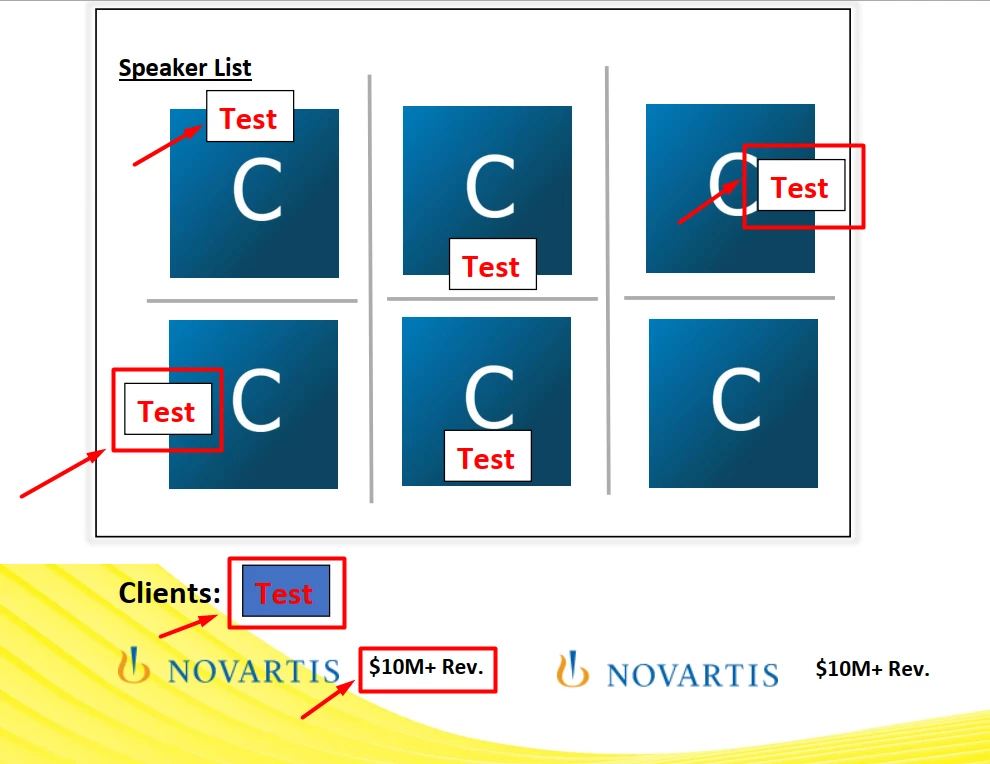
5. The below section in the PDF has a gradient background with a surrounding boundary. Can you help in locating this information in the json output?

6. The line of text below has different formatting for different words. Had noted somewhere in the doc that formatting is only based on first character in a line. But, I am unable to find formatting info.

Here is the relevant section from the json:
  {
      "Bounds": [
        72.02400207519531,
        721.4035034179688,
        271.4056091308594,
        742.0164947509766
      ],
      "ClipBounds": [
        72.02400207519531,
        721.4035034179688,
        271.4056091308594,
        742.0164947509766
      ],
      "Font": {
        "alt_family_name": "Calibri",
        "embedded": true,
        "encoding": "WinAnsiEncoding",
        "family_name": "Calibri",
        "font_type": "TrueType",
        "italic": false,
        "monospaced": false,
        "name": "BCDGEE+Calibri-Light",
        "subset": true,
        "weight": 300
      },
      "HasClip": true,
      "Lang": "en",
      "Page": 0,
      "Path": "//Document/Sect/P",
      "Text": "PDF to HTML Conversion ",
      "TextSize": 20.039993286132812,
      "attributes": {
        "LineHeight": 21.625,
        "SpaceAfter": 11.375
      }
    }
Clarity on the above 6 queries would help in integrating and consuming the API.
Thanks!


 AdChoices