
Need asistance in nested table in Adobe Document Generation API.
Hi, new to Adobe document generation API using https://developer.adobe.com/document-services/docs/overview/document-generation-api/ to generate document with values gathered.
Trying to use table tags with maker, unable to , help is highy appreciated.
Attached is sample json used and document table snippet.
Json:-
{
"clientOffices" : [
{
"clientName" : "ABC Corp",
"officesArray": [
{
"countryName ": "USA",
"cityName ": "New York",
"employeeStrength ": "500"
},
{
"countryName ": "India",
"cityName ": "Noida",
"employeeStrength ": "6000"
},
{
"countryName ": "UK",
"cityName ": "London",
"employeeStrength ": "600"
}
]
},
{
"clientName" : "XYZ INC",
"officesArray": [
{
"countryName ": "France",
"cityName ": "Paris",
"employeeStrength ": "5"
},
{
"countryName ": "Chaina",
"cityName ": "Bejing",
"employeeStrength ": "2"
}
]
}
]
}
Document :-
{% table-start clientOffices %} |
{% table-end %} |
Trying Repeat table rows vertically/horizontally with table markers, same issue there too
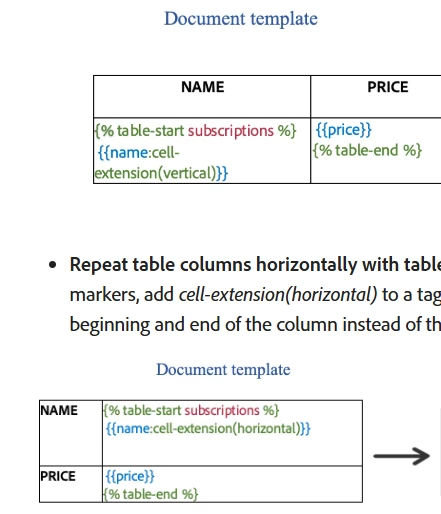
Problem seems to be with table-start and table-end tags.


 AdChoices