
Participant
April 13, 2021
Question

PDF tools API action in Power Automate is giving OperationException error

  • April 13, 2021
  • 1 reply
  • 1835 views

I am trying to get the Adobe pdf tools api to work in Power Automate. I've tried converting Word-documents (dotx) and images (png) to pdf but it's not working at all. When I use another api, there no problem converting with the same input parameters from Power Automate.


This is an example of the latest error. I am trying to convert an image from a Sharepoint-list:
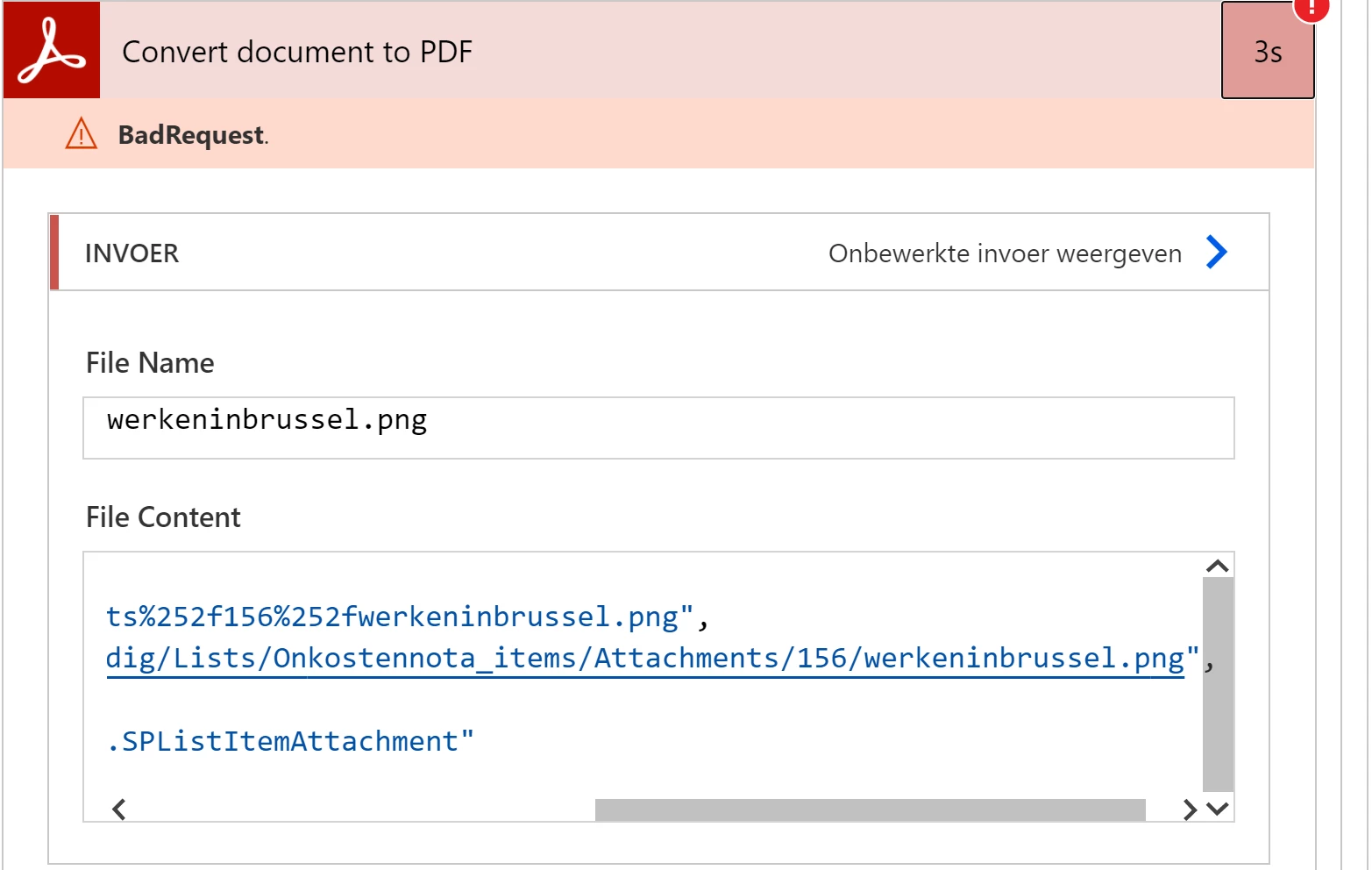
 

Output:

{"statusCode":400,"headers":{"Transfer-Encoding":"chunked","x-request-id":"7J1RTNRoDHLaDKURB19rgHNmBBtgCNmU","pragma":"no-cache","x-content-type-options":"nosniff","strict-transport-security":"max-age=31536000; includeSubdomains","x-robots-tag":"noindex,nofollow","vary":"accept-encoding","x-envoy-upstream-service-time":"50","Timing-Allow-Origin":"*","x-ms-apihub-cached-response":"true","Cache-Control":"no-store, must-revalidate, no-cache","Date":"Tue, 13 Apr 2021 11:50:34 GMT","Content-Type":"application/json","Expires":"Thu, 01 Dec 1994 16:00:00 GMT","Content-Length":"226"},"body":{"error":{"code":"OperationException","message":"For image/png mime-type The input file appears to be corrupted and cannot be processed.; transactionId=8iuZGIzrfBaeQnVp7oTxrdlHZJ6jXwKX-PowerAutomate"}}}


Any suggestions please?

    This topic has been closed for replies.

    1 reply

    Ben Vanderberg
    Community Manager
    Community Manager
    April 14, 2021

    Hi @MPhelpdesk ,


    I am not able to reproduce the issue that you are using. Can you provide more detail of the flow that you are running? i just tried using a PNG and it worked fine. However, as it relates to a DOTX file, try converting it to a DOCX file instead. The error indicates to me it might have something to do with how you are passing the file content.

    Participant
    April 14, 2021

    Thanks for your response.

    Yes, the problem was indeed the way I passed the file content. I have an action that adds an attachment (e.g. a .png) to a sharepoint list and then I used the output of that action as the input for the convert document to pdf action. But that was not working. Now I use the same input of the add attachment action to convert to pdf an that's working!


    But still having troubles with the Word-file. I have an action that fills a Word-template (DOTX) and indeed, that extension is not supported by the api. So I convert the DOTX to DOCX with an action and then I use that output to convert to PDF. But it is giving me a file extension error.


    Here's that part of the flow:

    The result:


    Participant
    April 14, 2021

    Update: I did use a wrong filename in the input of the convert action. But now when I use the correct filename and docx-file I get the 'original' error from my first post:

    Error:

    {
        "statusCode"400,
        "headers": {
            "Transfer-Encoding""chunked",
            "x-request-id""YAGXydy4ACfUyhvUMBn5mXPqkJ4oXfdc",
            "pragma""no-cache",
            "x-content-type-options""nosniff",
            "strict-transport-security""max-age=31536000; includeSubdomains",
            "x-robots-tag""noindex,nofollow",
            "vary""accept-encoding",
            "x-envoy-upstream-service-time""26",
            "Timing-Allow-Origin""*",
            "x-ms-apihub-cached-response""true",
            "Cache-Control""no-store, must-revalidate, no-cache",
            "Date""Wed, 14 Apr 2021 10:41:21 GMT",
            "Content-Type""application/json",
            "Expires""Thu, 01 Dec 1994 16:00:00 GMT",
            "Content-Length""288"
        },
        "body": {
            "error": {
                "code""OperationException",
                "message""For application/vnd.openxmlformats-officedocument.wordprocessingml.document mime-type The input file appears to be corrupted and cannot be processed.; transactionId=4Qkrmke9hEffkCCtJEukxAaCTYMrcWIq-PowerAutomate"
            }
        }
    }
     
    My input comes from the create file action (in OneDrive):


    The create file actions does make a valid .docx file and when I use the convert to pdf action from OneDrive, a valid .pdf is made. So I don't understand why the Adobe action with exactly the same input isn't working?