
Known Participant
January 3, 2024
Answered

Individual Recipients are always "Groups" in Agreements Created through API

  • January 3, 2024
  • 1 reply
  • 1610 views

When creating an agreement in UI, there's an option to "Add Recipient Group", or to simply add individual recipients.


When I'm creating agreements with the API, the recipients always show up as "groups" instead of just individuals.


Here is a screenshot of the recipient list for an agreement I created in UI. Note that the recipients show up as "(Signer)":
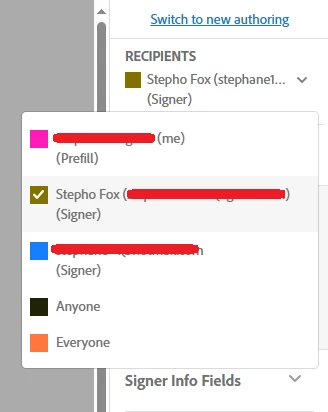
 

Here is a screenshot of the recipient list for an agreement I created with the API. Note that the recipients show up as "(Group)":
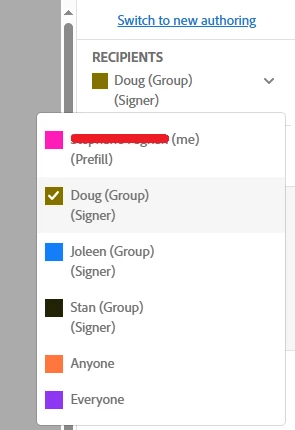
 

For the API call, I'm just following the format specified in the REST API Reference and this sample. I can't find any other way of formatting the API request such that it specifies the recipients as individuals rather than groups. Is this a limitation with the API?

 

    Correct answer atsmusz_as_dsEng

    The name in that part is for the "participantSet", for the recipient "member" (a participantSet of one still has at least one member) the name attribute goes "inside".


    participantSetsInfo": [
        {
          "memberInfos": [
            {
              "email": "recipient1@example.com",
              "name": "Bob Smith"
            }
          ],
          "order": 1,
          "role": "SIGNER"
        },
        {
          "memberInfos": [
            {
              "email": "recipient2@example.com",
              "name": "Jane Doe"
            }
          ],
          "order": 2,
          "role": "SIGNER"
        }
      ],


    1 reply

    atsmusz_as_dsEng
    Adobe Employee
    Adobe Employee
    January 9, 2024

    Hi @Stephane30690527gegt ,


    In an attempt to make sure I'm clear on your question, are you trying to add multiple recipients as a group ( a recipient group means ANY member can sign) or as individual recipients where each of the people need to sign? 

    For a group, (any of the 3 can sign as "recipient 1") the JSON recipients section looks like this:


     "participantSetsInfo": [
        {
          "memberInfos": [
            {
              "email": "recipientMember1@example.com"
            },
               {
              "email": "recipientMember2@example.com"
            },
            {
              "email": "recipientMember3@example.com"
            } 
          ],
          "order": 1,
          "role": "SIGNER",
          "name":"test agreement w recipient group"
        }
      ],


    For individual recipients it needs to look like this:


    "participantSetsInfo": [
        {
            "memberInfos": [
                {
                    "email": "recipient1@example.com"
                }
            ],
            "order": 1,
            "privateMessage": "Private message for Signer 1",
            "role": "SIGNER"
        },
        {
            "memberInfos": [
                {
                    "email": "recipient2@exaample.com"
                }
            ],
            "order": 2,
            "privateMessage": "Private message for Signer 2",
            "role": "SIGNER"
        },


    Aaron Smusz - Data Science Engineering - Adobe Acrobat Sign
    Known Participant
    January 9, 2024

    Hi @atsmusz_as_dsEng , thanks for your response


    I am trying to add individual signers only to the agreement. Initially, when I copied your second example above and tried it out, it gave me the result I was looking for (ie. it no longer says "(Group)" next to each individual signer's name).


    However, I realized that the difference between your example and what I was doing before, is that your example does not have the "name" attribute specified for the individual signers. When I tried to specify a "name" attribute for each individual signer, it went back to adding the "(Group)" identifier to each signer when I view the agreement in Adobe Sign.


    To be clear, here is a participant set that results in individual signers without the "(Group)" identifier (which is what I want):


    "participantSetsInfo": [
    	{
    		"memberInfos": [
    			{
    				"email": "example@mail.com"
    			}
    		],
    		"order": 1,
    		"role": "SIGNER"
    	},
    	{
    		"memberInfos": [
    			{
    				"email": "example2@mail.com"
    			}
    		],
    		"order": 2,
    		"role": "SIGNER"
    	}
    ],


     Here is a participant set that results in individual signers with the "(Group)" identifier (which is what I don't want):


    "participantSetsInfo": [
    	{
    		"memberInfos": [
    			{
    				"email": "example@mail.com"
    			}
    		],
    		"name": "Signer 1 Name",
    		"order": 1,
    		"role": "SIGNER"
    	},
    	{
    		"memberInfos": [
    			{
    				"email": "example2@mail.com"
    			}
    		],
    		"name": "Signer 2 Name",
    		"order": 2,
    		"role": "SIGNER"
    	}
    ],


    As you can see, the only difference between the two is the added "name" attribute for each signer. 


    On the Adobe Sign REST API Reference page, it says the "name" attribute relates to:

    > name (stringoptional😞 Recipient's full name


    The attribute reference says nothing about this attribute relating only to groups. So I'm not sure why adding this attribute changes each individual signer to a group. This seems like a bug in the API. I would like to be able to specify a name attribute without the signers showing up as groups.

    atsmusz_as_dsEng
    Adobe Employee
    atsmusz_as_dsEngCorrect answer
    Adobe Employee
    January 9, 2024

    The name in that part is for the "participantSet", for the recipient "member" (a participantSet of one still has at least one member) the name attribute goes "inside".


    participantSetsInfo": [
        {
          "memberInfos": [
            {
              "email": "recipient1@example.com",
              "name": "Bob Smith"
            }
          ],
          "order": 1,
          "role": "SIGNER"
        },
        {
          "memberInfos": [
            {
              "email": "recipient2@example.com",
              "name": "Jane Doe"
            }
          ],
          "order": 2,
          "role": "SIGNER"
        }
      ],


    Aaron Smusz - Data Science Engineering - Adobe Acrobat Sign