


Participant
July 14, 2022
Answered

How to delete something from the cloud

  • July 14, 2022
  • 1 reply
  • 671 views

I accidentally saved a pdf file through adobe acrobat to the Adobe-cloud. I want to delete it from the cloud but I cannot for the life of me find the cloud with that pdf. Only the creative cloud. I cannot delete it from the save as-option, as well.
Correct answer Meenakshi Negi

Hello,


Thank you for reaching out.


As you wish to delete the PDF from Acrobat Cloud, please use the following steps:

1. Open the link and sign in using your Adobe ID.

2. Go to the Documents tab and select the document from the list.

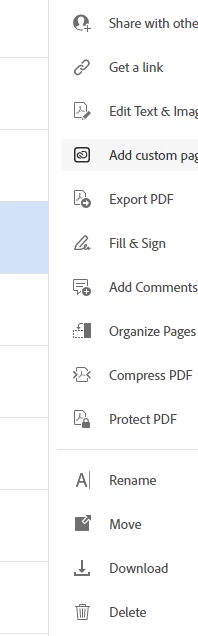
3. In the right-hand pane, scroll down to the delete option.

4. Click on delete to remove the PDF from the cloud.

Check the screenshot below:


Let us know if you experience any issues.


Thanks,

Meenakshi

1 reply

Meenakshi Negi
Community Manager
Meenakshi NegiCommunity ManagerCorrect answer
Community Manager
July 18, 2022

Hello,


Thank you for reaching out.


As you wish to delete the PDF from Acrobat Cloud, please use the following steps:

1. Open the link and sign in using your Adobe ID.

2. Go to the Documents tab and select the document from the list.

3. In the right-hand pane, scroll down to the delete option.

4. Click on delete to remove the PDF from the cloud.

Check the screenshot below:


Let us know if you experience any issues.


Thanks,

Meenakshi

alyssam61787953
Participant
November 21, 2025

What link?


AnandSri
Community Manager
Community Manager
January 30, 2026

Hello ​@alyssam61787953 


I hope you are doing well, and thank you for reaching out.


++ Adding to what our community product expert has already shared, please check out this Adobe help article on managing files and folders on Adobe Acrobat Online services: https://helpx.adobe.com/in/acrobat/web/manage-cloud-storage/manage-adobe-cloud-files/manage-files-folders.html


I hope this helps, and feel free to reach out if you need any assistance.

Regards,

Anand Sri.