



Why AI background removers leave fog inside wreaths, and what I do instead
I make botanical clipart for stock. Wreaths, pine borders, mistletoe, juniper. Every one has to ship as a PNG with a genuinely transparent background, and cutting them out used to be the worst part of the day.
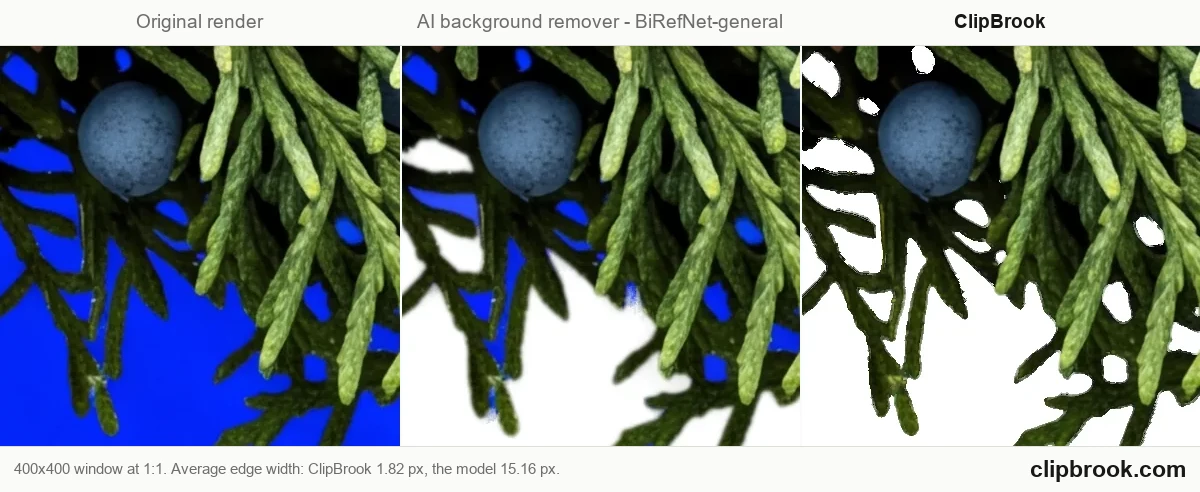
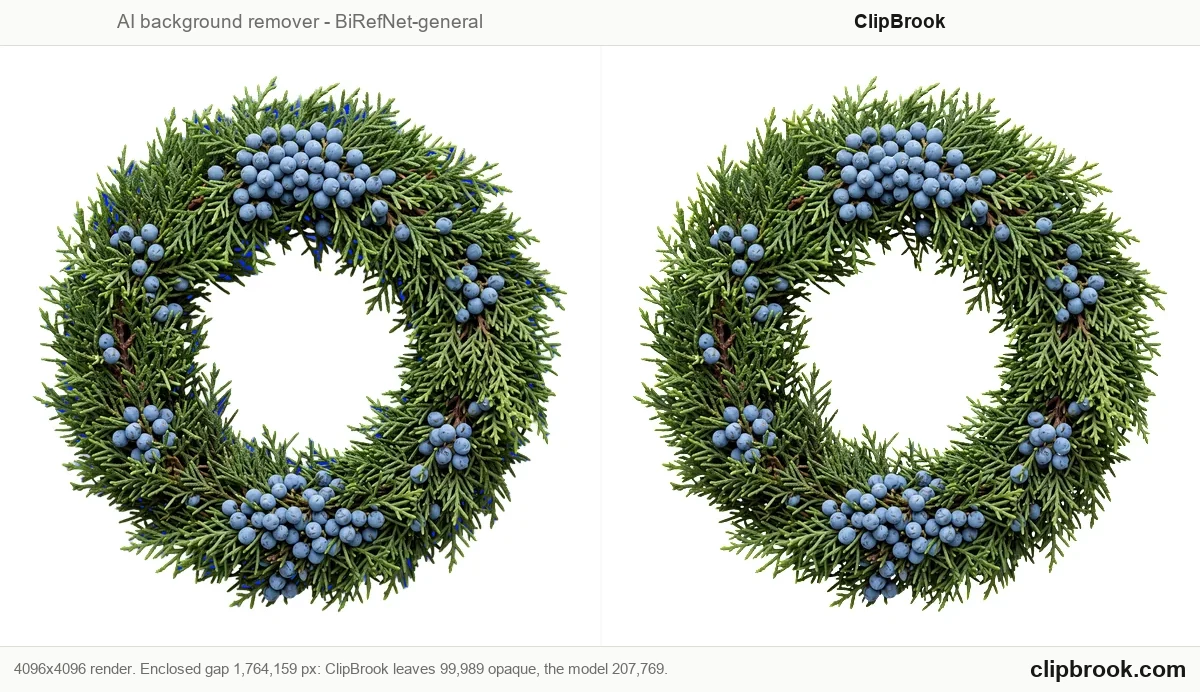
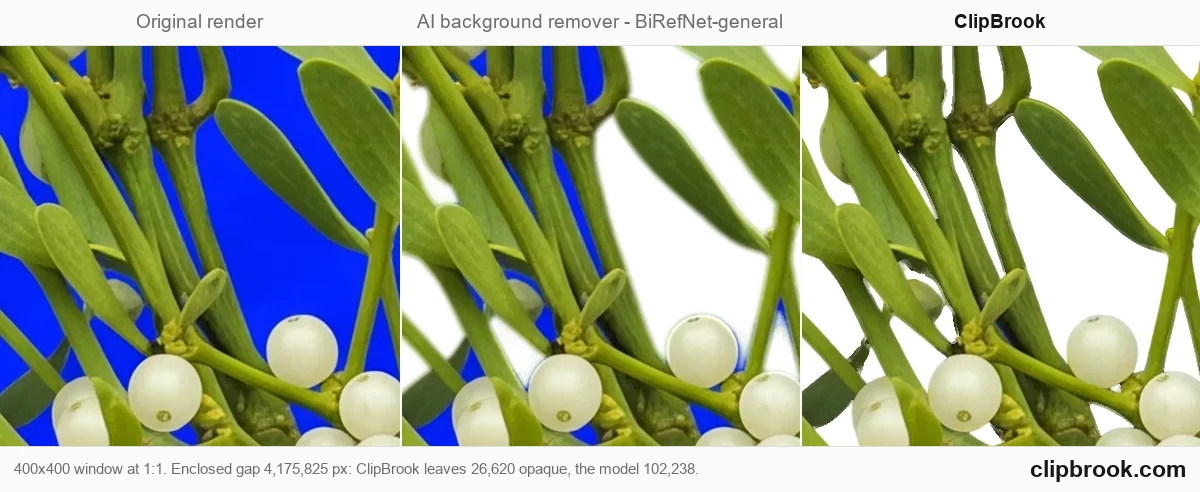
I tried the usual chain: the web tools, then rembg locally with u2net, then BiRefNet, then RMBG. They all failed the same way. A wreath is a ring, and inside the ring there's background that has to go — what I kept getting was a haze in there instead. Not opaque, not clear, a grey-blue smear that looked fine as a thumbnail and looked awful the moment a customer dropped it on a colored card. Pine needles came out as mush. Thin stems vanished, or came back with a colored rim baked in that no amount of levels would remove.
Then I looked at what those tools actually do, and it stopped being mysterious.
**rembg feeds BiRefNet a 1024×1024 copy of your image, gets a 1024×1024 mask back, and scales that mask up with LANCZOS to your original size.** On a 4096×4096 render that's a 4× upscale of a guess. u2net is worse: 320×320, then 12.8× up. A pine needle two pixels wide at 4K does not exist at 320×320. The information was thrown away before the network ever ran, so there is nothing to recover.
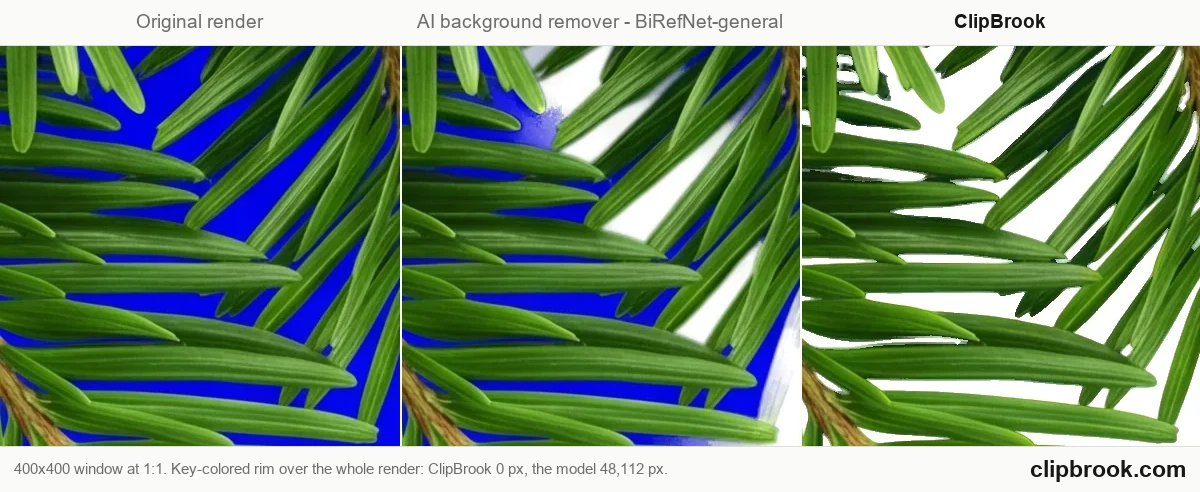
That explains all of it. The fog inside the ring is an upscaled mask blurring across a hole boundary. The rim is the mask sitting a few pixels off. The mush is 12.8×.
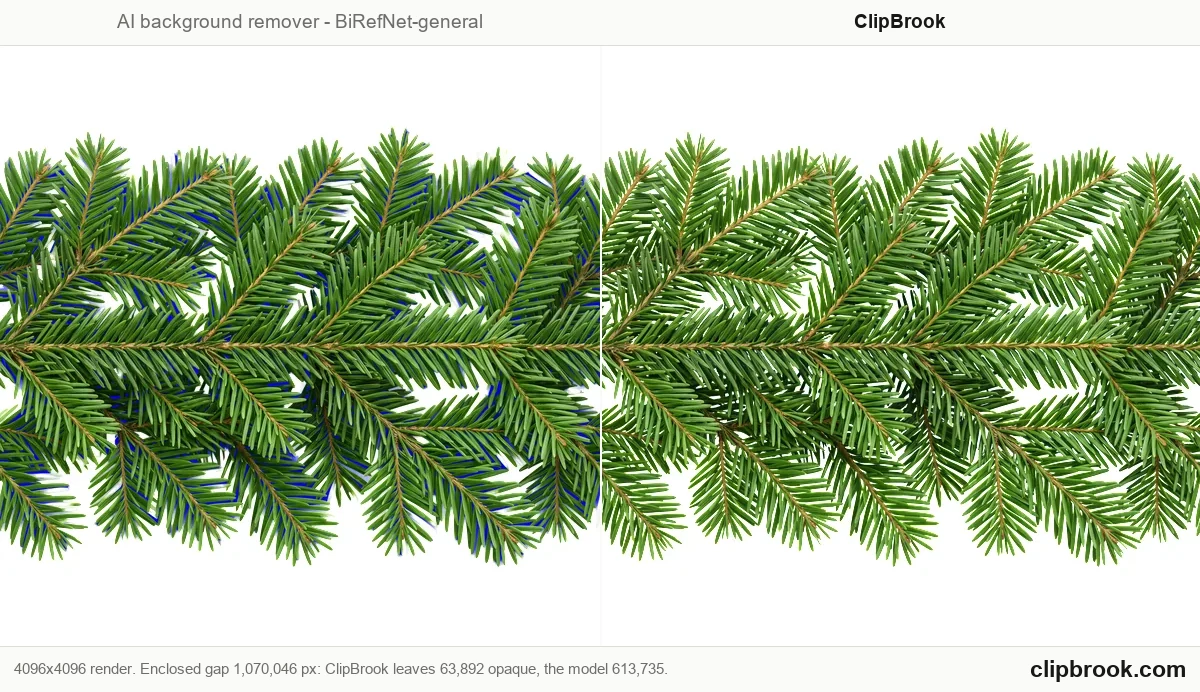
So I stopped asking a model to guess where the background was, and started telling it. There are two halves to this, and the first one matters more than the second.
## Part 1 — The prompt half
You cannot key a background that isn't keyable. Most of the quality comes from here, not from the cutting.
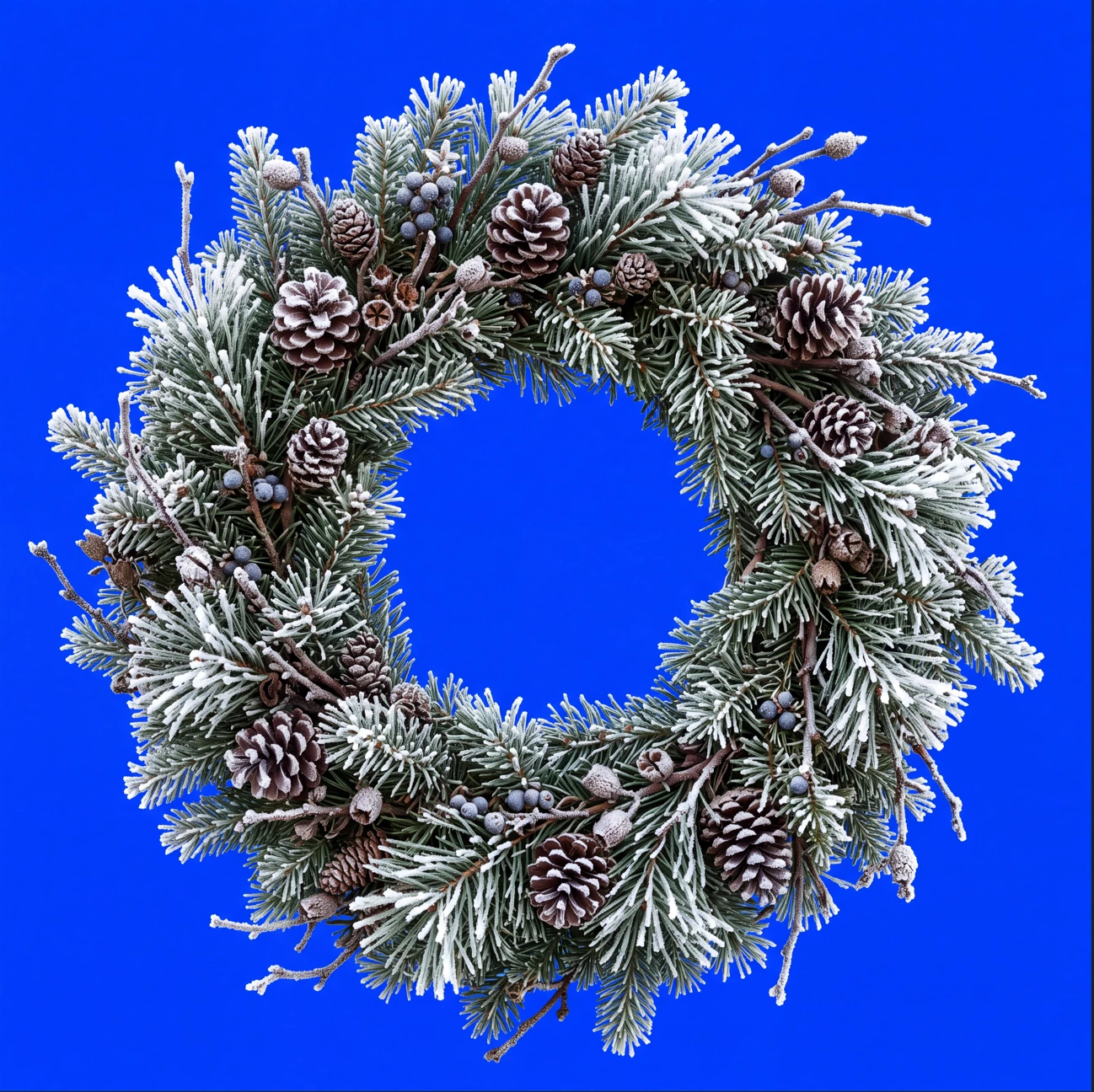
The idea: render the art on a flat, saturated color the subject does not contain, then remove that color by arithmetic. No network, no guessing.
Four things have to be true in the render, and generators break all four unless you ask:
1. **The background is one flat color, edge to edge** — no gradient, no vignette, no darkening in the corners.
2. **That color stays at full brightness inside every gap** — the holes between leaves are the hard part. Generators love to shade them.
3. **No soft edges** — no depth-of-field blur, no glow, no halo. A feathered edge is unrecoverable.
4. **No colored light bouncing onto the subject.** Cast shadows and ambient occlusion tint your subject with the background color.
**Pick the key color by what the subject is not:**
- Anything with leaves or plants: **Blue**, Green removes the plant's own green. This is the mistake everyone makes first.
- Blue or purple subjects: **Red**, Blue would eat the flowers.
- Anything: **Never green**, Foliage. Just don't.
Paste this at the end of your prompt, after your subject description. This is the exact block I use:
“Isolated on a completely flat, uniform, solid pure blue (#0000FF) digital chroma-key background. The pure blue background fills the image edge to edge like a flat digital chroma-key screen with no gradient, staying at full brightness inside every gap and opening in the subject; no reflection or tint of pure blue on the subject. Every edge of the subject is crisp, sharp and hard against the pure blue, with no soft, blurry, feathered or glowing transitions, no depth-of-field blur, no haze or halo; inside every hole and gap the pure blue stays at full brightness right up to the edge. Shaded parts of the subject keep their own natural color, never a pure blue tint. Everything in sharp focus with deep depth of field, evenly lit with soft neutral studio light, no cast shadow, no contact shadow, no ambient occlusion, no bounce light. The entire subject is centered and completely inside the frame with at least 10% empty background margin on every side, nothing cropped or touching the image edges. No frame, no border, no paper, no mockup, no vignette, no text, no watermark, no deformed or duplicated parts. No floating or detached fragments, no stray specks, dust or debris anywhere on the background; every element is physically attached to the subject.”
For a blue or purple subject, swap every "pure blue" for "pure red" and `#0000FF` for `#FF0000`.
If you paint in watercolor, add: *the background itself stays a flat digital color fill with no paper texture* otherwise you get watercolor paper behind your subject and the paper texture keys badly.
## Part 2 — The cutting half
Now the background is one known color and the cut is arithmetic instead of a guess. Here's what happens to that render, at full resolution, every pixel:
**Measure the actual key color.** Not `#0000FF`, what the generator really produced. "Pure blue" from a diffusion model usually carries a green channel somewhere in the 25–70 range. Guessing the key instead of measuring it is where a lot of naive chroma-key code falls over.
**Sort every pixel into subject, background, or transition** by how far its color sits from that measured key.
**Solve real partial alpha in the transition band.** A needle edge is genuinely half-subject, and it gets a genuine intermediate alpha rather than a hard yes/no.
**Find enclosed pockets.** Any background-colored region that never touches the image border is the inside of a wreath, and it gets cleared too. This is the one a matting network structurally cannot do it has no information about a hole it can't see the outside of.
**De-spill.** Edge pixels pick up the key color from the background. The fix samples the subject's own interior color at several erosion depths and pulls the tint back out. That multi-scale part matters more than I expected, a single depth left a cyan rim on fir needles for weeks before I understood why.
It's deterministic. Same image in, same bytes out, every time. That's the part I actually care about: when a cut is wrong I can point at which threshold did it, instead of re-rolling and hoping.
**And the limit: this only works on art you generated on a flat key color.** It does nothing for a photograph. A photo has no key color to remove. If someone tells you chroma keying beats matting in general, they're selling something.
## Sharing it
I built this for my own batches and I've put it out for anyone who wants it. It's called **ClipBrook**. Free, the core is open source under AGPL, it runs in your browser so the images never leave your machine, and it does whole folders at once because batching was the entire reason I wrote it.
## What I'd actually like back
<<Show me your broken ones.>>
If you run something through and the cut comes out wrong — fog left in a gap, a colored rim, a thin stem eaten, a subject that partly disappeared — post the render and what happened. Those are worth more to me than the successes. Every failure I've been handed so far has turned into a fix: the needle rim came from someone's fir branch, and a line-drawing bug I only found last week came from a subject with almost no interior for the de-spill to sample.
Broken results are how this gets hardened. Working results just tell me I already handled that case.

 AdChoices