



Amitej S
Community Manager
Community Manager
July 10, 2024
Question

Adobe Express Mobile: Important updates and device requirement changes

  • July 10, 2024
  • 33 replies
  • 13337 views


Hello, everyone!


We are making some updates to Adobe Express. As part of this, older versions of Adobe Express, Spark Page, and Spark Video will no longer be supported, and the minimum system requirements for mobile devices are changing.


What you need to know!


  • If you're using an older version of Adobe Express, Spark Page, or Spark Video, you'll need to update to the latest version and migrate your files. 
  • Rest assured, everything you've already created will move to the new platform and remain editable and intact. Migrated work can be found in Your Stuff folder.
  • If your device does not meet these requirements, you will not be able to update or use the new version of Adobe Express.


Note: Migrated Spark video projects will no longer be editable but can still be downloaded. They will also be exempted from the Adobe Express storage quota


Starting today, you may see pop-up messages about this update on your iOS or Android device.
The new app now requires at least 3GB RAM and iOS 17 or Android 10 to run.
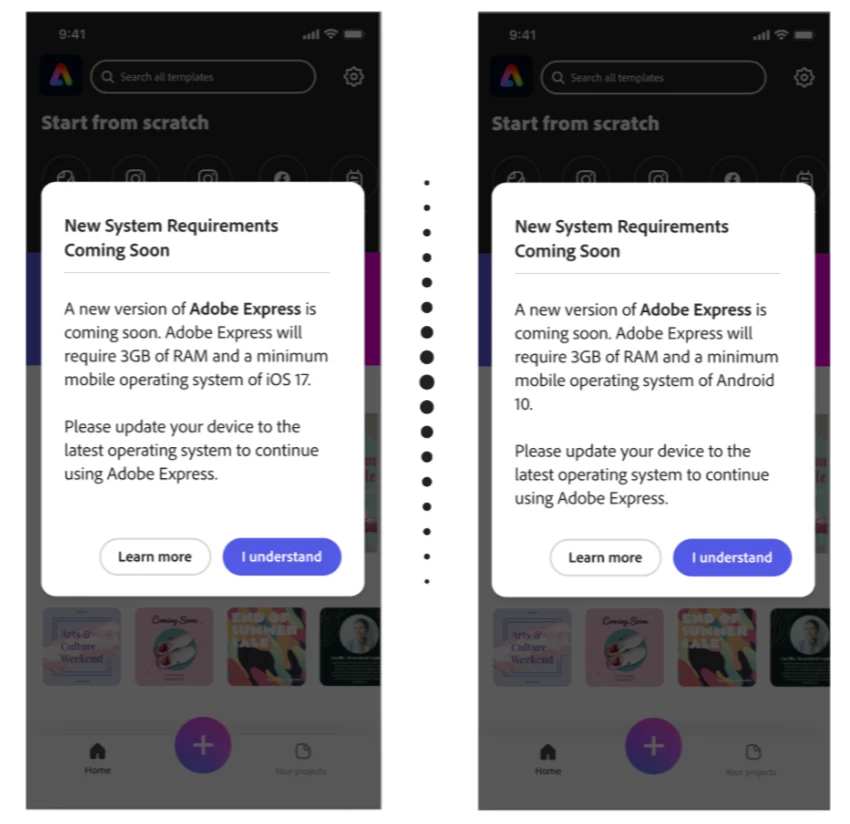


We know change can bring questions, and we're here to help. If you have questions, please reply to this thread. If you'd like to learn more about these updates, here are some important links: 


33 replies

Participant
March 11, 2025

Hi!

I have found the new upgrade very difficult to use and as I see that there is no chance to use the old version, I may have to find another way to create posts for the sports ministry I run. Thank you for the previous version. It served me well. I am grateful and I wish you many blessings.

-Pastor Bryan 

Amitej S
Community Manager
Amitej SCommunity ManagerAuthor
Community Manager
March 11, 2025

Hey @BKelsen, Welcome to our Adobe Express Community! We appreciate your support and understand the challenges of adapting to the upgrade. While the old version isn’t available, we’d love to help make the transition smoother. Let us know what’s difficult, and we’ll share guidance or alternatives. Meanwhile here are some resources that might help you out:

https://adobe.ly/4hu4Pwa

https://adobe.ly/4hsClTs


Feel free to reach out for any info.

Best,

Amitej

Participant
March 9, 2025

Hi since this update I can no longer upload images from my camera roll or anything similar as it sends me back to subscription tab. I've never once had an issue with this so could you please resolve this 😕😕

Participant
March 6, 2025

Quando teremos uma otimização do aplicativo Adobe Express para plataforma Android e Samsung One UI 7?
Tenho um Samsung Tab S9+ e o aplicativo não é compatível, nem no Google Chrome versão mobile ele funciona, tenho que usar versão web ou usar o navegador padrão da Samsung.

Lizatwork
Participating Frequently
March 6, 2025

This is unacceptable to any editor using Adobe Express. You cannot expect that when I create a serie of images to download and upload to a CMS system that I have to deal with file sizes of between 700 and 1 MB for images resolution 980 x 560 pixels. This means A conversion to jpg , B compression all things I am forced to handle outside of the app. This has to be included. Canva has it. It seems simple enough. 

Participant
March 5, 2025

当方のタブレットAndroid11なんですが…

Android10以上に対応しているはずなのに…

インストールできません!

困っています。解決方法を教えてください

Tarun Saini
Community Manager
Community Manager
March 6, 2025

Hi 

@miyuki_2816


Thanks for reaching out! I'd like to inform you that Android tablets are not supported yet. Our product team are working on supporting the new version of Adobe Express for Android tablets.


Regards,

Tarun

Participant
March 3, 2025

I need to switch to old version it's easy 

The new version is very slow and heavy 

Please tell me how can I switch to the old version 

Amitej S
Community Manager
Amitej SCommunity ManagerAuthor
Community Manager
March 3, 2025

Hey @Wael_Fathe9955, Welcome to our Adobe Express community!


As of now, switching back to the previous version of Adobe Express is not possible. Our team continuously works on improving the Adobe Express app for better features and stability. Feel free to share the details of issues you've mentioned along with the device OS, make and model details for us to investigate. 


Thanks!

Amitej 

Participant
March 9, 2025

I have this issue I'm using iPhone 15 pro max every time I try to edit or upload anything from my camera roll it just bugs I'm out tells me I need to upgrade which is wrong as I've never had that happen before 

Participant
March 3, 2025

There's been an issue regarding uploading media files for iPhone users. Neither the camera, photo gallery, nor files work. Both deleting and reinstalling the app do not seem to work let alone restarting the phone. Whenever I attempt to add an upload from my device, it crashes/restarts the app as a whole, leaving no edits to any projects.

Participant
March 1, 2025

Since this last update, I haven’t been able to upload any photos from my device, iCloud Drive, or even directly from the camera. The “upload from device” option simply doesn’t work; the app restarts itself. I’ve already deleted and reinstalled it, signed out and back in, but nothing works.


iPhone 15 Pro Max with the latest firmware and 117 GB of free space.

Participant
March 1, 2025

I use an iphone, i have been having difficulties uploading medias to my designs, deleted the app and reinstalled, still the same. Is this glitch on Adobe express for me alone or is anyone experiencing same??

Participant
March 8, 2025

I'm having the same issue. 

Participant
February 28, 2025

Hi! Does this update fix an annoying problem that I have with Adobe Express. When I click on an image on my design the Image edit pop up menu appears and shifts my design, and in some cases covers up the left edge of my design making it difficult to work. I just want to move things around so it doesn't need to pop up. Fix it so you need to double click or maybe right click on the image to get that menu to pop up. Maybe there's a work around now that I'm not aware of, so please share if so.

David__B
Adobe Employee
Adobe Employee
February 28, 2025

Hi @angie_7134

Sorry to hear about your difficulties. What type and model of mobile device are you using? Would it be possible to share screenshots or a video of the issue you're seeing?

Thanks,

Dave