

Participant
November 11, 2025
Question

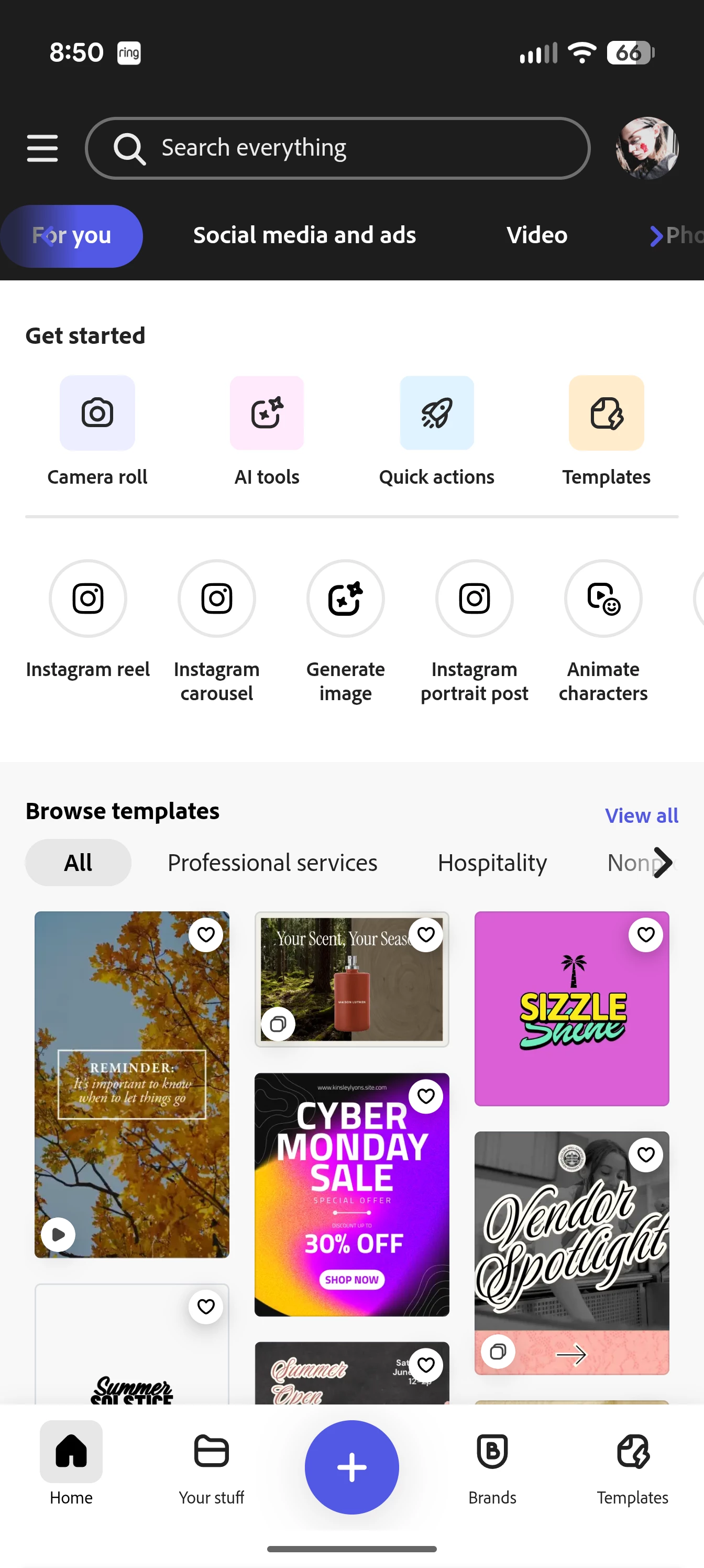
I can't see my files on my mobile app.

  • November 11, 2025
  • 1 reply
  • 61 views
  • It did the same thing on yhe computer but it refreshed. On Mobile it hasn't. I logged out and logged in, checked uodates, restarted my phone and still nothing. It's usually between the Templates and Get started section . But it's no where to be found now. Any ideas ? Thank you! 
1 reply

Community Manager
November 11, 2025

Hi @RuxandraC,


Sorry you’re experiencing this 😔. Please make sure your Adobe Express app is fully updated. You can also try clearing the app cache, restarting your device, and ensuring you’re signed in with the correct Adobe ID.

If the issue persists, could you share a short screen recording of the problem and your Adobe ID  so we can investigate further? 


Thanks for your patience!


^MM

RuxandraCAuthor
Participant
November 11, 2025

Thank you. It resolved eventually. Thank you all! 🙏

Community Manager
November 11, 2025

Hi @RuxandraC,


We’re glad to hear it’s resolved! 🙏 If you encounter any issues in the future, we’re always here to help.


^MM