



AnandSri
Legend
October 4, 2019
StickyQuestion

Want to change the signer of an agreement? We’re here to help!

  • October 4, 2019
  • 6 replies
  • 24564 views

Sent a wrong file or to the wrong person for signing? Don’t worry. Learn how to change who signs, reset the expiration date, cancel an agreement, and set reminders.  


Accidentally sent an agreement to an incorrect e-mail address or want to change/replace the email of the current signer. Use this easy process to make changes.  

  • Log in to your Adobe Sign account directly via https://secure.echosign.com/public/login
  • Click on the Manage tab.
  • Select the agreement and then mouse over the current recipient.
  • An information balloon expands to the left.
  • Click the Replace Participant link.
  • Provide the email for the new recipient and click Replace.
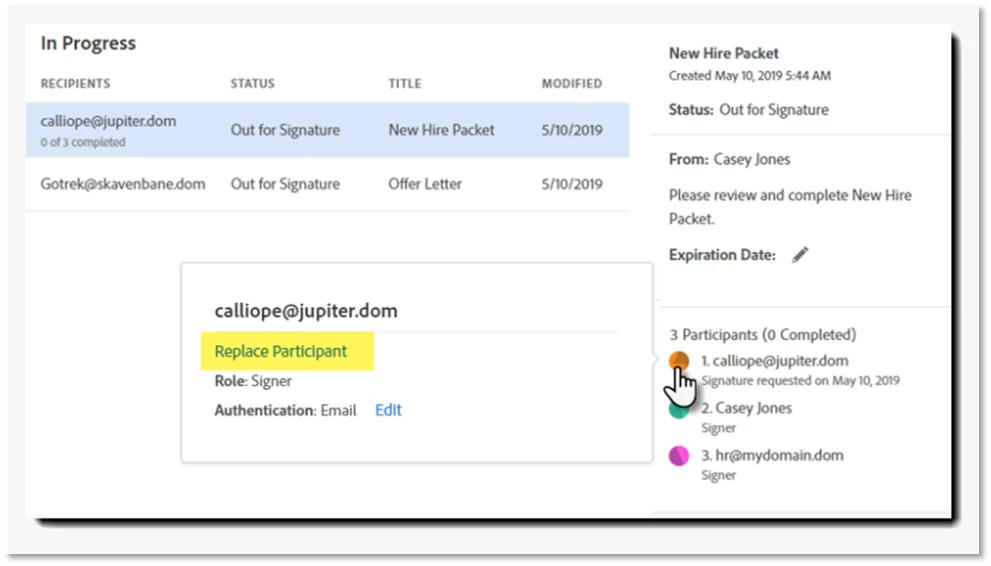
If you prefer a more verbose explanation of the process, you can find the full Step-by-Step here!

Review the same instructions for the classic Adobe Sign UI here


Note: This action only replaces the current signer of the agreement. If you need to change a signer that is later in the process, wait until it is their turn to sign.

If you are one of those who don’t like to click too much, then try our video tutorial and see if that help.


Tell us if these helped you use Acrobat better. Join the conversation here. We are listening!

To discover a host of other great features –

Go straight to: Replace the document on an agreement| Set, edit, or cancel reminders | Cancel the agreement


6 replies

Participant
July 21, 2026

This task used to be accessible from the document activity page or close to it. It wasn’t a “hidden” task and used to be a simple fix to change an email of a signer. Ever since Adobe change to the new version the tasks get more complicated. I used to be able to bring up the activity of a document and have the same options on that page. Now you have to navigate to a different page to look all this up. It’s terribly time consuming. I wish the designers would stop changing things to more clicks and more pages. It’s not very productive when you’re trying to do one simple task as changing to a different email address for a signer. I followed these directions and still don’t find where I can change an email address. Each time Adobe updates it seems something is either taken away, hidden, or a task becomes more time consuming. Frustrating.

Anand Sri Bhattacharya
Community Manager
Community Manager
July 21, 2026

Hello @DKngiht,


I hope you are doing well, and thanks for reaching out. We're sorry for the trouble.


We'll get this checked internally and will get back to you with an update soon. Please allow us some time to get this reviewed with the relevant team.


Thanks,

Anand Sri.


Participant
April 16, 2020

In my case the "bad address" email is not showing up in my manage area. I did get ADOBE notice in my email that the recipeint did not go through (spelled debora with an "h"; should have been without)

Participating Frequently
October 9, 2019

Note: This action only replaces the current signer of the agreement. If you need to change a signer that is later in the process, wait until it is their turn to sign.

So this means if there are 3 Signers (sign in order) and Signer #2 was wrongly placed as a Signer, Sender has to wait for Signer #1 to sign even if Sender has already realized his/her mistake prior? This would also mean that Sender has to patiently wait and monitor the progress of the document and see if Signer #1 has already signed. Poor Sender then! And what if Signer #1 has signed and Signer #2 (wrong Signer) has already received the email notification that he/she needs to sign the document before Sender was able to replace Signer #2 (due to other pressing tasks Sender has at work). Do we really want to wait for Signer #2 to say to Sender, "Hey, you wrongly sent the document to me. So and so needs to sign it instead of me". Why can't Adobe Sign make it easy for Senders/Users/Paying Customers? Please have this looked at. A lot of User-Friendly & Efficiency Tools are missing in Adobe Sign. We used a different eSignature solution for 5+ years and we never had these problems. We recently switched to Adobe Sign and we are missing a lot of features, to be honest. Don't get me wrong, there are also things we love about Adobe Sign.

Participant
March 17, 2020

Having to wait until the document is in a specific users queue before you can reassign it is one of the (many) ways AdobeSign falls short of DocuSign. I don't understand why the sender doesn't have the ability to fix this routing as soon as they know it's an issue; instead you have to monitor the document through the routing. I think you should also be able to reassign signing order after the document has been sent - we have our preferred review order, but if we find out that a user will be unavailable, it would be good to be able to move them up in the queue. Both of these functions are available in DocuSign.

Participant
March 17, 2020

Oops. Meant to reply to the main thread, not LTS722 specifically. LTS722's comment about notification to "Sender 2" reminded me of this shortcoming related to waiting until it's in a user's queue - if Sender 2 signs the document, but wasn't the right person to do it, do you have to start over? 

Participating Frequently
October 9, 2019

Hi Anandsri,

I like this update on being able to change the Signer, but to be honest, this falls short.

Please refer to my attachment.

I have done a test for one of the many scenarios for Editing/Amending a Document which is 'In Progress'.


Participating Frequently
October 8, 2019

Another scenario is...

Document with 8 Signers (sign in order) which is in transit and Signers #1 to #5 have already signed and you need to REMOVE Signer #6...

Is this also possible?

Participating Frequently
October 8, 2019

Hi there,

This is great... BUT!...How about a document with 8 Signers (sign in order) which is in transit? Say Signers #1 to #5 have already signed and suddenly, you need to add Signer #9... OR you need to add someone in CC once all signers have signed?