
anderfesouza
Participant
September 30, 2018
Answered

Reject for Technical Issues

  • September 30, 2018
  • 4 replies
  • 631 views

Hi guys.

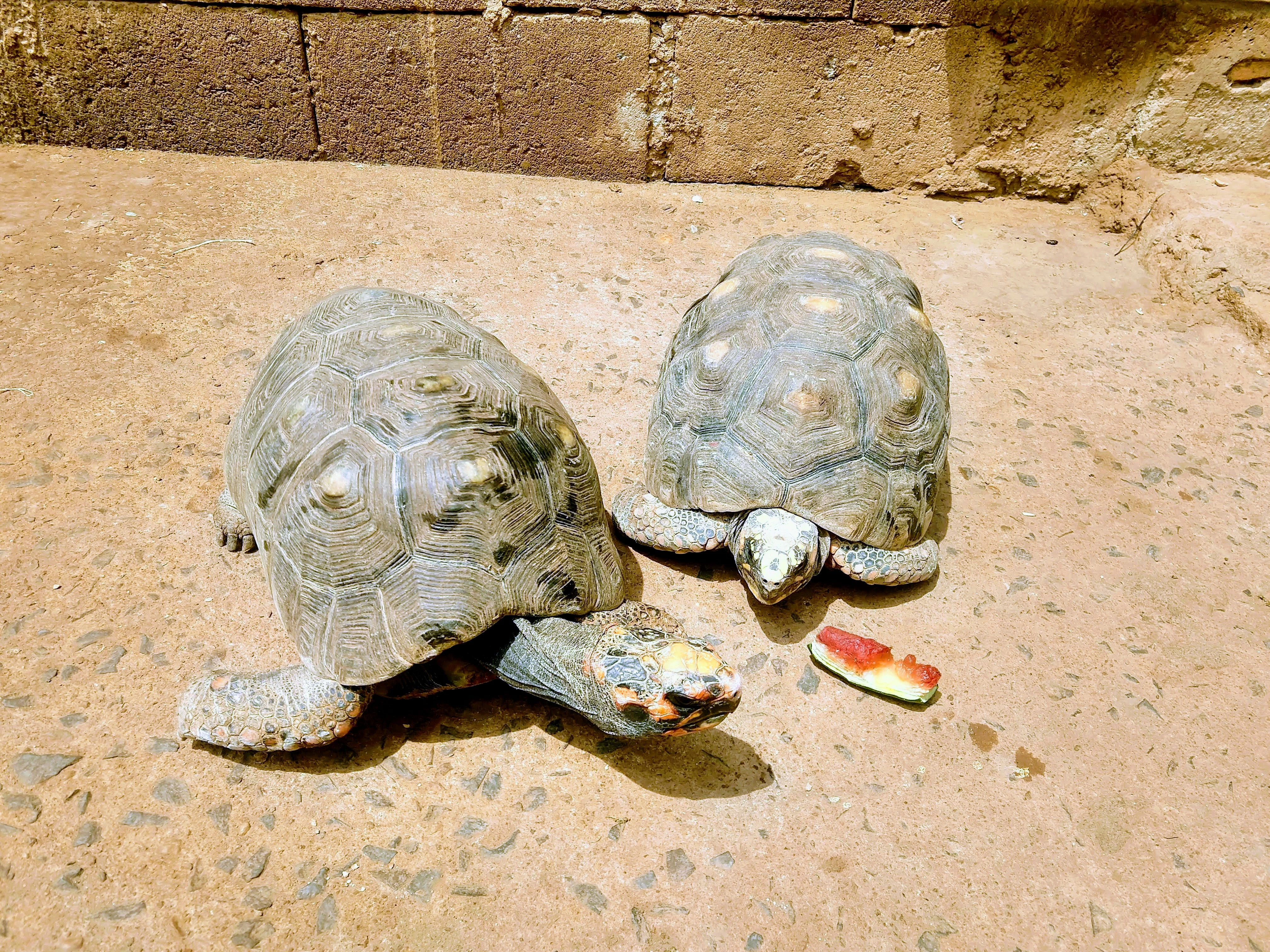
I don't know why my photo was reject. It's a very nice picture, with good colors and good luminosity.

Is anyone can help me on this?

Can you indicate an good open or free software to adjust the pictures? I'm just starting on this business.
This topic has been closed for replies.
Correct answer Ricky336

Your white balance is wrong. White balance is the colour temperature of the picture. Here your picture is too warm/yellow. You have to reduce the yellow cast and increase the blue. This can be done in a photo editing software under colour temperature.

For example:

Exposure also can be altered a bit and do crop out the brick wall as suggested.

4 replies

Jill_C
Community Expert
Community Expert
October 2, 2018

Definitely crop and reduce the highlights. The shells are overexposed, and the brick wall is a distraction from the main subjects. Just a few quick edits in Lightroom would make this much more acceptable. In general, you're probably not going to get many images accepted unless you learn some basic editing skills. There are many Photoshop and Lightroom training resources available. I use Creative Live since they have many free and discounted courses.

Jill C., Forum Volunteer
Abambo
Community Expert
Community Expert
October 3, 2018

JC926  wrote

I use Creative Live since they have many free and discounted courses.

Nice! Looks great. I use lynda.com (which is still lynda.com but the courses are also on linkedin learning, as linkedin bought lynda).


and not to forget the free resources on youtube. Youtube is mitigated, because you get what you pay for... You need to select yourself the scrap from the real valuable channels.

ABAMBO | Hard- and Software Engineer | Photographer
Ricky336
Community Expert
Ricky336Community ExpertCorrect answer
Community Expert
October 1, 2018

Your white balance is wrong. White balance is the colour temperature of the picture. Here your picture is too warm/yellow. You have to reduce the yellow cast and increase the blue. This can be done in a photo editing software under colour temperature.

For example:

Exposure also can be altered a bit and do crop out the brick wall as suggested.

Abambo
Community Expert
Community Expert
October 1, 2018

You should work the turtles. Especially the head of the right turtle is blown out.

It would help the picture also to see less the brick wall.

ABAMBO | Hard- and Software Engineer | Photographer
joanH
Inspiring
September 30, 2018

Hello anderfesouza,

Yes, this is a good photo of the two turtles but their colors look washed out. See the brick in the back, that is how rich the colors on the subjects should be. Technical includes exposure problems so  - enrich the subject color. Maybe crop out the bricks too. I can not suggest a free or open photo repair software but some quick fix-it software comes with several of the search engines Yahoo, Google-  Windows etc. - have added photo fix elements. Adobe Photoshop has everything I need so I hope you can own it especially if you are selling on Adobe Stock. Best regards, JH