



Participant
May 20, 2023
Answered

What is the quality problem with this image?

  • May 20, 2023
  • 4 replies
  • 274 views

This was rejected due to Quality, can you help me understand why?

This topic has been closed for replies.
Correct answer Abambo

I doubt that the black & white aspect of the image is a problem here. And indeed it is a colour image, even that the colours are limited.


Even looking at the picture, I think that it is a very pleasant image, and it distinguishes itself from all those generative AI assets. But, if you have a more in-depth look, you see artefacts a little bit everywhere.

Example:
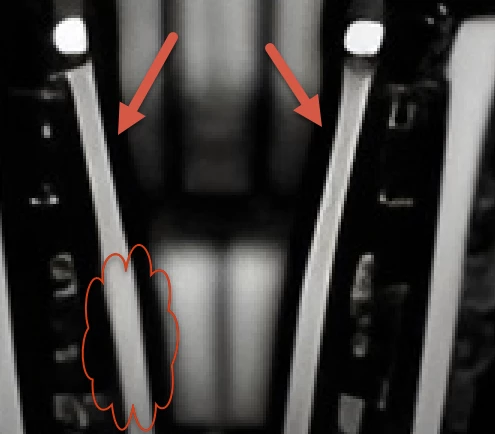
You see in the neck area a sharp line (arrows), where indeed a blurred line should be like the cloud. Or all the elements should be in focus, but then the sharp line is like over sharpened and exposes aliasing.


Artefacts (arrow) and noise (cloud):
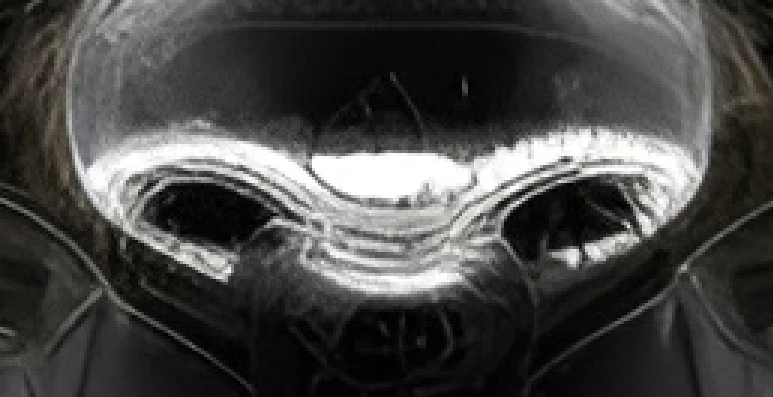
And the image generator also “simulated” chromatic aberration, but chromatic aberration is a photographic defect.


The really bad part of the image is around the eyes, where the AI introduced many artefacts, that make the asset difficult to correct.

4 replies

Abambo
Community Expert
AbamboCommunity ExpertCorrect answer
Community Expert
May 21, 2023

I doubt that the black & white aspect of the image is a problem here. And indeed it is a colour image, even that the colours are limited.


Even looking at the picture, I think that it is a very pleasant image, and it distinguishes itself from all those generative AI assets. But, if you have a more in-depth look, you see artefacts a little bit everywhere.

Example:

You see in the neck area a sharp line (arrows), where indeed a blurred line should be like the cloud. Or all the elements should be in focus, but then the sharp line is like over sharpened and exposes aliasing.


Artefacts (arrow) and noise (cloud):

And the image generator also “simulated” chromatic aberration, but chromatic aberration is a photographic defect.


The really bad part of the image is around the eyes, where the AI introduced many artefacts, that make the asset difficult to correct.

ABAMBO | Hard- and Software Engineer | Photographer
Nancy OShea
Community Expert
Community Expert
May 20, 2023

Don't submit B&W images.   Customers want full color.  If they wish to grayscale it after purchase, they can do it easily in Photoshop or simliar image editor. 


Read these articles from Stock Contributor's User Guide. 


==========
Generative AI:
https://helpx.adobe.com/stock/contributor/help/generative-ai-content.html
===========
Model/Property Releases:
https://helpx.adobe.com/stock/contributor/help/model-release.html
https://helpx.adobe.com/stock/contributor/help/property-release.html

Real person = Model release signed by the human it's based on.

Fake person = Property release signed by you as creator of the AI Illustration.


Nancy O'Shea— Product User & Community Expert
Jill_C
Community Expert
Community Expert
May 20, 2023

Some of the details are rather blurry, such as in the shoulder area; and some white areas are blownout. Clipping is confirmed by looking at the histogram.

Jill C., Forum Volunteer