Firefly board data is lost. There's no version history or sync indicators. A couple of hours of work disappears after closing the window. All these AI features are pointless if I can't rely on the product.
Firefly board data is lost. There's no version history or sync indicators. A couple of hours of work disappears after closing the window. All these AI features are pointless if I can't rely on the product.
Firefly board data is lost. There's no version history or sync indicators. A couple of hours of work disappears after closing the window. All these AI features are pointless if I can't rely on the product.
After a detailed check on our end, we can confirm the following:
The board was originally created on June 17 at 12:03 PM, and a total of 23 edits were made (including creating an artboard, updating fonts, adding content, aligning elements, and resizing images).
The latest saved version at 02:57 PM matches exactly the artboard you shared with us. This confirms that no content was lost. (here’s a copy of your last version)
Additionally:
The Express file you located was created manually on your side, and is not the result of any system recovery or unexpected behavior. Artboard created an Express file once opened there
Regarding the prompt you encountered (asking you to confirm leaving the page because changes may not be saved), this can sometimes appear when the application detects potential unsaved changes. While we don’t currently see evidence of data loss, if this behavior happened again, please help us investigate further by capturing a HAR file (network logs) while reproducing the issue. This will allow us to check if any save requests are failing or being interrupted.
Please don’t hesitate to reach out if the issue persists or if you need help capturing the logs, we’re happy to assist.
After a detailed check on our end, we can confirm the following:
The board was originally created on June 17 at 12:03 PM, and a total of 23 edits were made (including creating an artboard, updating fonts, adding content, aligning elements, and resizing images).
The latest saved version at 02:57 PM matches exactly the artboard you shared with us. This confirms that no content was lost. (here’s a copy of your last version)
Additionally:
The Express file you located was created manually on your side, and is not the result of any system recovery or unexpected behavior. Artboard created an Express file once opened there
Regarding the prompt you encountered (asking you to confirm leaving the page because changes may not be saved), this can sometimes appear when the application detects potential unsaved changes. While we don’t currently see evidence of data loss, if this behavior happened again, please help us investigate further by capturing a HAR file (network logs) while reproducing the issue. This will allow us to check if any save requests are failing or being interrupted.
Please don’t hesitate to reach out if the issue persists or if you need help capturing the logs, we’re happy to assist.
The board represents an earlier version that has been preserved before massive data loss. I tried to replicate the error today, but I didn't have much time for that, so I can't provide you with a HAR file. As a consequence of my attempt, new images have been added to the board. All the new images added today can be identified by their placement outside the artboard (Bologna 20026).
Thanks, Hajar, for your suggestions, but nothing is helping.
The main issue is not losing AI images, but those that I add to the board from my computer. Almost all the images and boards I created have gone. When I try to close the board, a warning pops up (see attached). After waiting for a while and trying again, the warning keeps reappearing. I have no idea how long it will take, so I finally close the board.
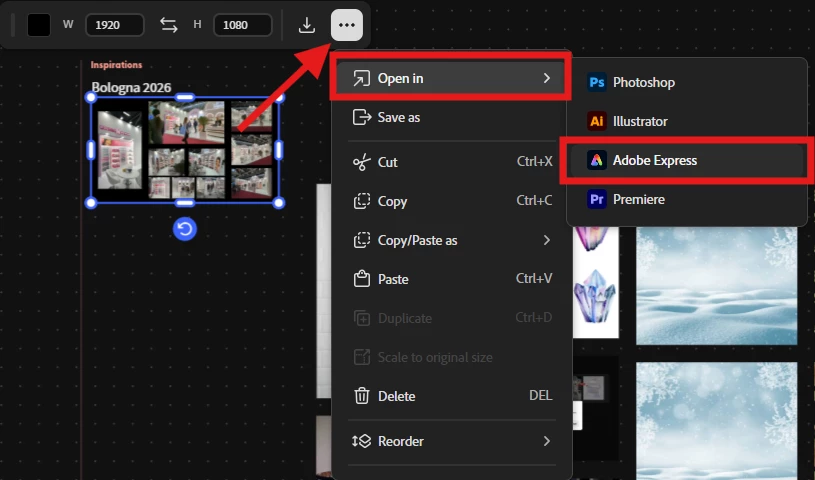
Interestingly, the same board that had lost its data suddenly appears as an Adobe Express project too.
Thank you for the additional detail and the screenshot, niedre, that's really helpful context!
It sounds like the images and content you added manually aren't being saved or synced properly, and the recurring warning when you try to close the board suggests the save process itself may be getting stuck or failing in the background rather than completing successfully. The fact that the same board surfaced as an Adobe Express project is an important clue too, and I want to make sure our team has full visibility into that connection.
To help us get to the bottom of what's happening, please let us know of the following:
does this happen if you try the board in an incognito/private window or a different browser?
Is there any chance your Creative Cloud storage is close to its limit?
Could you share the link to the Adobe Express project that appeared, so we can check whether it actually retained the missing images? Here’s how to do it:
Click Share on your Board
Go to Settings
Select “Anyone with the link”
Recipient act as should be “Editor”
If you’d prefer not to share it publicly, you can also send the link via direct message (DM) instead.
Step 1
Step 2
One more detail that will be super helpful to us if you can provide it, is a HAR file captured while you reproduce the issue (opening the board, adding an image, then attempting to close it) would also give our team the clearest picture of what's failing on the backend.
In the meantime, I'd recommend avoiding force-closing the tab while that warning is showing, in case it's still attempting to save in the background. We appreciate your patience while we dig into this.




 AdChoices