Inspiring
January 1, 2024
Answered

How do I access my library of saved images?

  • January 1, 2024
  • 4 replies
  • 3466 views

I cannot see where the images that I have saved are. I want to go back and reuse them.

Correct answer Anubhav M

Hello @Mikey_D,


Thanks for reaching out. To access your Favorites in Firefly, you may switch to the Favorites tab or use this link: (https://firefly.adobe.com/favorites).
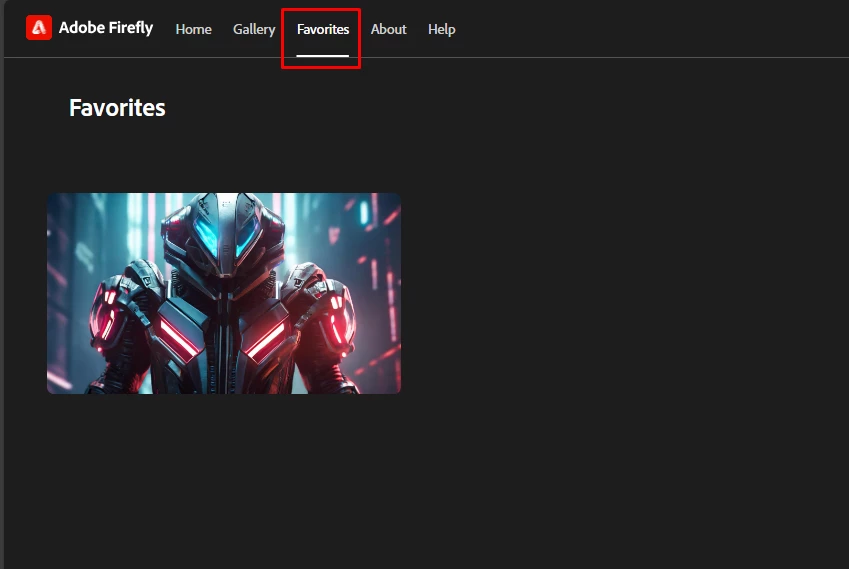
Feel free to reach out if you have more questions or need assistance. We'd be happy to help.


Thanks,
Anubhav

4 replies

January 21, 2025

Hey @Mikey_D 

One thing that I would like to mention is to create a word doc or Google doc and save the link and an image/ screenshot of the image that you like(d).

1) You have those links and images. Essentially it is a safe way to keep your files
2) You can share your links & images
3) You can organize the links into specific pages / documents
Example

Cheers
O.Nate

Participating Frequently
January 21, 2025

I'm having the same problem. Where are the ones we saved?


droopydog500
Community Manager
Community Manager
January 21, 2025

Hello @lapoints1207,


Are you talking about ones you saved with "Save to Library" or did you save them another way? If you used "Save to Library", please see my response above.


My best,

    droopy

Adobe Community Expert (not an Adobe employee)
Participant
October 26, 2024

How do you access your Save to Library in Firefly? I can't find where the library is in Firefly or in the Creative Cloud. I'm NOT looking for my Favorites folder.

droopydog500
Community Manager
Community Manager
October 27, 2024

Hello @Emilio_Brett-Hall3224,


They are saved in your creative cloud library, accessible in the creative cloud app:

I save mine to the folder "AI-Assets".


From the document, Everything You Wanted To Know About Saving Images From Firefly Text to Image :


Q: I saved to my Creative Cloud library, but I do not see them there.

A: You would have specified which folder you want to save them in when you saved them (or previously specified a default). Look in the folders in your creative cloud account for them or alternatively, if you follow the steps in the section above on saving to library for changing the default folder, you will see what folder it has been saving them in by default.


My best,

    droopy


Adobe Community Expert (not an Adobe employee)
Anubhav M
Community Manager
Anubhav MCommunity ManagerCorrect answer
Community Manager
January 1, 2024

Hello @Mikey_D,


Thanks for reaching out. To access your Favorites in Firefly, you may switch to the Favorites tab or use this link: (https://firefly.adobe.com/favorites).

Feel free to reach out if you have more questions or need assistance. We'd be happy to help.


Thanks,
Anubhav

Participant
May 30, 2024

How do you access your Save to Library in Firefly?  Crazy, you can save an image to a library but you can't access it easily from the same App?