Kartika Rawat
Community Manager
Community Manager
October 3, 2024
Question

Unleash Your Creativity with Fast Mode in Adobe Firefly! 🚀

  • October 3, 2024
  • 16 replies
  • 3107 views


Hi Everyone!


Dive into the Fast Mode of our Text to Image feature and watch your ideas come to life in no time! Quickly ideate, generate, and compare image variations at a crisp 512x512 resolution. Once you’ve crafted the perfect image, either download it instantly or use the Upscale option to elevate it to a stunning 2K resolution for high-quality, production-ready output. Fast Mode is perfect for simple topics, eye-catching backgrounds, vibrant illustrations, and detailed close-up portraits. Get ready to create like never before!


Please follow the steps mentioned below to access the Fast Mode feature-


    1. Visit the Firefly website and select Text to Image.

    2. Choose an image from the gallery to open the Text to Image editor.

    3. In the General settings section, use the Model dropdown menu to select Firefly Image 3 and toggle on Fast Mode.
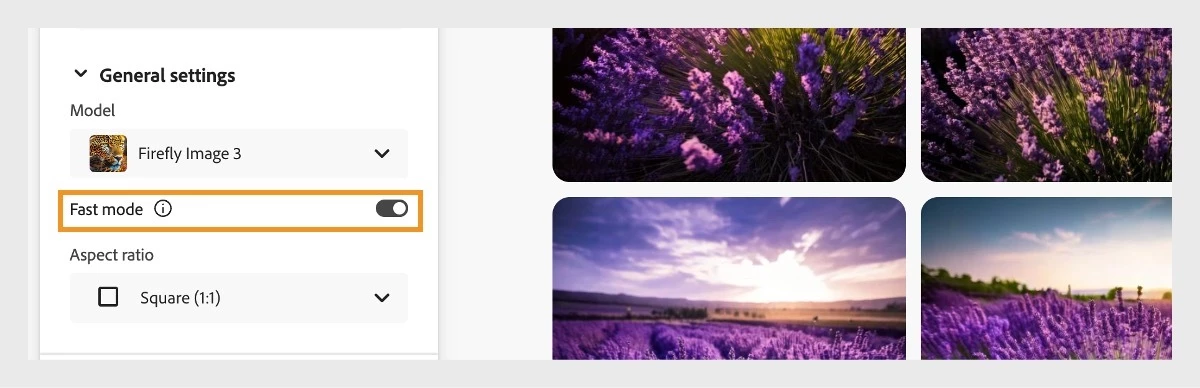


    4. Adjust other settings in the left panel to further refine your image generation.

    5. In the Prompt field, enter a detailed description of the image you want to create.

    6. Click Generate to produce a new set of image variations at 512x512 resolution.

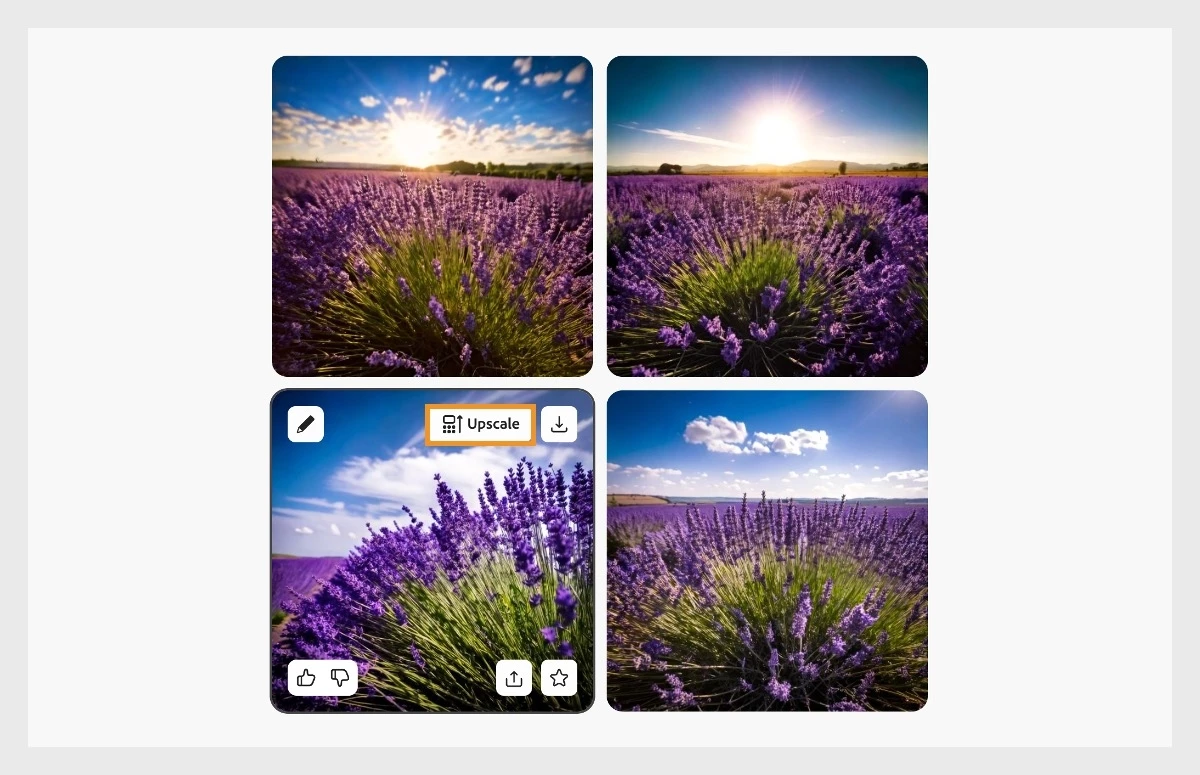
    7. Hover over the image you want to upscale and select the Upscale option to convert it to 2000x2000 resolution. 


Note:

Upscaling uses one generative credit per image.


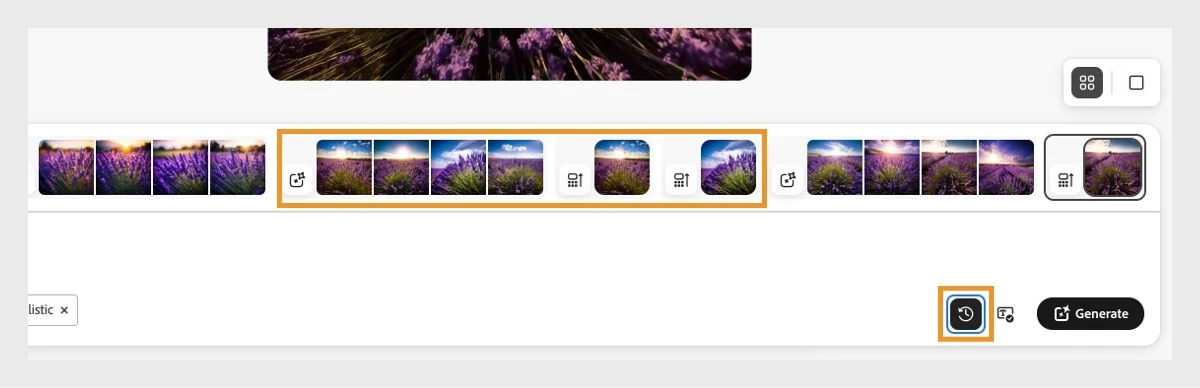
  1. Download the image or explore other editing options. View all generated images, including upscaled ones, in the History strip by clicking the History icon next to the Generate button.


Note:

The history will be saved in your browser’s cache. Deleting your browser cache files will also erase the history.


If this was helpful, please click the Upvote icon in the top left corner of this post. Your feedback helps us improve the experience. Thank you!


Have questions? Click 'here' to start a discussion.


This topic has been closed for replies.

16 replies

AlanGilbertson
Community Expert
Community Expert
October 26, 2024

It would be helpful to know how many credits the fast image generator uses. It's a question that is sure to come up.

droopydog500
Community Manager
Community Manager
October 27, 2024

Hi @AlanGilbertson!


The generation of four fast generation images (single press of generate button) is one credit. If you upscale a single image, that is one credit per upscale.


My best,

    droopy

Adobe Community Expert (not an Adobe employee)
@mj
Community Expert
Community Expert
October 16, 2024
Community Expert
October 14, 2024

Super cool!

Community Expert
October 11, 2024

This is cool! I just presented at the Adobe learning Summit on the morning of October 3rd! I could've used this, because with an hour presentation showing about 12 to 15 tips tricks and hacks the generating part kinda eats up my time! 


I can't wait to see what they're gonna show and present at MAX!

headTrix, Inc. | Adobe Certified Training & Consulting
GeekyGirlRex7295714
Community Expert
Community Expert
October 11, 2024

Faster is better! Thanks.

Writer | Developer | Facilitator | Geek!
Sean McCormack
Community Expert
Community Expert
October 10, 2024

This is a very cool addition. 

Sean McCormack. Author of 'Essential Development 3'. Magazine Writer. Former Official Fuji X-Photographer.
Community Expert
October 10, 2024

Great progress, keep it up

derekwatson
Community Expert
Community Expert
October 9, 2024

Great to see constant improvements

Derek Watson
Michael Ambroise
Community Expert
Community Expert
October 8, 2024

I love that !

_______Senior graphic designer | United Nations Population Fund
@mj
Community Expert
Community Expert
October 8, 2024

Will defo be trying this out, thank you