Answered
Using 2 computers and firefly
Did you guys know that if you create images in firefly on one computer and then log in to to firefly on another computer your images will not show up. Make sure you only use firefly on one computer.

Did you guys know that if you create images in firefly on one computer and then log in to to firefly on another computer your images will not show up. Make sure you only use firefly on one computer.
Thanks for posting this message. You discovered one of the limitations of the "Favourite" image system—it saves the data about the favourites in the browser cache on your computer. So if you use a different browser or computer your favourites are not visible.
The ability to store favourites or generated image information centrally has been a frequent request. I recommend you look at these posts and upvote the one(s) you would like to see:
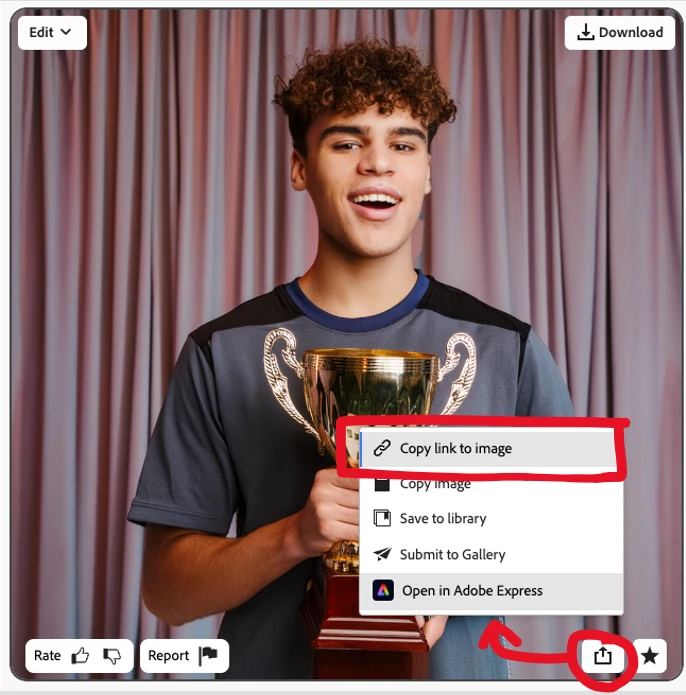
If you need to access one of your creations on another computer, you can always copy a link to that image, and then take that to the browser of another computer and pull up the image/prompt/styles. You can copy the link by pressing the "Share" button on the lower right and then select "Copy link to image". That stores the link in the clipboard and you can paste into a document or wherever.
Hope this helps.
droopy
Already have an account? Login
Enter your E-mail address. We'll send you an e-mail with instructions to reset your password.


 AdChoices