


Inspiring
October 25, 2023
Answered

A way to compensate UV distortion?
  • October 25, 2023
  • 1 reply
  • 369 views

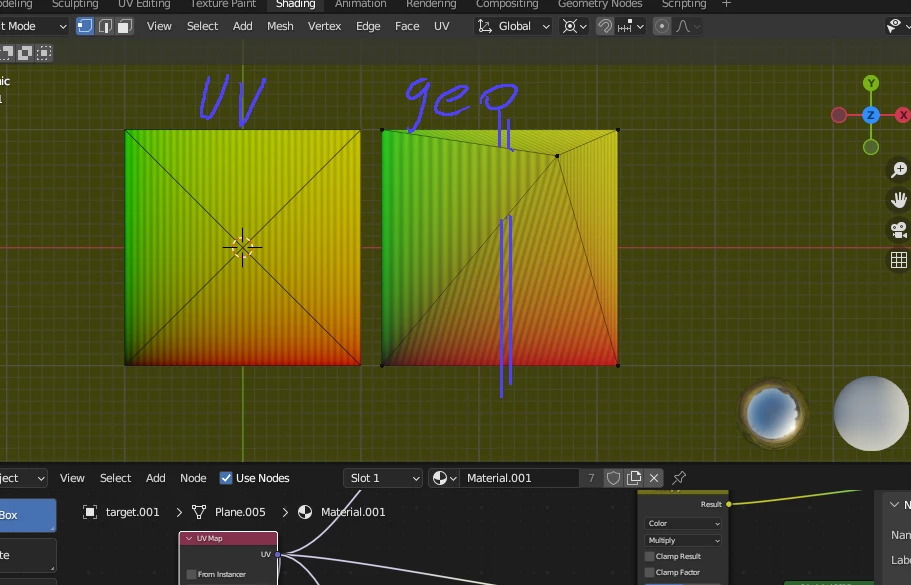
I am trying to do a procedural model  where  the mesh deforms  a bit  when necessary .   Without  re-doing textures.    Like in this example.  Certain  texture space  squeezing to the right is expected  because I want the center point keep  it's coordinate in texture.    But how can I  make top and bottom triangles  keep it straight?   

I appreciate any  idea how can it be compensated for alredy built texture ?   I can pre-bake each triangle having its own vertex color . It's sort of automatic in Blender    and use colorID  it as a mask  plus distorted UV  exr  as distortion vector   but what's next?

This topic has been closed for replies.
Correct answer davescm

Keeping the centre UV co-ordinate, not changing the texture, and having the texture align differently appear to be contradictory requirements.

You could reproject the texture in Blender , in UV editing hit 7 to view from above (orthographic) then use UV Project from View. That would keep the horizontal and vertical lines aligned on each side.


Dave


1 reply

davescm
Community Expert
davescmCommunity ExpertCorrect answer
Community Expert
October 25, 2023

Keeping the centre UV co-ordinate, not changing the texture, and having the texture align differently appear to be contradictory requirements.

You could reproject the texture in Blender , in UV editing hit 7 to view from above (orthographic) then use UV Project from View. That would keep the horizontal and vertical lines aligned on each side.


Dave


kirkr5689Author
Inspiring
October 26, 2023

Thanks Dave, you are probably right it's impossible task.