

Renato Stegun
Participating Frequently
October 28, 2021
Question

After Effects and Media Encoder 2022 Render problem (SOLUTION)

  • October 28, 2021
  • 5 replies
  • 1691 views

I managed to solve here by clearing the cache in After Effects (see print below).
Open After Effects and go to:
- EDIT > Preferences > Media & Disk Cache > Clean Database & cache
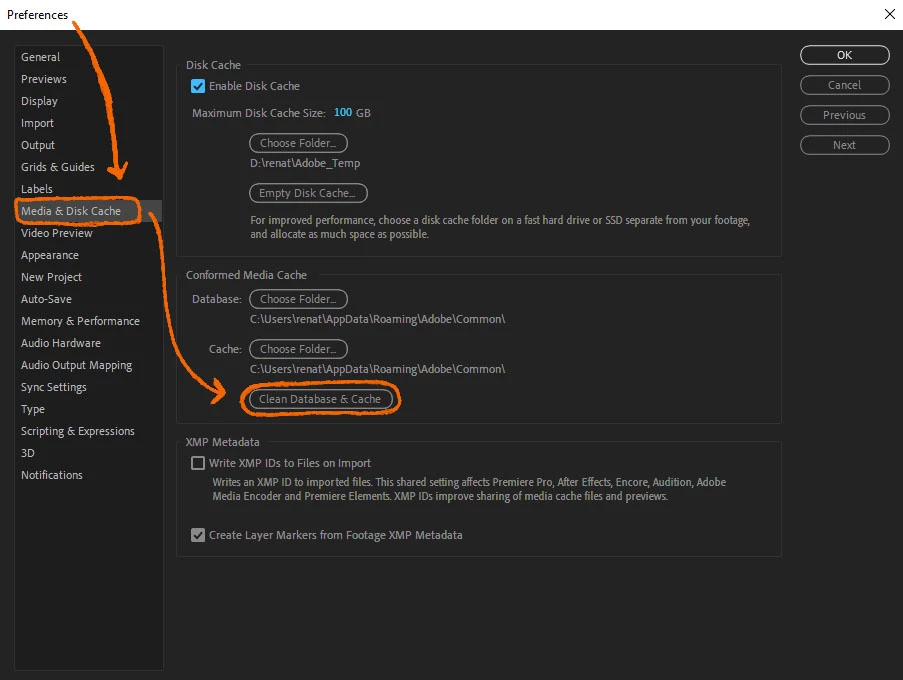
This topic has been closed for replies.

5 replies

Participant
November 11, 2021

This seemed to only work a few times and then went back to the same issue. Waiting to see if Adobe puts out a fix.

Participating Frequently
November 5, 2021

Didn't work for me

Participant
November 5, 2021

Doesn't work for me either. 

Only workaround I can think of is exporting MOV from AFX and then import into Premiere and export from there. Really annoying. 

I wonder why would Adobe remove the option of exporting mp4 from AFX itself? would be really helpful now if you're working with big files 

Participating Frequently
October 29, 2021

It works! Thank you, and I will try more times to see if it's really work for every times 🙂

Participating Frequently
November 4, 2021

Back here to report it's not working always and didn't work on another MacBook, so waiting for a fix update. 

Renato Stegun
Participating Frequently
November 4, 2021

Really. Yesterday I opened another project and the problem came back. I redid the procedure and it didn't solve. I can't understand what happens. Unfortunately.

gupta shivangi
Legend
October 29, 2021

Hi Renato,

We appreciate you sharing the workaround that helped you. We're sure many other users will benefit from this.


Regards,

Shivangi