Correct answer S_S

@HAGEI776 


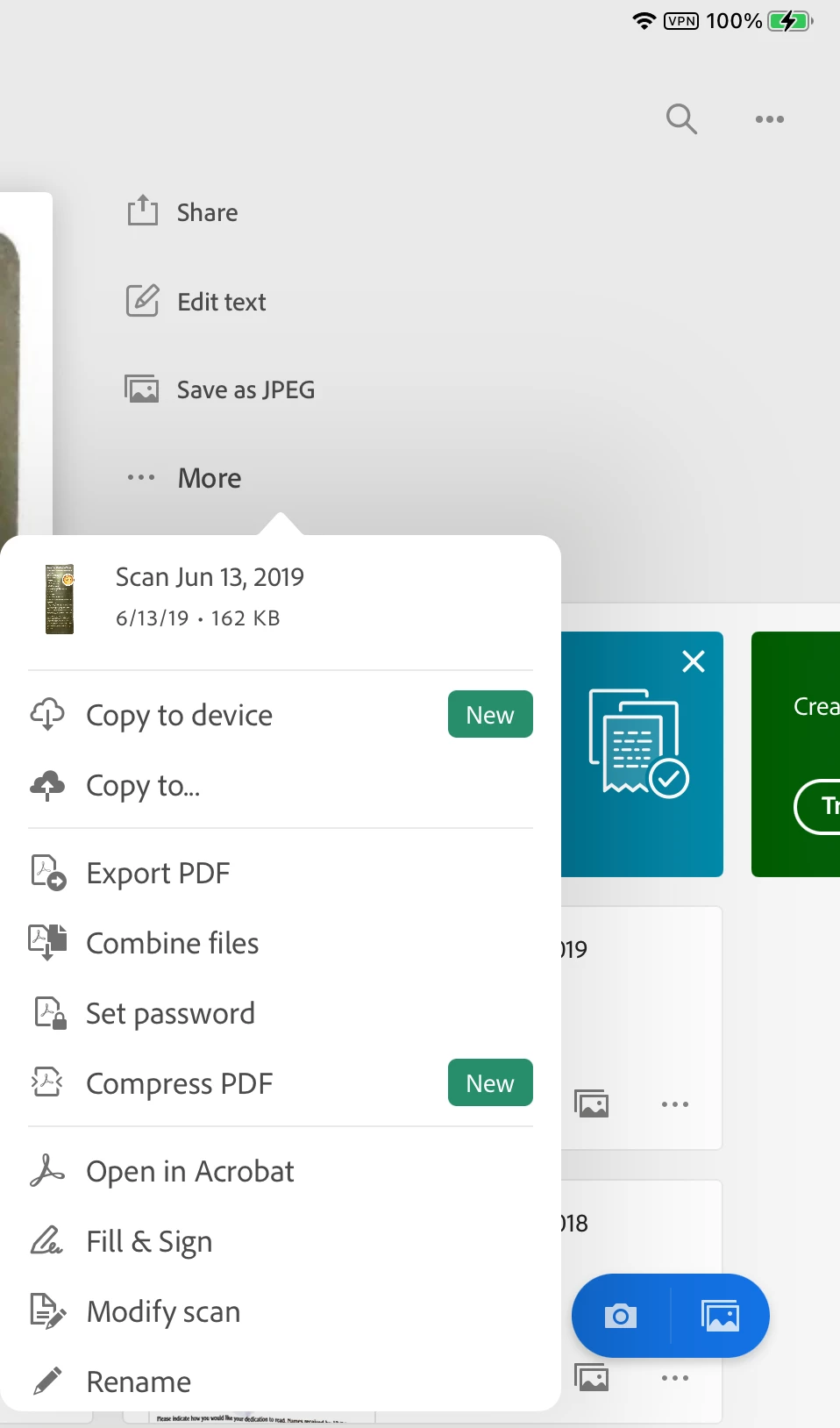
I did a bit of poking around and see that "Copy to Device" is new and will save to your device. You can also save as a jpeg, copy to DropBox, Set a PW, and more. Will any of these help?


Jane

Forum volunteer


Hi @HAGEI776,


Hope you are doing well. Sorry for your experience with Adobe Scan.


Concerning all the suggestions shared above, Adobe Scan is a cloud-based service, and you cannot use the application without it uploading the file to the cloud for OCR and storage.

This is in line with the fact that the application cannot access your files application to write files automatically unless you use the "Copy to device" option.


As a workaround, I suggest using the option "Copy to device," as suggested by Jane, and then deleting the file from Adobe Scan.


Note: You cannot modify or open the file through Adobe Scan again if you delete it from the application.


Hope this helps.


-Souvik

36 replies

Inspiring
May 11, 2022

Hello,

I have been trying to contact support via the app but I didn't find a way to do that.

I'm running version 22.04.19 on my iPhone Xs with iOS 15.4.1

The scanning view open only at the first launch of the app, any try after that of pressing the Camera Icon in the lower right is unresponsive. Moreover, upload to the Document Cloud for the scans is stuck to "in progress". 

I have checked my local wi-fi network and it works as expected, I tried with cellular data and other apps/services just work. 

Any idea what is going on? 

Participant
May 11, 2022

I am having the same issue

Participant
February 21, 2022

The files from my Adobe Scan android application are not uploading to Abobe cloud. I have tried many solutions but nothing worked. The network connection is always stable so that isn't the issue. Please solve this problem.

Harsh Vardhan Pareek
Community Manager
Community Manager
February 22, 2022

Hi @Shreyash23265341im43 


Could you confirm a few more details to understand the issue better?

1. Did you try to change the connection from wifi to cellular or vice-versa?

2. Android version?

3. Application version?

Make sure that the app is up to date.


Thanks,

Harsh


Participant
June 20, 2021
  • I was recently trying to scan a few screenshots from my phone, using Adobe scan . I accidentally included an important document. I tried deleting it but it was already processing. After processing I deleted the file from my phone. But does it delete it from the Adobe servers? 
Participating Frequently
June 20, 2021

Delete from Adobe service

Shyam prakash sah
Participant
June 21, 2021

Thank you 

Participant
April 26, 2021

I have recently subscribed to Adobe premium on the Adobe Scan app on my iPhone. However, none of my scans are being saved to the Adobe cloud and when I try to scan I just get the following error message:


UNABLE TO UPLOAD

The Adobe Document Cloud free storage limit has been reached. Subscribe to Premium to increase your limit.


I have already subscribed - why am I getting this message!

Ria Tagra
Inspiring
May 3, 2021

Hi,


Hope you are doing well.

Thank you for posting your query here. Please help me with few details to understand your issue better.

  1. OS version?
  2. Make and model of your device?


Try to sign out and sign in back to your account. Do the following to restore your subscription:

  1. Tap the profile icon.
  2. Tap Subscriptions or Manage subscriptions
  3. Tap Restore Purchases.

For more help refer to: https://helpx.adobe.com/acrobat/mobile-app-faq.html


When you tap Save PDF in Adobe Scan, your file is automatically converted to PDF and saved to your Adobe Document Cloud storage.


For more help refer to: https://helpx.adobe.com/mobile-apps/help/adobe-scan-faq.html


Let us know how it works at your end. If you have any further queries please feel free to reach out to us. We would be more than happy to assist you.


Regards

Ria

Participant
May 4, 2021

Hi Ria,


It is an iPhone 8 with iOS 14.5.1.


I tried signing out and signing back in but nothing changed. I also tried restoring purchases but I got an error message saying that "No purchases were restored.".  I even tried deleting and re-downloading the app but that did not work. When I try saving my scans it says my storage is full even though when I go on my profile it says I have only used 12% of 20GB.


Please let me know any other solutions 

Known Participant
March 14, 2021

After a scan is completed on an iphone and the automatic borders are displayed, how do I tell Adobe Scan that I have finished scanning and please upload the scanned documents to Adobe Document Cloud?

Ria Tagra
Inspiring
March 22, 2021

Hi procyte,


Hope you are doing well.

Thank you for posting your query here. When you tap Save PDF in Adobe Scan, your file is automatically converted to PDF and saved to your Adobe Document Cloud storage.


For more help refer to: https://helpx.adobe.com/mobile-apps/help/adobe-scan-faq.html


Let us know how it works at your end. If you have any further queries please feel free to reach out to us. We would be more than happy to assist you.


Regards

Ria

Participant
February 1, 2021

Apparently, the app doesn't provide an option to save the scanned documents offline alone.

https://community.adobe.com/t5/adobe-scan/new-adobe-scan-uploads-all-to-cloud/td-p/9531371

Files are automatically uploaded to their cloud. Instead, I tried Microsoft Lens and they don't even force us to sign in. I suggest you try Microsoft Lens. I've switched since a few documents were confidential and I didn't want Adobe Scan to upload them to their cloud.

Participant
July 31, 2020

I noticed once I did the scans the app automatically, and without asking, uploaded the scans to Adobe Cloud. 1) that should not be on by default or at the least should ask on first attempt and 2) I poked around the app but could not readily find a way to either turn off auto uploads or make it prompt, I'll poke around some more. Otherwise, good and useful app.

Participant
January 9, 2020

Hello,

I would like to know how to cancel uploading the scanned documents to the cloud. I want to save on my mobile device only.

Meenakshi Negi
Community Manager
Community Manager
January 20, 2020

Hi there,


Sorry for the delay in response.


There is no option to disbale the saving of scanned PDFs to document cloud and save them directly on the device. The files saves automatically to document cloud in the Adobe Scan application. This is an as designed behaviour.

If you wish, you may share this suggestion with the team using the followng form:

https://adobe.allegiancetech.com/cgi-bin/qwebcorporate.dll?YQWCX7


Let us know if you have any questions.


Regards,

Meenakshi


Participant
November 10, 2020

I think, Adobe wants to look into our data and save them in their cloud. 

Along with that they want to consume our Mobile data and put us in trouble.

Participant
October 31, 2019

I have used Adobe Scan app for long time on my phone (OnePlus 6).

Now as I am using this app I can not find any of the files scanned from document cloud.


What is the problem with this app?

Meenakshi Negi
Community Manager
Community Manager
November 2, 2019

Hi Marttim, 


As the files are not uploading to Document Cloud, please sign out of the application.

Uninstall the application and reboot the device. Then re-install the application from the Google Play Store.

Check if you still experience the same behaviour.


If the file shows as uploading to document cloud, please login to Document Cloud online and check if the file is already upoaded there.

Open this link https://documentcloud.adobe.com/link/home/ and sign in using the same credentials as used for Adobe Scan.

Then go to Files > Adobe Scan folder. Check if the file is listed there.


Let us know if you still experience the issue.


Regards,

Meenakshi

Participant
November 2, 2019

Thank you - now it works again!

yashara75734020
Participant
August 17, 2019

Since yesterday I can’t upload photos that I took with my phone to the adobe scan app to turn them into scanned Pdfs. This worked fine before, but now I have to take the photos with the app itself, which takes more time. When I select the pictures an error pops up and tells me, that I don’t have an internet connection, even though I‘m connected to the intenet. I hope they fix that error soon.

Meenakshi Negi
Community Manager
Community Manager
October 4, 2019

Hi Yashara,


Sorry for the delay in response.


Are you still experiencing an issue in uploading image from gallery to Adobe Scan application?

If yes, please sign out of the application and reboot the device. You may also try uninstalling and re-instlling the Adobe Scan application.

Make sure that the application is updated to latest version. 


If the issue persists, please let us know.


Regards,

Meenakshi
