


Participant
November 29, 2019
Answered

Add a new text field to an existing component

  • November 29, 2019
  • 2 replies
  • 2451 views

Hi guys,

I'm pretty new to adobe xd and already loving it! However, I came across this issue and been struggling to resolve it myself with no luck. Here's what's happening...

I've created a component which has one text element and a box and I've created dozens of instances using this. I realised I need to add another text field to the component and I decided to edit the master component and type some text. However this doesn't get added to the existing component. Not sure what I'm doing wrong. Any help is greatly appreciated. 


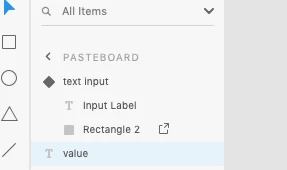
PS: In the screenshot below, I need the value text field to be part of the text input component but I'm not allowed to move it and group with the rest of the component items.


This topic has been closed for replies.
Correct answer hammer0909

Double-click on the component to put it into edit mode. Select the Text tool and click in the component and type the text. This will get added to the component. If you add it to the default state, it will appear in all of the states but if you add it to another state, it will only appear in that state. The mistake most people make is that after double clicking on the component to put it into edit mode, they'll click off of it effectively deselecting the component and then whatever you add will not get added to the component.

2 replies

hammer0909
Community Expert
hammer0909Community ExpertCorrect answer
Community Expert
November 29, 2019

Double-click on the component to put it into edit mode. Select the Text tool and click in the component and type the text. This will get added to the component. If you add it to the default state, it will appear in all of the states but if you add it to another state, it will only appear in that state. The mistake most people make is that after double clicking on the component to put it into edit mode, they'll click off of it effectively deselecting the component and then whatever you add will not get added to the component.

sacbmthAuthor
Participant
November 29, 2019

Many thanks Chad - double clicking did work. 

Ares Hovhannesyan
Community Expert
Community Expert
November 29, 2019

Here is reference to component help https://helpx.adobe.com/xd/help/components.html 


Here is a guide to edit master component

Edit a master component

You can use any of these options to edit a master component:

  • Right-click an instance on canvas and select Edit Master Component. 
  • Click a component in the Assets panel and select Edit Master Component.
  • Select an instance on canvas and select the edit pencil icon next to Default State in the Component section in the Property Inspector.
 

If you’ve deleted a master component from the canvas, XD generates a master component on the canvas next to the objects you’re currently editing. 

sacbmthAuthor
Participant
November 29, 2019

Thanks Ares_Hovhannesyan

I've already followed the first step and tried to add a new text field into the existing component but it doesn't seem to work as the text field just doesn't get grouped with other bits.