



AE 26.5x89: Collapse Transformations breaks per-instance Essential Property visibility (Advanced 3D)
Hi, I'm running into a reproducible visibility problem in After Effects 26.5x89 (release version) when several instances of the same precomp have Collapse Transformations enabled.
Each instance has its own Essential Property settings, but the menu content inside them seems to follow the uppermost collapsed instance. The settings themselves stay correct. The three renders below show how changing only which instances are collapsed changes where the menu appears.
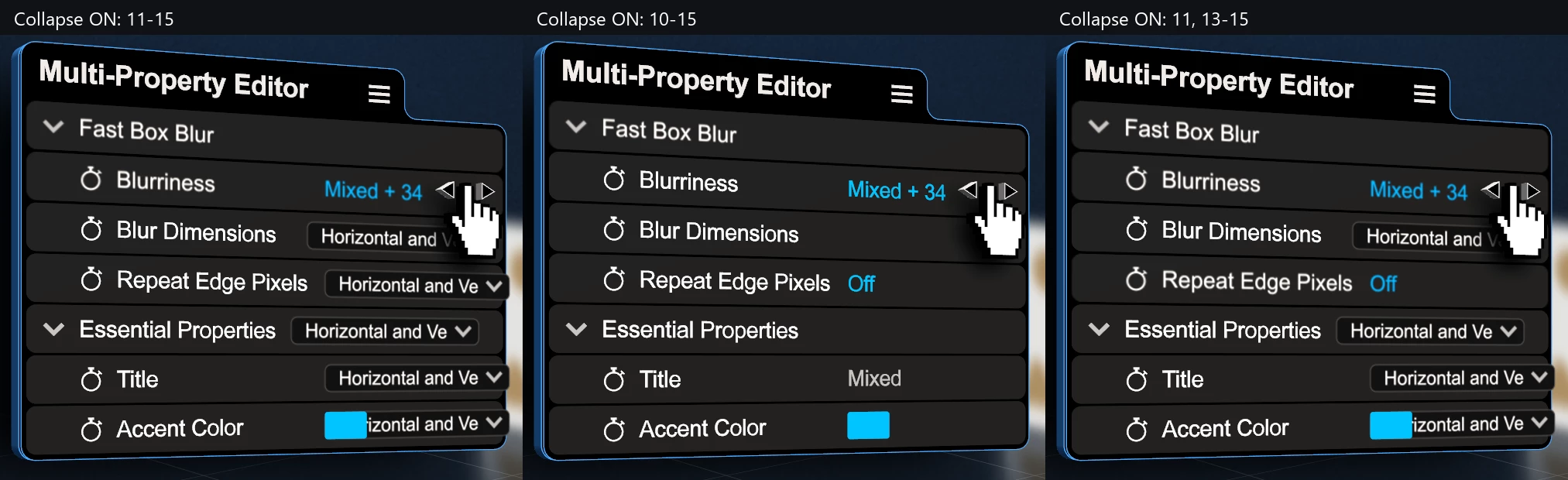
Same frame, three Collapse configurations. The steps below explain the differences.
My setup
- The parent comp, Thumbnail (Hor) 01, uses Advanced 3D.
- The repeated precomp, Property, uses Classic 3D.
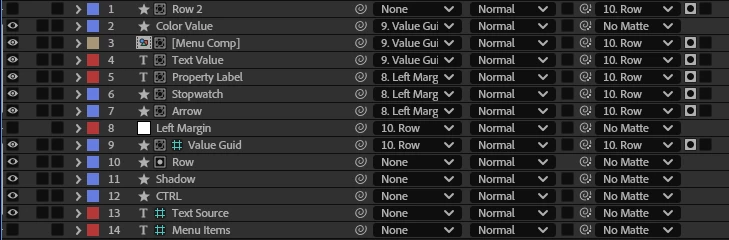
- Inside Property, Menu Comp is a 3D precomp layer, alpha-matted by Row. Its visibility is controlled by expressions using the instance's Essential Properties, including a dropdown called Value Type.
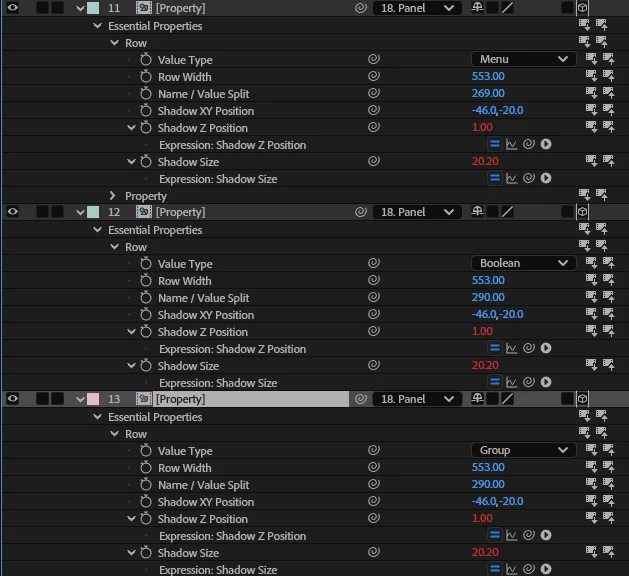
The instance I'm focusing on is timeline layer 11, with Value Type = 4 (Menu). The values on layers 10–15 are:
10 → 1; 11 → 4 (Menu); 12 → 3 (Boolean); 13 → 7 (Group); 14 → 6; 15 → 5.
How I reproduced it
With Collapse Transformations off on all these instances, each row displays correctly. Enabling it only on layer 11 also works: the menu appears where it should.
I then rendered the same frame with these three configurations, shown left to right in the comparison image:
- Collapse ON for layers 11–15; OFF for layer 10: the menu appears on all five instances, even though only layer 11 is set to Menu.
- Collapse ON for layers 10–15: the menu disappears from all of them, including layer 11. The only change from the first test is enabling Collapse on layer 10, whose Value Type is 1.
- Collapse ON for layer 11 and layers 13–15; OFF for layers 10 and 12: layer 12 correctly returns to its Boolean display, but the menu still incorrectly appears on layers 13–15.
So the affected instances don't need to be adjacent. A non-collapsed instance between them doesn't stop the visibility problem.
I'd expect each instance to render its own settings independently. Instead, the Menu-visible or Menu-hidden state appears to propagate from the uppermost collapsed instance to collapsed instances below it.
A few details that helped narrow this down:
- The stored Essential Property overrides stay different and correct. Other instance-specific content, including the group arrow and color swatch, also remains independent.
- In the source, Menu Comp is enabled, its evaluated opacity is 100%, and there is no relevant expression error.
- I ruled out ordinary occlusion by Hand, Panel, and other parent-comp layers in controlled tests.
Turning Collapse Transformations off on the affected instances restores the correct rendering. I haven't verified the community suggestions of using separate source comps or separate 3D bins; changing bins can also affect shadows and intersections.
I noticed that Adobe's 26.2 fixed-issues notes describe Essential Property values being shared between precomps in the same Advanced 3D bin with Collapse enabled. This looks related to this earlier community report, but I can't tell whether my 26.5x89 result is a regression, an unfixed variant, or a separate issue. I also checked the nesting/Collapse Transformations documentation. I don't know the internal cause; the cross-instance rendering behavior is what I can reproduce.
These tests used disposable copies of the composition and targeted single-frame renders. I didn't modify the original working comp or save the project during testing.
Could the After Effects team take a look? Please move this thread to Bug Reports if that's the better place for it.
2. Instance settings — Layers 11, 12, and 13 keep their own Value Type settings: Menu, Boolean, and Group.
3. Inside Property — The source precomp structure, including Menu Comp and its Row matte.
 AdChoices