hilaly07
Participating Frequently
April 7, 2018
Answered

after effect preview not work

  • April 7, 2018
  • 24 replies
  • 314510 views

Hi

yesterday this problem happen when press play bottom the review not work

also timeline not moving

i use AE cc 2018

Windows 10 64 bit

Ram 8 GB

you can see the play bottom is square shape and no motion appear
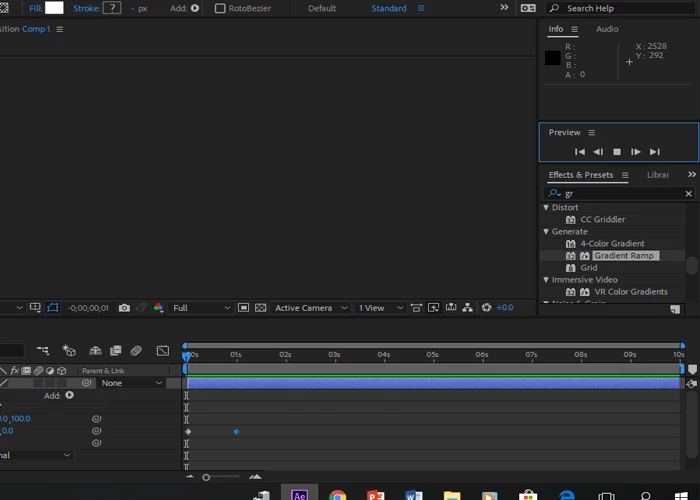
Correct answer _Maido_

I've said previously, it's best that you contact support, to have someone take a closer, hands-on look at your system and this includes taking a look at your OS settings and AE settings.

Meanwhile, when you say "no playback", exactly what happens when you initiate a Preview?

What happens in the Timeline, does the Preview Time Indicator (vertical red line) move across the timeline?

What happens in the Comp Panel?

Please take a screen grab of your Comp and Timeline Panels.


When I leave AE open and take a break, a lunch (or leave it open overnight ), when I come back and hit the spacebar, it will play it once without sound and when I stop it and try to play it again, it does nothing. I can scroll the timeline and it composition updates, but can't play it back anymore. When I purge all the cache and memory it cleans it up and it also caches/renders it internally (green bar fills up) but it won't play it. When I check "cache before playback" on Preview panel then it time cursor will follow the caching process, but no way to really play it back in realtime with sound.

Restart always repairs it. My fellow animator next to me has the same issue.

Not really the dealbreaker type of thing, but kind of interrupts the flow every time it happens.

But, I figured it out

It seems to be an issue with audio hardware (and monitors connected with audio-supported cables). When I (1) removed external devices from windows audio settings and (2) changed audio hardware (File > Preferences > Audio Hardware) back to Speakers it started to playback my preview (AE needs restart to get the audio back though). (3) If you have headphones connected to the monitor audio output, then

This kind of explains the issue (and my situation after leaving AE open):

"When an audio-supported video cable is being used such as a DisplayPort or HDMI cable, Windows may change the default audio device to the audio-supported cable thinking another audio device is being used. The issue may be seen to occur when a portable is coming out of sleep as the system is detecting the audio-capable cable first."

24 replies

New Participant
October 31, 2021

I've tried everything but it still takes about 5 seconds to actually play and on all of my other projects it plays right away. The project its doing it on is super simple and only has about 5 clips with no effects yet


Known Participant
May 20, 2021

FWIW, in my case, it turned out that I had imported a bad audio file. Once I got rid of the audio file and restarted AE, it worked. So if you have an issue where the playback stops working AND if you had just imported a file, try deleting that last file and reopening AE.

AE2021, Win10 64bit

Inspiring
April 27, 2021

For reference, I work on a mobile desk (a gaming laptop), with 16gb of ram, a quad i7 and an nvidia 980 with 4gb vram.  My working spaces vary from approx 120gb to 1tb, and I can only work with that much data at onceover mobile (and much slower) interfaces.  I had the same problem, and it had little to do with cache locations or space.  It had everything to do with whether or not my system was sending audio over an audio interface that used a dolby-styled digital framework.

There have been others who have adjusted all their drivers and cleared cache to get this functioning again.  Others, like me, have an onboard pc audio system that's a surround-based unit.  In order to get the volume to play through at a decent level, I need to turn on the enhanced driver, which adds power to the main speakers and turns on the rest of the speakers.  However, in order for this driver to send the audio, it must be converted to a digital surround compatible format before being sent to its output side.  If I turn this on before I start any adobe video application, the playback cacheing does not work so perfectly.  However, I have found that turning this on after the app is started and the playback begun, the function is rather normal.  In the 2018 version of the software, it wouldn't work at all with the enhancer on in any app, ever.  With the 2020 version of adobe suite, sound apps or others that don't do frame-video will function normally in this way.  However, the issue still persists.

Here is my startup practice:

1. turn off enhancer

2. open app

3. turn off the dv and AR engines in settings of AE or Premiere (Or both)

4. Turn on enhancer

5. Turn on DV and AR engine in AE or Premiere (or both)

6. Wait for cache location hinting to catch up

7. Go to work


IF you have a system with enough memory, you can cache your playback for longer periods.  I do not have that capability.  If you turn off this feature however, you may find your preview stuttering if you don't have a really powerful CPU (at least 8 cores).  Cacheing is the same as rendering, and, depending on what format you use for your output module, your cache will playback faster when compressed, but slower while compressing.  Turning off the cache before playback forces your processor to handle the compression and the decompression in direct succession for each played frame.  You can do better with a less compressed format, but it will require more memory to process efficiently.

OFFICER#88
Inspiring
April 9, 2021

Please Adobe, fix this anoying issue what begun in some update few months ago...

Ofcourse88
Participating Frequently
March 7, 2021

For people out there that want to defend this FLAW from adobe just know this. When I use Boris Effect Silhouette - roto paint software or Mocha Pro, I never have this DUMB preview issue with the cache or clearing the cache. You just set your project up and define where your cache will be and if you have enough space it WORK! I can playback any resolution as long as I have enough ram. I have 192 gigs of RAM and a dedicated 2TB cache drive. I work in silhouette or mocha and can playback realtime playback 4k withhout having to do anything! Just caches the frames then BOOM playback full res. Some where between 2005 to 2010 ADOBE got rid of multithreaded rendering and its been a PITA for literally YEARS. It used to be a champ and crush PREVIEWS. Now in 2021 I am still going to the media cache and clearing..  ALSO in these other programs like Silhouette and Mocha Pro they have the ZOOM set by 10% + - increments.. So you can get real close and zoom in or zoom out and find the area you need to examine... AE has been stuck with 100, 50, 25, 10 for literally 28 years!!!! They never thought it mattered I guess. But USE one of these modern software packages Like silohuette and Mocha and you will see HUGE PERFORMANCE and simple ZOOOM IN AND OUT capability of a modern program in 2021!!!!!  ADOBE doesnt think anyone has noticed they stink with upgrading the product. This program should have been RECODED and REDEVELOPED YEARS and YEARS AGO!!!  ALL OF THESE SUBSCRIPTIONS..THEY ARE ALMOST AS RICH AS APPLE!!!! AND WE SHOULD HAVE REALTIME VIDEO EFFECTS IN 2021!! NOT CHECKING THE FREAKING CACHE!! WHY ISNT IT SMART ENOUGHT TO CLEAR THE CACHE OR ASK YOU OR COMPRESS IT OR WHATEVER!!! 

Inspiring
April 27, 2021

So let me get this straight... ...You work with an application bundle that doesn't have variable audio system access, only variable video output, on a machine with god-sized ram and god-sized space, and think that somehow an application designed to work on machines matching a wide range of capability from minimalist to beyond your system, with both variable audio and variable video output modules that opperate independently of one another should work exactly the same as your app on your system, when people here have systems ranging from 16gb ram, 4vram, with hdmi and dolby sound built in to their onboard?  I don't mean to insult or injure, but please, try to be helpful, or provide some information on your particular problem so that we can try to help you.  Otherwise your post just takes up space.  That's not to say your aren't important to this community.  Just try to be in THIS commmunity when you post, not in the community of another app.  But I do appreciate you.


Participating Frequently
April 27, 2021

you comment doesnt make any sense. If I have more than enough ram and system resources YES I expect Adobe after effects to work exactly as it supposed. In fact it should work even better. Your long winded rant about mutli-tier systems from minimal to maximum does not confuse me. The problem we are all experiencing isnt a mystery either. Its just the dang PREVIEW /CACHE often times doesnt work as it should. We have had this issue for years. Its a known issue that we have just lived with. And most just come up with a range of things to get it on track again.  We shouldnt have to clear out our cache manually when other applications can do this automatically without an issue.

New Participant
March 7, 2021

i literally can not see the preview panel it has disappeared what do I do now

Participating Frequently
February 24, 2021

Still run into this issue several times a day in 2021...

Participating Frequently
November 19, 2020

THANK YOU!!! This worked for me! I didn't even have to restart AE, I just went to Edit > Preferences > Audio Hardware and changed my "Default Output" from my headphones to my laptop speakers.

New Participant
June 8, 2021

FINALLY! This worked! Thank you!


Participating Frequently
September 2, 2020

It works! I was connecting headphones to the monitor out minijack. But, disabled sound device (in this case the Benq Monitor) AND reboot Windows. The in AE go to prefs/ Audio Hardware and Audio Mapping. Now with headphones connected directly to the CPU the previews are OK with usual key 0 numpad. Thanks!!

New Participant
July 16, 2020

I had a similar problem, i was not able to preview anything after i left running AE for few hours. I tried many thing including restart, finally came to this post and just turned off my bluetooth audio connection and vola it renders in a flash, WOW . btw i am using AE on MAC.
