



Rameez_Khan
Legend
August 25, 2022
Question

After Effects 22.6 is now live!

  • August 25, 2022
  • 21 replies
  • 23649 views

After Effects 22.6 is now available for download from the Creative Cloud desktop application. This release is recommended for all users.


What's new?


Keyframe Color Labels: 
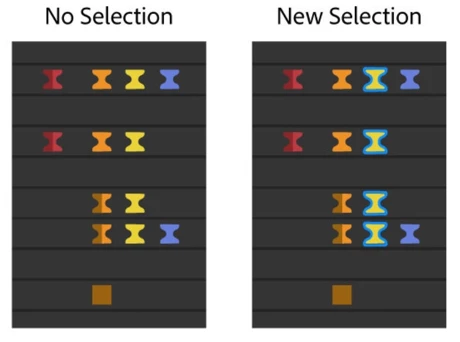
One of the top-voted feature requests —colored keyframes— has been added to After Effects 22.6. Keyframe color labels allow you to assign colors to keyframes in the composition. Coloring your keyframes helps you to organize, identify, and quickly locate critical components of your composition. You can also use the color labels to quickly select keyframes with the same color group. Label colors can be seen even when the keyframes are selected. When the keyframes are selected, they have a blue outline to differentiate them from your assigned color labels.


For more details on how to use color labels, see the Keyframe Color Labels help page.


What's fixed?

  • Fixed an issue on macOS where files copied during a Collect Files operation may copy as 0-bytes in size.
  • Fixed an issue on macOS where Save/Open/Import dialogs would not show up when After Effects was disconnected from the network.
  • Fixed an issue that caused After Effects to hang when initializing required components
  • Fixed an issue where the Application menus on macOS may not work or act erratically if a dialog was displayed during application startup.
  • Fixed an issue where zero denominator errors would occur on project open. For example:- After effects error: zero denominator converting ratio denominators (17::18).
  • Fixed an issue that caused the composition interactive re-draw to slow down if multiple font styles of Apple SF symbols fonts were rendered in test layers. 
  • Fixed an issue that caused drop-down menus to be cut off on dual monitor workspaces with different resolutions. 
  • Fixed an issue that caused After Effects to crash on double-clicking in the Project panel after selecting a "Learn" tutorial from the Home screen.
  • Fixed an issue with the preview that sometimes caused After Effects to become unresponsive if caching frames when idle. 
  • Fixed an issue that caused an ‘Illegal Argument Flag: -reuse” error when running aerender with the -reuse flag. 
  • Fixed an issue that caused After Effects to crash on quit when the app was trying to save the workspace changes. 
  • Fixed an issue that caused After Effects to crash when opening certain CMYK Illustrator files. 
  • Fixed an issue with CC Libraries that caused the preview and thumbnail for some footage to break when dragged into the project panel. 
  • Fixed an issue with Stroke that caused the "Below Previous in Same Group" option to not show up in the Stroke settings. 
  • Fixed an issue with the Solid layer that caused the Lock Aspect Ratio to not stick. 
  • Fixed an issue where the 3D Camera Tracker and Warp Stabilizer would stop after analyzing the first frame of the footage.
  • Fixed an issue where After Effects would crash on shutdown if a third-party ScriptUI-based panel had been displayed.


How to update After Effects to version 22.6?

Open the Creative Cloud desktop application and click the Updates tab on the top-left. Find After Effects in the list and click Update.

I don't see the update in my Creative Cloud desktop application. What should I do?

Click Help > Check for Updates from the Creative Cloud desktop application to refresh it.

21 replies

nubnubbud
Inspiring
October 20, 2022

So, when are you guys fixing the bug where tracking points more than 25 frames disables the UI interactibility? I can't do work like this. I need to be able to click buttons or press shortcuts to use the program effectively. At the same time, Playback is still unusable. I have both CS6 and CC22 on my computer, and only CS6 can actually play an entire 4k video clip without failing. CC22 barely gets 3 seconds in before it stutters to 2FPS, uneven, and 11 seconds into a clip before it stops playing the video altogether.

JohnColombo17100380
Community Manager
Community Manager
October 20, 2022

Hi @nubnubbud,

I don't know that we are aware of the bug you're describing (at least, I personally am not aware.) Would you mind making a Bug report in the Bugs section here on the forums? That will help us track the issue and get more info so that we can investigate possible fixes.


Thanks very much,

- John, After Effects Engineering Team  

nubnubbud
Inspiring
October 20, 2022

https://community.adobe.com/t5/after-effects-discussions/ae-wont-stop-tracking-once-started/td-p/9503822#:~:text=Right%20click%20on%20the%20task,up%20the%20Save%2FCancel%20window.

it's an old issue. if you spin up CS6 it even happens there. basically, if you have trackers which use enough CPU (super easy to do with large features or search areas, especially on high res footage), the entire UI lags to the point that it cannot recognize keypresses or clicks. It still tracks, and will stop when the clip is over, but in many cases this can leave a clip unstoppably tracking for half an hour with the only workaround a risky move that could close without saving if the OS is fickle.

along with that, please study CS6's preview. unlike CC22, it has no special tricks, and somehow never maxes out RAM with playback, only uses 20% of my CPU, and plays at a continuous 13-15fps while caching 4k frames, and easily exceeds realtime when cached, even with effects. I've been testing it, and it seems to simply be better optimized for 4k than CC22's so it's worth a look and test! 

just in case- I'm running a windows pc with a 1070, a 6700k, and 32 gigs of RAM, as I normally just do simple plate and color composites.

Participant
October 13, 2022

This might be the worst version of After Effects in a while. With colorful keyframes (beautyful!) but plenty of bugs. Try to suggest to the developers to USE the software first, before launching it!. A whole production line of animators stopped because of the PUPPET PIN tool. 

Participant
October 7, 2022

I've been running AE 2022 for a while now & just upgraded to v22.6.  Now AE won't run!  I've tried uninstalling & reinstalling to no avail.  I tried to find a way back to an older version without any luck.  How do I get AE 2022 back on line?


zandwacht
Inspiring
October 10, 2022

Using the Creative Cloud desktop app, you can install older versions of AE. Click the 3 dots on the right of the app name on the home screen and choose "other versions" like 22.4. Don't wait too long: when MAX launches next week, the 27.x branch will become the current version and your downgrade options might change.

Participant
October 4, 2022

Hi there,
I am using 22.6.0 (build 64) on an M1 Pro. Every update makes the performance worse, even up to the point my 2012 iMac is rendering faster than my current setup. I get memory errors so quickly. Even if it is simple comp, after a while everything slows down and then I can't preview anything. Lots of people writing things to try but I wanted to know if this is a recognized problem or not. Thanks.

iestynx
Inspiring
October 4, 2022
Really hope this gets sorted. I’ve ordered an M1 Ultra in my frustration.

Is this a macOS problem?
<>
Gleb.albovskyy
Participant
October 4, 2022

No, this is Adobe problem.

iestynx
Inspiring
October 4, 2022

Since this update I've been getting so many memory errors. I manage to get around 4 frames of RAM preview at quarter res. I have to keep purging the cache. There's loads of room. The cache is on an external 500GB SSD that has had no problems in the past. I've adjusted my memory setting as the warning message says.

On an iMac Pro 

3 GHz 10-Core Intel Xeon W

32 GB 2666 MHz DDR4

Radeon Pro Vega 64 16 GB

macOS 12.6

AE 22.6

Either theres a memory issue with AE or it's the way it talks to the plugins. Maxon and Twixtor causing different types of crashes.

Krishna5C55
Participant
October 2, 2022

I am thinking why thell I updated when everything was working just fine. Now I cant even see a single frame preview.

I had to un install 2 times and go back allthe way to 18.4.6.... and still that problem is there 

Gleb.albovskyy
Participant
September 24, 2022

Have to admit this version is barely usable. I work on MacBook Pro with M1 Pro 16GPU and 32RAM. And guess what? 3 minutes takes 10 hours to export. Already tried all tips and fixes, nothing helped. Waste of time (and money). 

Participant
September 23, 2022

Hi There,

unfortunately the same problem with Quicktime DNxHD/HR Files we had since the release of AE 12.3.

We have AVID 2018.12.14 in the House and no Update anytime soon because of deep workflow integration with other applications.

Avid is unable to read the Alpha Channel of both DNxHD and DNxHR.

DNxHR also have an issue with wrong Metadata in 1920x1080 interlaced Clips - by writing "progressive" into Metadata instead. 

So we're stucked on 12.2.1 and there's no benefit with native Apps for Apple Silicon for us so far.

MacBookPro 18,1 ; macOS 12.6 ; AE Version 12.3-12.6 

Aeliok
Participant
September 23, 2022

well well...even in this version (from 2020) no problem has been solved regarding crashes with gpu...i can't use any version before 2020 anymore because literally pc goes into freez mode (ALL FREEEZE SCREEN TURN OFF FOR A SECOND THEN BACK) as soon as i make window change whether it's from after effects to chrome or discord or any other program...i know from 2021 ae use gpu instead, but even switch from windows (setting to ae use gpu)  still crashing like hell...
pc spec:

ryzen 9300x
34gb ram 
gpu : rtx 2070Super
drive video : 31.0.15.1604

zandwacht
Inspiring
September 23, 2022

I get no images in the comp window after the update. Just grey. Tried turning metal acceleration on and off, MFR on and off, cleared cache. Intel iMac Pro, 64Gb, AE 22.6.0. This app has been incredibly unstable and buggy the last 1-2 years. 

zandwacht
Inspiring
September 23, 2022

Turned out some scenes just don't show anything when some assets have continuously rasterize on. Which I can't work without. Worked fine in 22.4. Grmbl.