



Rameez_Khan
Legend
August 25, 2022
Question

After Effects 22.6 is now live!

  • August 25, 2022
  • 21 replies
  • 23649 views

After Effects 22.6 is now available for download from the Creative Cloud desktop application. This release is recommended for all users.


What's new?


Keyframe Color Labels: 
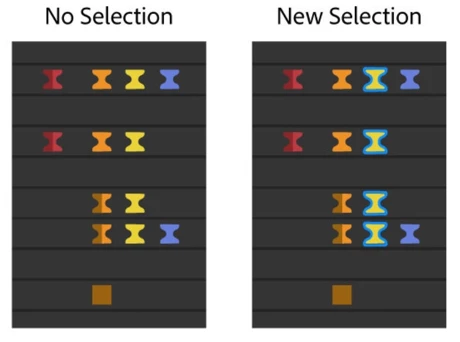
One of the top-voted feature requests —colored keyframes— has been added to After Effects 22.6. Keyframe color labels allow you to assign colors to keyframes in the composition. Coloring your keyframes helps you to organize, identify, and quickly locate critical components of your composition. You can also use the color labels to quickly select keyframes with the same color group. Label colors can be seen even when the keyframes are selected. When the keyframes are selected, they have a blue outline to differentiate them from your assigned color labels.


For more details on how to use color labels, see the Keyframe Color Labels help page.


What's fixed?

  • Fixed an issue on macOS where files copied during a Collect Files operation may copy as 0-bytes in size.
  • Fixed an issue on macOS where Save/Open/Import dialogs would not show up when After Effects was disconnected from the network.
  • Fixed an issue that caused After Effects to hang when initializing required components
  • Fixed an issue where the Application menus on macOS may not work or act erratically if a dialog was displayed during application startup.
  • Fixed an issue where zero denominator errors would occur on project open. For example:- After effects error: zero denominator converting ratio denominators (17::18).
  • Fixed an issue that caused the composition interactive re-draw to slow down if multiple font styles of Apple SF symbols fonts were rendered in test layers. 
  • Fixed an issue that caused drop-down menus to be cut off on dual monitor workspaces with different resolutions. 
  • Fixed an issue that caused After Effects to crash on double-clicking in the Project panel after selecting a "Learn" tutorial from the Home screen.
  • Fixed an issue with the preview that sometimes caused After Effects to become unresponsive if caching frames when idle. 
  • Fixed an issue that caused an ‘Illegal Argument Flag: -reuse” error when running aerender with the -reuse flag. 
  • Fixed an issue that caused After Effects to crash on quit when the app was trying to save the workspace changes. 
  • Fixed an issue that caused After Effects to crash when opening certain CMYK Illustrator files. 
  • Fixed an issue with CC Libraries that caused the preview and thumbnail for some footage to break when dragged into the project panel. 
  • Fixed an issue with Stroke that caused the "Below Previous in Same Group" option to not show up in the Stroke settings. 
  • Fixed an issue with the Solid layer that caused the Lock Aspect Ratio to not stick. 
  • Fixed an issue where the 3D Camera Tracker and Warp Stabilizer would stop after analyzing the first frame of the footage.
  • Fixed an issue where After Effects would crash on shutdown if a third-party ScriptUI-based panel had been displayed.


How to update After Effects to version 22.6?

Open the Creative Cloud desktop application and click the Updates tab on the top-left. Find After Effects in the list and click Update.

I don't see the update in my Creative Cloud desktop application. What should I do?

Click Help > Check for Updates from the Creative Cloud desktop application to refresh it.

21 replies

seamartin1247
Inspiring
September 20, 2022

I've had to uninstall 22.6. On my MAC AE kept on re-rendering the preview frame that my curser was sitting on. Even if the frame was already rendered AE rendered it again. This slowed down my workflow as I was always interupting a re-render of the preview frame.

Inspiring
September 16, 2022

Hi,

After the 22.6 update, Extendscript is not working as expected in our panels. Have tested in windows 10.
Reverted back to 22.5 and the same panel is working without any issues.


Thanks 

Participant
September 13, 2022

Hello,


I have the latest version of After Effects but I have a problem with importing images and videos. For images, it only accepts if I import PNG but for videos it doesn't accept at all. (the error message code is 86 :: 1
I tried with many different formats (mp4, avi, quicktime etc) but I still cannot import videos to my project. Any solutions? Thanks

Rameez_Khan
Legend
September 15, 2022

Hey @EAKDOGAN@ku.edu.tr 


Sorry for your issue!

  • Which OS are you on?
  • Where are the files stored that you are trying to import?


Let me know.

Rameez

Lucas Machado - Fiergs
Participant
September 6, 2022

I'can't update!

Rameez_Khan
Legend
September 15, 2022

Hi @Lucas Machado - Fiergs


Sorry to hear that!

Can you let us know if you are getting any error messages while trying to update?


Thanks,

Rameez

mihimaruGT
Inspiring
August 31, 2022

Hello, I need to use the mouse wheel, the window can be zoomed in and out infinitely, instead of 50%-100%-150%-200%!THX:-D


Participating Frequently
August 31, 2022

I had faced this issue as well, not all the times but it is happening in new version

Known Participant
August 30, 2022

Hi There,

Were any changes made with respect to how CEP extensions' JSX files are loaded into the host application? We've been seeing many user reports with this update specifically, indicating our jsxbin file is not being loaded properly. 


We've been loading our jsxbin as such and have never had any issues prior to this update:


const __dirname = getSystemPath('extension')
evalExtendscript(
    `$.global[${JSON.stringify(process.env.CEP_ID + '.meta')}] = { extensionPath: 
        ${JSON.stringify(__dirname,)}, version: ${JSON.stringify(process.env.BUILD_NUMBER)} };
    $.evalFile(${JSON.stringify(path.join(__dirname, 'ourjsx.jsxbin'))})`,
)
JohnColombo17100380
Community Manager
Community Manager
August 30, 2022

Hi @Cameron J,


Thanks for posting about this issue. Is your CEP extension run as modal? Reproducing issues like this on our end is difficult without your extension, but let us know if it's possible to reproduce using the sample CEP panels provided here.


Thanks for reporting this issue and for any further information you can provide, 

- John, After Effects Engineering Team 

Known Participant
August 31, 2022

Hey John, we run our extension as a panel. Unfortunately the issue is transient, and not reliably reproduced. All I know is that it started with 22.6. Users have reported that it resolves by:

a) Downgrading back to 22.5

b) Over time, by either refreshing the panel, restarting AE, or their computer. This doesn't work 100% of the time however.


It happened on my machine once, and I was able to troubleshoot a little bit. The issue indicates to me that our jsxbin did not load into AE correctly via the code I pasted above. Calls to our extendscript functions were all throwing errors about a field in the $.global object being undefined - an object which we set when our jsx loads.

Marie-Liesse Boyez
Participant
August 29, 2022

I'm not fond of the keyframe outline. Makes it harder to judge distances between very close keyframes. It would be nice to have an option to turn it off.

Warren Heaton
Community Expert
Community Expert
August 29, 2022

Have you tried changing Timeline Zoom levels?  Zoomed in, it's much easier to judge the distance - or the duration - between close keyframes than when zoomed out.

I find the Zoom in Timeline panel to single-frame units keyboard shortcut to be extremely helpful for this.


Zoom in time

= (equal sign) on main keyboard

= (equal sign) on main keyboard

Zoom out time

- (hyphen) on main keyboard

- (hyphen) on main keyboard

Zoom in Timeline panel to single-frame units (Press again to zoom out to show entire composition duration.)

; (semicolon)

; (semicolon)

Zoom out in Timeline panel to show the entire composition duration (Press again to zoom back in to the duration specified by the Time Navigator.)

Shift+; (semicolon)

Shift+; (semicolon)

Participant
September 7, 2022

I second this complaint.  I think the implementation of colored keyframes is neat but the outline is a big drawback for me.  It makes the interface feel bloated and harder to see things at a glance.  We could zoom in, sure, but that's asking the user to do extra work that we didn't have to do before.  The outline is also SO thick.  I'm neurotic so I actually counted the pixels on a standard keyframe.  It results in a pixel width increase from 18 to 30 pixels.  That's a whopping 66% bigger.  That's nuts.  Not only that, but there are actually 2 outlines if you look closely.  A darker outline surrounded by a brighter one.  Seems unnecessary to have both. A better solution would be to vary the color when selected, similar to how mask points and lines work.  Hope to see this improved in future versions.

Inspiring
August 29, 2022

I was hoping this new update would support audio playback but, like the previous version it does not. When will Adobe fix audio playback in AE? In the meantine, is there a plugin that allows AE to play out audio? 

Warren Heaton
Community Expert
Community Expert
August 29, 2022

@Indie767 

Sorry to hear you're having trouble with audio.  Could you provide some more details?

After Effects should include audio in a Preview as long as as the following things are happening: it's enabled in the Preview panel; it's enabled in the Timeline for the Layer; the audio source is a supported file format; and the audio source is mono, stereo, or dual channel.


And, of course, the Default Output must be set correctly under Preferences > Audio Hardware.


Inspiring
August 31, 2022

After several saumersalts through the proverbial hoop, I got my audio working again. I made a huge mistake by updating. I'm going to finish my comp in 22.6 and then go back to version 18 which seems like the most stable version and live with it going foward. Updates are becoming useless with cute tweaks that are mostly useless to me and my performance grows worse with each iteration. Adobe should stop with these useless updates and focus on stabilty and what works. 

Participant
August 28, 2022

i bougt a new mac yesterday and strated downloding every program i need ps, ai but it wasnt able to instal After Effects, every time it said "instalation faield, error 183. I tryed what was told on the error list but id didnt help, but the od thig is that i have the program in my files and can start the application. but whle using it its a lil buggy and when i wont to 3d track the kamera it says "obtain dynamiclink server"

i bought the macbookair m1 2020 

need help asap 

Participant
August 28, 2022

also i tryed downloding in desing just to try and it installed fine 

im getting a bit frustraded


Participating Frequently
August 26, 2022

After Effects error: Attempt to remove an item from a position outside of list length (27:: 9).


After this exciting feature of labeling keyframe (a feature I had upvoted), I updated the after-effects. And now every time I move the keyframe, trim layer length, or move a layer in time, it shows me this error. For context, the same project was working fine previously.


Spec:

Intel i9 12900k

GTX 3060ti

64 GB DDR5  ram

And project and windows are separated in different ssds.

Rameez_Khan
Legend
August 26, 2022

Hi @Mayank - Motion


Sorry to hear about this, and thanks for upvoting the feature request!

Is it happening in all your projects or just this one?

Would it be possible for you to share a project file with us so that we can test it on our end?


Thanks,

Rameez 

Participating Frequently
August 29, 2022

Hey,


Yes, the problem still continues. I switched back to version 22.4. I tried purging all memory and disk cache and things work but it needs constantly needs to be purged. like 4-5 times every hour. Also, overlord(plugin to transfer Illustrator shapes to After effects) is not working in version 22.6 which is working fine in version 22.4.