



After Effects 22.6 is now live!
After Effects 22.6 is now available for download from the Creative Cloud desktop application. This release is recommended for all users.
What's new?
Keyframe Color Labels:
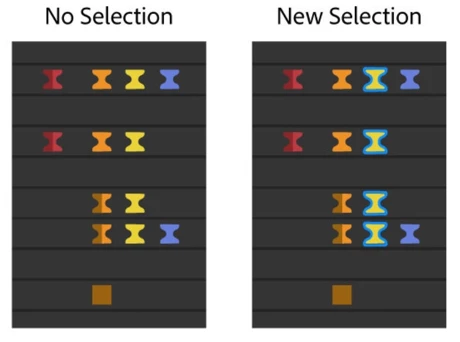 One of the top-voted feature requests —colored keyframes— has been added to After Effects 22.6. Keyframe color labels allow you to assign colors to keyframes in the composition. Coloring your keyframes helps you to organize, identify, and quickly locate critical components of your composition. You can also use the color labels to quickly select keyframes with the same color group. Label colors can be seen even when the keyframes are selected. When the keyframes are selected, they have a blue outline to differentiate them from your assigned color labels.
For more details on how to use color labels, see the Keyframe Color Labels help page.
What's fixed?
- Fixed an issue on macOS where files copied during a Collect Files operation may copy as 0-bytes in size.
- Fixed an issue on macOS where Save/Open/Import dialogs would not show up when After Effects was disconnected from the network.
- Fixed an issue that caused After Effects to hang when initializing required components.
- Fixed an issue where the Application menus on macOS may not work or act erratically if a dialog was displayed during application startup.
- Fixed an issue where zero denominator errors would occur on project open. For example:- After effects error: zero denominator converting ratio denominators (17::18).
- Fixed an issue that caused the composition interactive re-draw to slow down if multiple font styles of Apple SF symbols fonts were rendered in test layers.
- Fixed an issue that caused drop-down menus to be cut off on dual monitor workspaces with different resolutions.
- Fixed an issue that caused After Effects to crash on double-clicking in the Project panel after selecting a "Learn" tutorial from the Home screen.
- Fixed an issue with the preview that sometimes caused After Effects to become unresponsive if caching frames when idle.
- Fixed an issue that caused an ‘Illegal Argument Flag: -reuse” error when running aerender with the -reuse flag.
- Fixed an issue that caused After Effects to crash on quit when the app was trying to save the workspace changes.
- Fixed an issue that caused After Effects to crash when opening certain CMYK Illustrator files.
- Fixed an issue with CC Libraries that caused the preview and thumbnail for some footage to break when dragged into the project panel.
- Fixed an issue with Stroke that caused the "Below Previous in Same Group" option to not show up in the Stroke settings.
- Fixed an issue with the Solid layer that caused the Lock Aspect Ratio to not stick.
- Fixed an issue where the 3D Camera Tracker and Warp Stabilizer would stop after analyzing the first frame of the footage.
- Fixed an issue where After Effects would crash on shutdown if a third-party ScriptUI-based panel had been displayed.
How to update After Effects to version 22.6?
Open the Creative Cloud desktop application and click the Updates tab on the top-left. Find After Effects in the list and click Update.

I don't see the update in my Creative Cloud desktop application. What should I do?
Click Help > Check for Updates from the Creative Cloud desktop application to refresh it.
 AdChoices