Known Participant
September 15, 2023
Answered

After Effects 23.6 crashes to desktop when I try to open one specific project file (Windows 10)

  • September 15, 2023
  • 9 replies
  • 1958 views

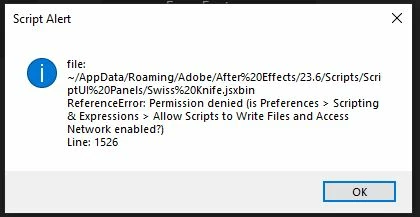
There's a project I've been working on for a couple weeks.  The last time I worked on it was 09/12/23 and it worked perfectly fine.  Today, whenever I try to open it, AE instantly crashes to desktop.  I've tried starting in safe mode, clearing preferences, disabling all 3rd party plugins, creating a new project and loading the troublesome project into it, and doing a clean uninstall and reinstall of AE 23.6 and nothing works.  Instant crash every single time.  All my other projects open perfectly fine.  When I try to open it in safe mode, I get the following errors:


Being as that one .jsxbin is speficially mentioned, I've deleted it and still nothing.  My computer specs are:


Windows 10 64-bit

Cpu: Ryzen 5900x

Gpu: Gtx 1080ti

64gb Ram

AE is saved on my startup SSD, my caches are on a seperate SSD, and the project is onan 8tb HDD.  This is a time sensitive project so I'll be happy to provide any other information and all help is greatly appreciate - thank you.

This topic has been closed for replies.
Correct answer jenkmeister17177426

Yes, that SageThumbnail plugin certainly looks to be the culprit on the crash. AE is trying to retrieve the thumbnail for an image which in turn is invoking the OS thumbnail reading code which is then hitting the SageThumbnail code. I'd guess if you uninstall it, the crash will go away. 

9 replies

Known Participant
September 15, 2023

Success! Thank you so much, you really really saved my butt!

jenkmeister17177426Community ManagerCorrect answer
Jenkmeister
September 15, 2023

Yes, that SageThumbnail plugin certainly looks to be the culprit on the crash. AE is trying to retrieve the thumbnail for an image which in turn is invoking the OS thumbnail reading code which is then hitting the SageThumbnail code. I'd guess if you uninstall it, the crash will go away. 

Known Participant
September 15, 2023
Please download the attached file to view this post
Jenkmeister
September 15, 2023

Ok, so no crash reports logged with your forums email. Is there a .crash file being placed onto your desktop or in C:\Users\[username]\AppData\Roaming\Adobe\After Effects\23.6\logs ? 


If so, can you paste the contents of that .crash file back here? 

Jenkmeister
September 15, 2023

"3rd party plugins" in safe mode refers to rendering plugins, not script extensions, and those error messages are definitely script extensions. But if that's only in safe mode, let me see if I can find the crash reports (hopefully you sent them in with your email address?) and see what's going on.

Known Participant
September 15, 2023

I also don't have either of those plugins, or any of the culprits being named in that other thread. Disabling all 3rd party plugins also didn't help anyway.

Known Participant
September 15, 2023

Thanks, sorry forgot to mention that "Allow scripts to write files and access network" is definitely enabled.  It's just weird that none of my plugins are causing any issues in any other project, just this one.  I'll check the link you provided now though.

Jenkmeister
September 15, 2023

Previous thread with similar questions about extcomms - might have some ideas for which extensions to look at: https://community.adobe.com/t5/after-effects-discussions/extcomms-error-status-code-0/td-p/12785319

Jenkmeister
September 15, 2023

That extcomms error is comming from another installed plugin. One suggestion is Keystone, another is Limber. Definitely seems like one of your script extensions (not rendering plugins) are interferring here. 


The error message on Swiss Knife is that you don't have the Permissions set for allowing scripts to write to disk (Preferences -> Scripting).