


Participant
May 19, 2022 5:30 AM UTC
Question

After Effects Can't Continue: Internal Structure Inconsistency

Hi, I'm getting the following error when I try to load AE:

After Effect's can't continue: internal structure inconsistency (g) (25 :: 2)
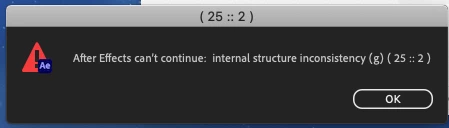
Running AE 2022. I've uninstalled and reinstalled the software and updated my OS; currently running MacOS Catalina 10.15.7 

Processor: 3.1 GHz Quad-Core Intel Core i7

Memory: 16 GB 1600 MHz DDR3

Graphics: NVIDIA GeForce GT 650M 512 MB

Please help, thank you!

15 replies

Participant
Jun 19, 2024 12:54 PM UTC

In my case (Mac M2), I closed all other Adobe apps, changed to opening After Effects without Rosetta and it worked. Then, I changed back to Open with Rosetta and is still running.

Translate
Participant
Jul 3, 2024 12:12 PM UTC

you saved me thank you so much

Translate
Participant
Oct 4, 2023 3:50 PM UTC

Hello @nishu_kush We want to have an urgent response from Adobe regarding this after effects problem which is really starting to annoy us creators. Explain to us in detail what's going on and give us an answer guys !

Translate
nishu_kush
Legend
Oct 11, 2023 7:17 PM UTC

Hi @Perez5FEF,


Please check out the following thread for more details on this: https://community.adobe.com/t5/after-effects-bugs/after-effects-23-6-can-t-continue-internal-structure-inconsistency-g-25-2-macos-sonoma/idi-p/14131582

Hope it helps.


Thanks,

Nishu

Translate
ToolfarmJP
Community Expert
Community Expert
May 31, 2022 12:59 PM UTC

I assume the cause is shortage of GPU VRAM. You need at least 2GB to run After Effects.


https://helpx.adobe.com/after-effects/system-requirements.html


Translate
Participant
May 31, 2022 3:45 PM UTC

Hi, I resolved the issue by contacting customer service- installing an older version of AE.

Translate
Participant
May 31, 2022 8:41 PM UTC

hola, eso quiere decir que con la ultima version no funcionaria??


Translate
nishu_kush
Legend
May 20, 2022 5:25 AM UTC

Hi louism22996612,


Sorry for your issue.

When do get this error - post-launch or while the splash screen is loading Are there any updates available for your OS? Did you install any third-party plug-ins? Please try resetting the preferences: https://community.adobe.com/t5/after-effects-discussions/faq-how-to-reset-trash-preferences-in-after-effects/td-p/10634342

Let us know.


Thanks,

Nishu

Translate
Participant
May 31, 2022 11:06 AM UTC

Hi!

I have the exact same problem. Eveytime I try to open the app (AE 22.4) I get this two messages. Already tried to reset the preferences but it did not work, I also tried deleting and reinstalling the app, restarting Creative Cloud, my Mac, and nothing has worked. I also dont have any third party plug-ins.


Operating System MacOS Catalina 10.15.7 (latest Version)

Processor: 2,9 GHz Quad-Core Intel Core i5

Memory: 16 GB 1600 MHz DDR3

Graphics: NVIDIA GeForce GTX 660M 512 MB


Please help!

Translate
Participant
May 31, 2022 11:07 AM UTC
Bildschirmfoto_2022-05-31_um_12-57-57.png
Translate