


Inspiring
November 27, 2023
Answered

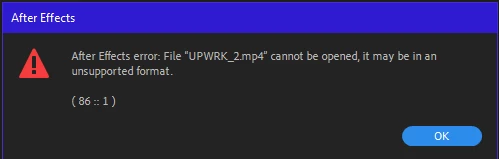
After Effects error: File "name.mp4" cannot be opened, it may be in an unsuppoted format. (86 :: 1)

  • November 27, 2023
  • 21 replies
  • 3610 views

Recently, After Effects has been giving errors with almost all video file formats.
Does anyone know how to solve this issue?

P.S.: I've already tried fixing it using YouTube tutorials (changing the file extension to .avi, running the video through Media Encoder, restarting the computer), and none of it helps.
The Error:

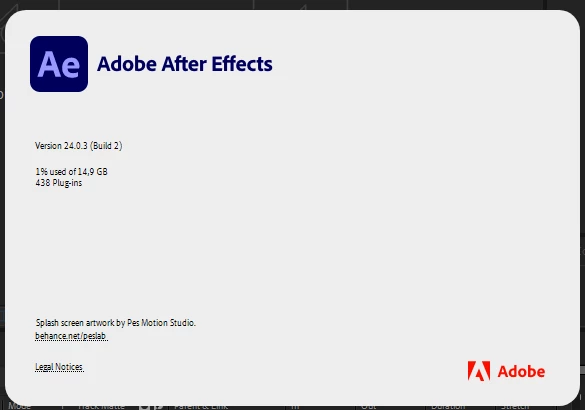
My AE version:
 

This topic has been closed for replies.
Correct answer ValeriiN

So, the issue is resolved.
Honestly, I don't know how, but after the recent update, everything fixed itself.
Now, I can import all video formats again.
Thank you all for your attention.

21 replies

ValeriiNAuthorCorrect answer
Inspiring
December 22, 2023

So, the issue is resolved.
Honestly, I don't know how, but after the recent update, everything fixed itself.
Now, I can import all video formats again.
Thank you all for your attention.

Warren Heaton
Community Expert
Community Expert
December 2, 2023

Disabling plug-ins is a common trouble-shooting step, but I'm not sure it's a solution here.

ValeriiNAuthor
Inspiring
December 2, 2023

Recently, I installed a plugin from Mister Horse called Animation Composer.
Is it possible that the issue is related to this?
P.S.: I also have this plugin installed in Premier Pro, and everything works there without errors.

ValeriiNAuthor
Inspiring
December 2, 2023

I'm rolling back to 23.6 & 23.4 and the issue still happens 😕😕

Warren Heaton
Community Expert
Community Expert
December 2, 2023

It's something specific to your computer that is causing the issue.

You could try another computer (our Creative Cloud plan allows us to have the software active on two machines).


Another thing to try when whatever is causing a conflict cannot be determined is to do a clean install of Windows and After Effects on your current machine.  That of course takes some time and effort that ideally would not be necessary.

ValeriiNAuthor
Inspiring
December 2, 2023

Thank you for the advice.
The transcoded file through Media Encoder, as you suggested, finally imported into After Effects.
However, this did not solve the main problem... The fact that the video has a variable frame rate HEVC and was shot on an iPhone 11 doesn't seem to significantly impact the import; still, all videos, regardless of format and source, give the same error (except QuickTime/Apple ProRes 422 LT).

Warren Heaton
Community Expert
Community Expert
December 2, 2023

If the file "name.mp4" is decompressing in Premiere Pro and Media Encoder as expected, try using Media Encoder to transcode the file to an Apple ProRes 422 LT QuickTime movie file for use in After Effects (Format pop-up menu set to QuickTime and Preset pop-up menu set to Apple QuickTime ProRes 422 LT).  Assuming this works, you can do that until you determine what on your system is preventing the file from working in After Effects in the first place.  If that does not work, try using Shutter Encoder (donation-ware) to transcode the file.  If ProRes 422 LT still does not work, try another on of the "Editing codec" options available in the Choose function pop-up menu. 

Also, since your clip is variable frame rate HEVC from an iPhone 11, I wouldtranscode to ProRes 422 LT for Premiere Pro anyway.

December 2, 2023

Can you try rolling back to 23.6 or 23.4 and see if the issue still happens? It's hard to know what you have installed on your machine that is blocking this from working, or what else might have changed on your machine. There is nothing in the log files outside of the warning around your CPU but given you probably didn't change that, I'd expect some other software or OS update you've installed to be interferring with AE.

ValeriiNAuthor
Inspiring
December 2, 2023

Hello.
I still can't use the program.

Can someone help me with this issue?

ValeriiNAuthor
Inspiring
November 30, 2023

Hi.
I would like to know if my issue is being considered.
I still can't use the program properly, and I don't understand what to do.