

Malanche
Participant
October 27, 2021
Answered

After effects is not working with Monterey OS

  • October 27, 2021
  • 16 replies
  • 39310 views

After install the new OS Monterey the app is not working. 

Be careful friends. i spend all night trying delete every single scrpit that makes the crash and still not working.

Correct answer jenkmeister17177426

We've heard from the AE Juice developers. They have updated plugins that support Monterey available here: 


Windows: https://aejuice.com/pack_manager/AEJuice_Pack_Manager.zip
macOS: https://aejuice.com/pack_manager/AEJuice_Pack_Manager_mac.zip


Please download these to continue to use AE Juice on MacOS 12.

16 replies

Participant
June 29, 2023

I'm on a PC and tried back dating to the 2022 version due to less frustrating issues in 2023 and here we are almost 2 years later and the crash is still an issue, but wait, don't bother updating the software, here's a link to update the plugins... Holy cow, Adobe... I'm going back to CS6... 

Participating Frequently
June 16, 2022

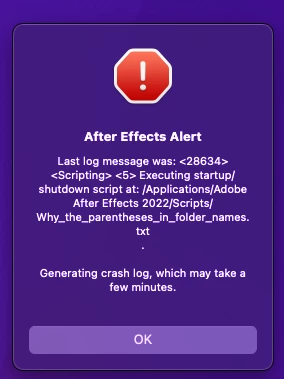
Hi, I didn't used after effects for a while. And now I won't open. I get this alert.

I have tried to uninstall and reinstall. Tried version 22.4 and 22.3.

I don't have any Plugins installed.


MacOS Montery 12.4

MacBook Pro 2021

M1 Max 32 GB

Jenkmeister
June 16, 2022

Sorry for the trouble you are having. We'll need a bit more information. Can you do the following and post back the result:

1. Open Terminal on MacOS

2. In the Terminal window, (assuming After Effects is installed in the default location), type 

   cd "/Applications/Adobe After Effects 2022/Adobe After Effects 2022.app/Contents/MacOS/"

and press return.

3. In the Terminal window, type

   "./After Effects"

and press return


After Effects should then begin to start up and a log of what's happening should be output into the Terminal. After After Effects stops working, select all the output in the Terminal window, copy it and past it back here. That should help us understand where the failure is. 

Jenkmeister
June 16, 2022

You may also want to check out the AE Beta that's also available on Creative Cloud Desktop. There are some fixes in that for startup failures (such as Blackmagic DeckLink drivers that didn't properly support Apple Silicon hardware). 

Participant
May 12, 2022

I'm having the same issue, but I am running Catalina not Monterey, and I have no AEJuice plug-ins.

Every time I try to start AE, it crashes and I get this error:


I already tried removing all plug-in folders from my Library, which had no effect.

Jenkmeister
May 12, 2022

What version of After Effects are you using? Do you have any special hardware plugged in? I belive you're on a Mac computer, is it a newer Apple Silicon device or something older? Are there any other crash dialogs that appear after that? 


I searched through the reported crash logs we receive but was unable to find one attached to your email address (the one associated here on the forums) so any other system information, version information, etc. would be helpful. 


Thanks

Sean

Participant
May 15, 2022

After Effects version is 22.4

No peripherals plugged in except headphones, ethernet cable and mouse.

No other crash dialogs appear.

Mac specs:

editf47050080
Participant
April 21, 2022

It is definitely the plugin "AEJuice" I removed it and no more crash. Thanks!

Participant
January 22, 2022

SOLVED:
I came here to say that I updated Monterey to Version 12.1 (it's January 22, 2022 today) and both After Effects and Photoshop are now able to save files with multiple monitors connected. AE will render as well. This is on a 2013 trash can. I didn't update either adobe apps and did nothing with the prefs or plugins, so my conclusion is that it was an Apple issue. I'm so glad I switched to Windows as my main workstation, otherwise I'd be stuck using these apps with one monitor up until now.

Participant
December 8, 2021

I've got the same issue with AEJuice Plugins, AE 22, and Monterey, but I've been able to isolate a few elements.


First of all, the AEJuice suite contains a number of plug-ins.

Pack Manager 4 installs a UI that give easy access to their library of animated elements.  The latest version of that is 21.11.1011 (as of this writing) and it appears to work without issue.  It also includes the CopyEase plugin that can be accessed under the Window menu.  All of that seems to be working, at least for me.


HOWEVER, AE Juice also offers a number of older free plug-ins on their website, that were working just fine under BigSur, but prevent AE from launching under Monterey.


PMSystemOne.plugin
AEJuiceShifter.plugin
AEJuiceQuickFolders.plugin
AEJuicePackManager3.plugin
AEJuiceFontPreviewer.plugin
AEJuiceCopyEase.plugin*


If you have any of these installed on your system, they are possibly the cultprit preventing AE from launching.  Even though the error message appears to be pointing at one of your script files, it's these plug-ins.

They are likely installed in this folder:

/Applications/Adobe After Effects 2022/Plug-ins


If you remove those listed plug-ins from that folder, you should be able to get AE running again.


Hopefully AE Juice will be able to update their plugins to work with Monterey.  I found the font previewer and shifter to be pretty handy.


*There is another version of CopyEase that gets installed with PackManager4 in:

/Library/Application Support/Adobe/Common/Plug-ins/7.0/MediaCore/AEJuice

That version works.  Deleting the CopyEase plug-in from the Applications folder doesn't remove the working version.

Bad Habits Good Times
Participant
December 7, 2021

is there a fix


Participant
December 6, 2021

I just downloaded the new AEJuice and After Effects opens again! 🙂 

Windows: https://aejuice.com/pack_manager/AEJuice_Pack_Manager.zip

macOS: https://aejuice.com/pack_manager/AEJuice_Pack_Manager_mac.zip

Participant
November 2, 2021

I can confirm that installing the latest version of AEJuice has fixed the problem for me.

https://aejuice.com/pack_manager/AEJuice_Pack_Manager_mac.zip 


I tried uninstalling everything, removing all my plugin folders, even all other Adobe software and the adobe folders (in Libraries and applications) - then did a clean install of Aftereffects - BUT AE still crashed.

However, when I then installed the latest AEJuice installer, it worked again - so clearly something gets written into the OS that is incompatible, and the sure way to fix it is to install the latest version of AEJuice.

Participating Frequently
November 5, 2021

We do not have AE Juice installed.

After installing it nothing changed. The problem still appears.

Jenkmeister
November 5, 2021

What problem do you see? We know AE is working on MacOS12 so we'll need a bit more info from you on what you're seeing fail. 

Malanche
MalancheAuthor
Participant
November 1, 2021

I tested again AE juice and works well!