
Known Participant
August 10, 2023
Question

Apple Mac Studio M2 Ultra 192gb RAM

  • August 10, 2023
  • 3 replies
  • 3619 views

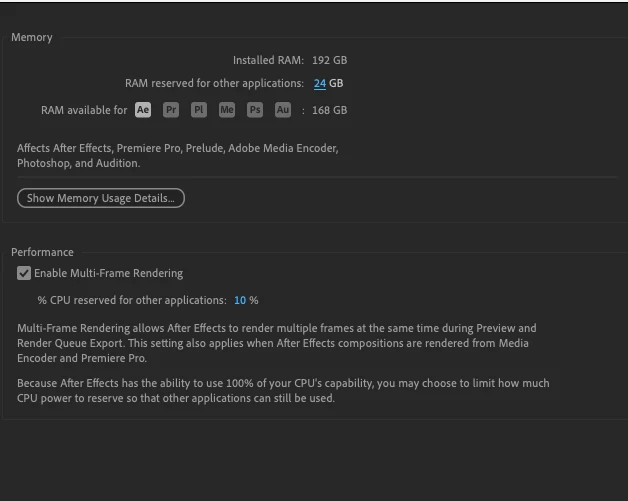
So after all of the hype about these machines and the incredible amount of RAM than no one could possible need or use. I am constantly running into low memory, run out of memory warming banner. AE will not allow me to allocate any less than 24gb for the system and it's becoming infutiating.  


I've moved form a mac pro with 256gb RAM so this after all of the "apple marketing" turns out this sytems is yet to be a mac pro killer. 


Any advice - or is this also a bit of an adobe bottleneck? I've also spoken to Apple who of course blame it all on adobe. But the fact i cannot upgrade the RAM anymore - seems RIDICULOUS.



This topic has been closed for replies.

3 replies

Participating Frequently
August 15, 2023

Has there been any resolution to this? I am about to pull the trigger on purchasing a new M2 Ultra system for AE and PR work.. this post has me hesitating.

Known Participant
August 16, 2023

no updates yet. I'm underwhelmed with performance. Don't get me wrong AE starts up super fast, but i would trade that any day for these issues/errors to stop. I'm essentially paying for software which either can't or won't use the power of the M2 Ultra. Sometimes wonder if anyone at Adobe actually tries the SW on these systems.

nishu_kush
Community Manager
Community Manager
August 18, 2023

Hi David,


Sorry for the delay.

Could you try the suggestions in the following thread and see if it brings any change: https://community.adobe.com/t5/premiere-pro-bugs/issues-with-premiere-23-5-on-m2-ultra-studio/idc-p/14007966/page/4#M13412

Let us know how it goes.


Thanks,

Nishu

nishu_kush
Community Manager
Community Manager
August 10, 2023

Hi David,


Sorry for your issue.

Could you share the following details so that we can troubleshoot the issue?

  • Does it happen with all the projects? Can you open the Activity Monitor and see how much RAM After Effects is using?
  • Check if it happens on a new blank project.
  • Are you using any third-party plug-ins?

Let us know, we're here to help.

Note: Moving this thread from Bugs to Discussions for troubleshooting.


Thanks,

Nishu

Known Participant
August 11, 2023

at some point it's happening in most projects i'm working on.  It obviosuly doesn't do it on a blank project, becase there would be nothing to use the RAM. This is always when i play back, essenmtially just running out of memory. The cache is set to 100gb which every time i purge (and i'm purging alot is full. 


No third party plugins used on the one today.


Known Participant
August 10, 2023

I feel your pain David Jackson. After recently sswitching over to a new M2 machine I've had multiple AE crashes due to low memory as well as a raft of other issues. I haven't had these problems with any software other than After Effects. I do wish they would proritize resolving these issues. It's difficult to justify making a monthly payment for a tool that is so unreliable.