


Participant
Jan 24, 2019 2:12 PM UTC
Question

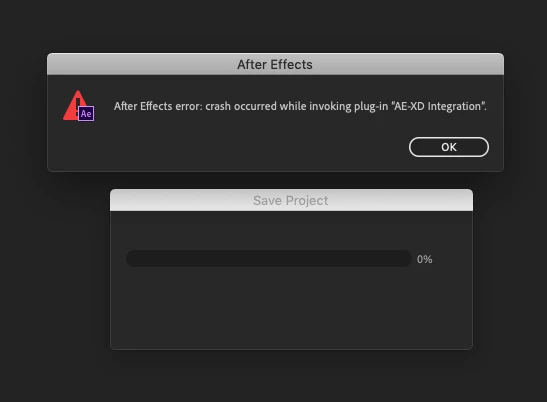
Crash occurred while invoking plug-in "AE-XD Integration".

Hi.

I get the following error each time I try to save, or AE tries to auto-save my project.

It happens after I have imported stuff from Adobe XD using the Import -> After Effects function in XD and then saves the AE file.

After Effects error: crash occurred while invoking plug-in "AE-XD Integration".

Is there a fix for this issue?

I'm running Xd: 14.0.42.14 and AE: 16.0.1
21 replies

Participant
Nov 21, 2023 7:54 AM UTC

For MAC remove or delete "AEXD.plugin"
/Library/Application Support/Adobe/Common/Plug-ins/7.0/MediaCore ---- 'AEXD.plugin"
Now After Effects Opning

Translate
thedc6324
Participant
Oct 11, 2023 11:54 AM UTC

[FIXED]
Go to C:\Program Files\Adobe\Common\Plug-ins\7.0\MediaCore\Public and delete AEXD folder in there.

Translate
Participant
Nov 24, 2023 7:37 PM UTC

This stopped the error occuring, but did the after effects project still doesnt open. After effects opens, but there is only an empty project.


Translate
Participating Frequently
Oct 1, 2021 5:55 PM UTC

I've faced the same issue. I've created a simple dummy XD a file without any effects, just text and some shapes and background layer and it is working fine. After Effect is not able to handle heavy XD effects stuff. It is a complete waste of time.

Adobe need to upgrade after effect so that it handle XD effect.

Translate
Mohamad r
Participant
Jan 10, 2021 2:31 PM UTC

Hi, 
I had this problem too, Check This Issues
1- There is large file in your XD project (4k Picture and some thinfg like this)
2- There is missing font
3- There is Arabic font

Translate
Participant
Oct 7, 2020 6:41 AM UTC

Same problem, i trying this issue, need help to fix and solved this issue

Translate
Rameez_Khan
Legend
Jul 3, 2019 5:57 PM UTC

Hi all,

I can see from our bug database that the issue should not occur with the following versions of After Effects and Adobe XD:
After Effects: 16.1.2

Adobe XD: 19.0.21 or higher

Let us know if it still doesn't work on these versions.

Rameez

Translate
Rameez_Khan
Legend
Apr 3, 2019 3:32 PM UTC

Hi folks,

Would you mind updating to After Effects (16.1) and let us know if you still face this problem?

Thanks,

Rameez

Translate
tracyy9598
Participant
Apr 5, 2019 7:32 AM UTC

yes i just did,

and adobe xd's "export to after effect" option is disabled....

Translate
Participant
Apr 3, 2019 7:38 AM UTC

Crashing every time. I have lost 4-5 hours of work.

Translate
Participant
Mar 25, 2019 5:02 PM UTC

I've had the same issue.

Basically if you have a clean after effects project with nothing in it, it works fine. If you have anything in the After Effects project prior to exporting from XD it will crash on save.

Work around seems to be create an AE project for your exports from XD, then import that AE project into your main AE project.

Translate
codyr97165123
Participant
Mar 4, 2019 6:40 PM UTC

I just got done dealing with this issue as well. A way I made it work was to create a new file, import all the new Xd assets/comps and save as....Then re-open the file that was giving you trouble. Go to File>Import>File and choose that newly created AE file with your Xd comps in it. You should be able to save the original file at that point and keep working.

Definitely not an ideal solution, but a decent work around for the time being. Hope it works!

Translate