Participant
June 26, 2023
Answered

Entire Comp Shifts During Export

  • June 26, 2023
  • 3 replies
  • 3121 views

Hello all,


My comp seems to be shifting to the left side and reappearing on the right side during the exporting process. I've never experienced this issue before and frankly I have no idea why it's occuring. I've tried exporting to the render queue as well as media encoder, I've restarted the programs, cleared the cache, created a comp in a comp - anything I could think of so far has not worked.


This is what the comp is supposed to look like, and what it currently looks like in my AE file:

 

Thanks in advance!

This topic has been closed for replies.
Correct answer steveignite

Updated ME to latest, and the issue has gone away.

3 replies

Warren Heaton
Community Expert
Community Expert
June 28, 2023

@Marlee5E25 and @amandal63303071 

This appears to be happening under Windows with After Effects 23.5 and Media Encoder 23.5.


Try using the one of the H264 Output Modules in the After Effects Render Queue instead of sending the Composition to Media Encoder.  If that still has issues, render Best Settings/High Quality (the file will be large) from After Effects and then encode that to MP4 in Media Encoder.


Another option is to roll back to an older version.  As long as you stay at version 23.x or above, the 22.5 After Effects project file should open.  If rolling back to After Effects version 22, use File > Save As > Save a Copy as 22.x in After Effects 23.5 - checking any newer features that are different in prior versions like Track Mattes.


Also, if you have a moment, add what you posted here to this thread:


This thread has the participation of Adobe staff and will likely include news of a fix once it becomes available.  Please be sure to include your operating system version, After Effects version, and Media Encoder version.


Inspiring
September 11, 2023

I am having the same issue. Both exporting from AE as a PNG seq, and using Media Encoder H.264 mp4. Windows. Except I have the thin RHS part of the frame displaying on the left.


AE version 23.6.0

Media Encoder version 23.0.1


Don't have time to add more info, sorry, as I need to meet a deadline and working round this is not helping.

steveigniteCorrect answer
Inspiring
September 11, 2023

Updated ME to latest, and the issue has gone away.

Participant
June 28, 2023

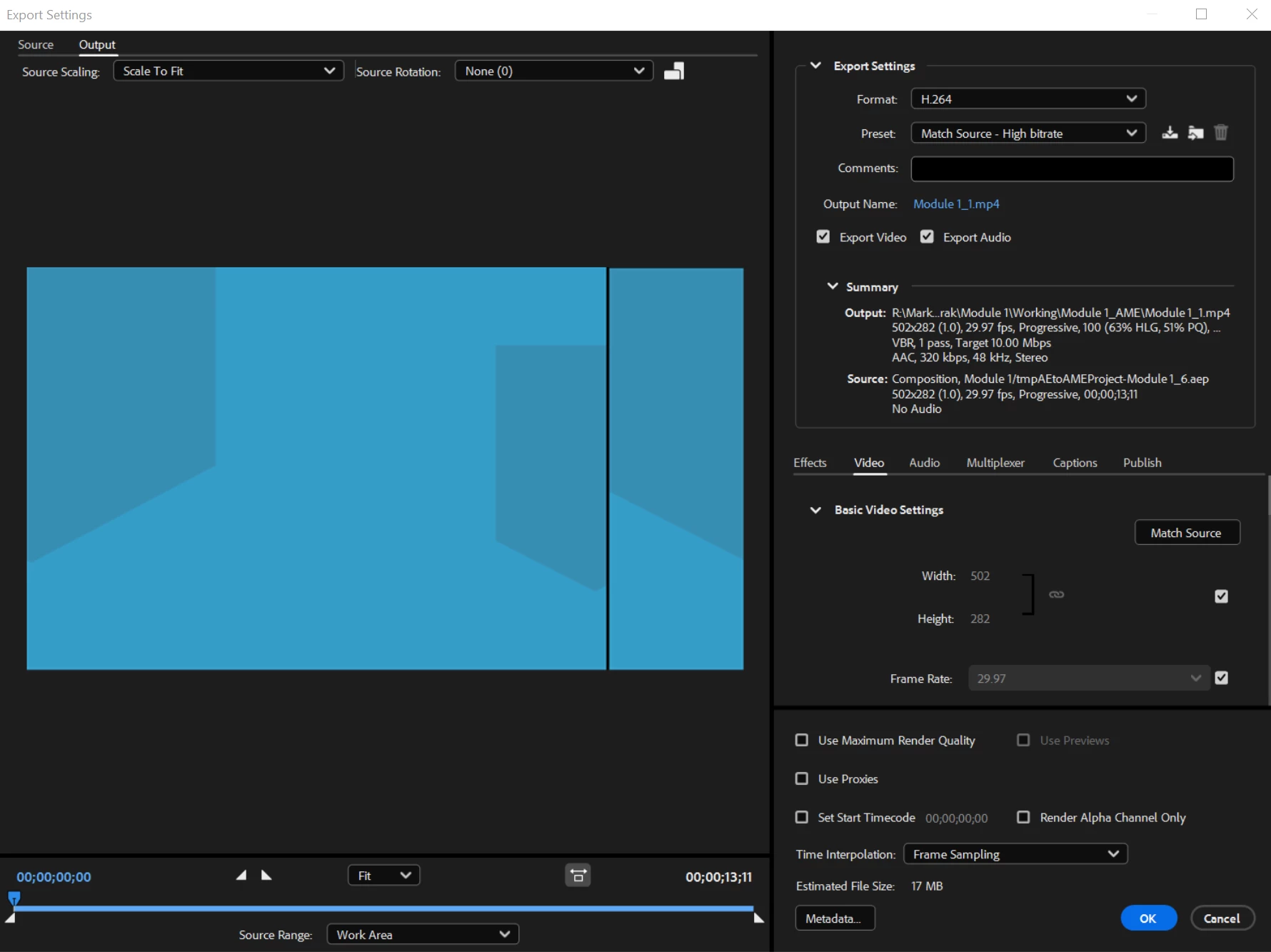
Not an answer; I just wanted to share that you're not alone--I'm experiencing the same problem as of a couple days ago. I'm experiencing this issue with every video I export, so my best guess is that it isn't something in the composition settings, but something about my Adobe Media Encoder settings?? Restarting, updating the program, clearing the cache, creating a new file--nothing has helped.

After Effects composition preview:


Once exported:


Here are my Export Settings:


Ishan Y
Community Manager
Community Manager
June 27, 2023

Hey Marlee5E25,

We're sorry for the poor experience. We're currently investigating a similar issue. Could you check again if you also see this issue by exporting through the After Effects render queue? Could you set the Performance option to Software Encoding in your Media Encoder export? That will help us better understand the issue. Please also check if you see the issue while exporting in Quicktime format. This will help us better understand the problem.


Thanks,

Ishan 

Participant
June 28, 2023

Hi Ishan,


Thanks for your reply. I was able to use the AE Render Queue to export my project correctly. However this problem is still occuring when I attempt to export any file type through Media Encoder, even if I switch the performance settings to software encoding. The issue is occuring when the file moves between After Effects and Media Encoder. I can see the file preview, and the shift is happening in the preview, no matter how the settings are changed.


Thanks!

Marlee

Ko.Maruyama
Community Expert
Community Expert
June 28, 2023

If you change your pixel aspect ratio correction settings, does it still appear?
Does your version of AME match your version of AE?