Participating Frequently
May 15, 2018
Answered

Exporter issue - 5 minute clip taking up to 20 hours to render

  • May 15, 2018
  • 3 replies
  • 1575 views

I hope I can get some clarity on what I'm doing incorrectly or if my computer is not performing optimally. I've been exporting fine until this latest project - which is almost identical to a previous project I rendered out which did not take as much time. It's a very simple project containing only one null/camera to scale Red Raw 5k footage on a solid background that has only a ramp and bulge effect applied to it accompanied with two lights. Both projects used Red Raw footage but this one is taking a god awful amount of time to render out. It is only a minute and a half longer so I don't understand what the problem is.

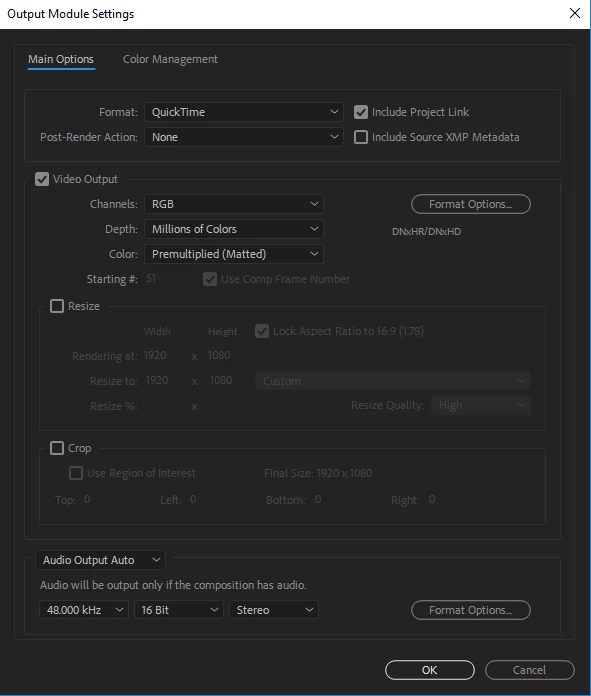
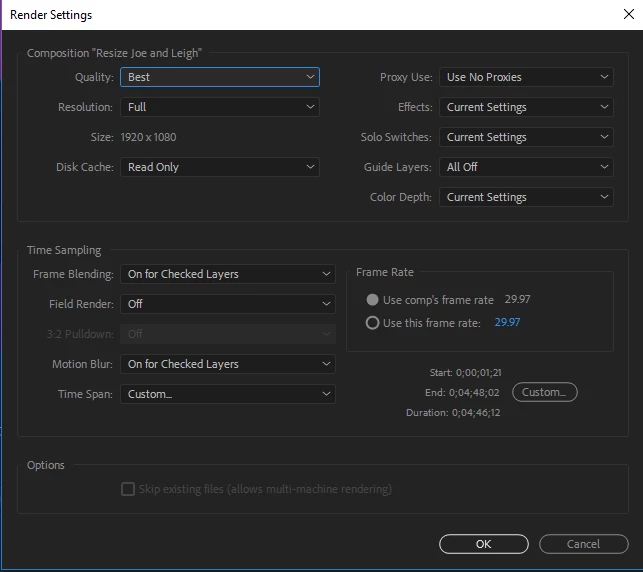
Here is all of my current adobe, computer and rendering settings/preferences.

AE Version 15.1.1 (Build 12)

This is the Preference file for AE:

Adobe After Effects 15.1 Prefs.txt - Google Drive 
And below is my computers system information.
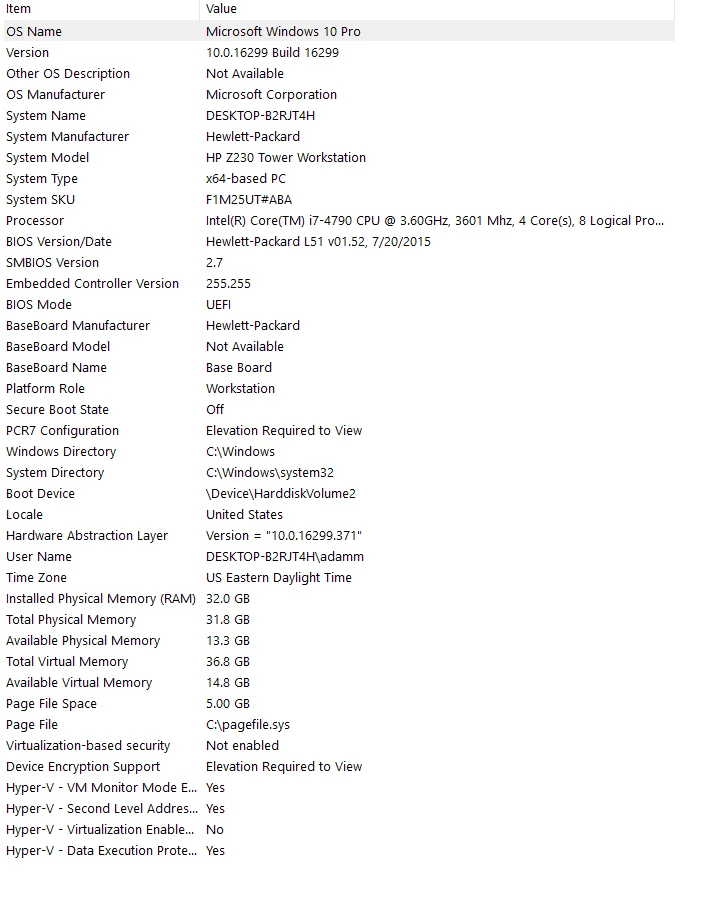
Let me know if any other information is needed and I will supply it.

This topic has been closed for replies.
Correct answer Rick Gerard

Rendering time depends entirely on what is going on in the comp. Small changes can make big differences in the render time. Temporal effects are the biggest render time killer. 3D layers with lights probably add the next biggest render hit. If you have plenty of cache available and you ran about the same number of full-resolution previews and whatever is going on in the comp is almost identical then the time per frame should be about the same. If the minute and a half longer part is more of the slowest part of your first render then it's entirely possible that the render times are completely normal.

FYI, I have a maximum render time limit of seven minutes per frame. Most comps are way less than that but some of my complex composites end up with hundreds of layers and can easily take that long to render. If it looks like I'm going over that limit then I simplify the project. I also always render Image Sequences if I think a render is going to take more than a few minutes. It's a lot easier to recover if there are problems, and converting an image sequence to a suitable production master video with audio renders very quickly.

One last point. A minute and a half is an awfully long comp. A minute and a half longer than another comp is even longer. I hope you are not editing in AE. More than 90% of my comps are a single shot under seven seconds because I hardly ever edit anything that has more than seven seconds between cuts and I always render only the frames I think I'm going to use in the final edit. I haven't got time to mess with frames that will never be used.

3 replies

Rick GerardCommunity ExpertCorrect answer
Community Expert
May 15, 2018

Rendering time depends entirely on what is going on in the comp. Small changes can make big differences in the render time. Temporal effects are the biggest render time killer. 3D layers with lights probably add the next biggest render hit. If you have plenty of cache available and you ran about the same number of full-resolution previews and whatever is going on in the comp is almost identical then the time per frame should be about the same. If the minute and a half longer part is more of the slowest part of your first render then it's entirely possible that the render times are completely normal.

FYI, I have a maximum render time limit of seven minutes per frame. Most comps are way less than that but some of my complex composites end up with hundreds of layers and can easily take that long to render. If it looks like I'm going over that limit then I simplify the project. I also always render Image Sequences if I think a render is going to take more than a few minutes. It's a lot easier to recover if there are problems, and converting an image sequence to a suitable production master video with audio renders very quickly.

One last point. A minute and a half is an awfully long comp. A minute and a half longer than another comp is even longer. I hope you are not editing in AE. More than 90% of my comps are a single shot under seven seconds because I hardly ever edit anything that has more than seven seconds between cuts and I always render only the frames I think I'm going to use in the final edit. I haven't got time to mess with frames that will never be used.

Participating Frequently
May 15, 2018

A lot of the videos we do are shot in 5k on green screen - keyed -  then using the camera to push in and out to avoid jump cuts. A lot of the time its set up like this because it's all corporate communication and we try to give the background some focal difference and adding other assets to give a parallax of sorts. I know that adding all that into the project is going to take a lot of time to render out but this is the first time it has exceeded at least a two hour rendering time. Most of the projects have no other assets so we are trying to be creative as possible to make these videos semi-interesting. I can't make 3D environments in Premiere. Maybe we aren't thinking through the process correctly of these communications.

TL;DR

They are just communications to departments hence the length and addition complexities added for creative purposes

---

Any ideas on what would work better in this situation?

magical_Skyline0D4A
Inspiring
May 15, 2018

Read this article so you can have clearer ideas and know how to export videos in any situation Basics of rendering and exporting in After Effects CC ... let us know if you can solve it or you still have doubts.

Mylenium
Legend
May 15, 2018

Turn off Hardware accelerated encoding.

Mylenium

Participating Frequently
May 15, 2018

Mylenium  wrote

Turn off Hardware accelerated encoding.

Mylenium

I tried this and the render time still climbed to 20 hours. It must be something else.

Community Expert
May 15, 2018

I would render an Image Sequence to keep things safe for any comp that required more than an hour of rendering. Long comps could be broken up into segments then cut back together in your NLE after they are rendered. For that workflow, the first thing I would do is cut up the shot into manageable sections.

I had about a 10-minute gimbal stabilized walk and talk last year that needed about 15 inserted graphics. Each graphic had to be attached to things the actor was walking past so the shot needed Camera Tracking. Each of those sections became a separate comp. The renders were edited in PPro to form what looked like a single shot. Not only did it solve the impossible task of camera tracking a 10-minute shot, but the total scene time requiring overlays was under 6 minutes so I didn't have to bother with tracking or rendering a DI from a little less than half the original footage.