


Participant
September 19, 2023
Answered

No budget short movie / Free motion graphics footage / GPS tracking red dots

  • September 19, 2023
  • 2 replies
  • 424 views

Hello,

I am writing to the Adobe Community as I am desperately looking for free footage of gps tracking :

Description of the footage : "On his screen, you can see a red dot moving on a map (fully digital or basic satellite view of a field/country area) where other red dots are moving more slowly".

The project is a short movie that I am working on and we would really love to have some materials (the footage) to strengthen the somewhat futuristic/technology-based dimension of the movie.

The context is a mad scientist that has marked/GPS tracked a dog, and this shot of the gps tracker would serve follow the dog as he escapes into the fields (while being GPS marked).

As 100 % of our very limited budget has been used, we are looking for free option with of course a huge thanks and credits gratification were you to help us find / created / obtain such footage.

Thank you so much in advance.

May the Adobe community be blessed.
Correct answer Rick Gerard

Your best option would be to use a screenshot from Google Earth or even Google Maps, animate the position of a shape layer ellipse over a path, and then add a simple expression to a text layer that would fake some GPS coordinates from the Position values of the motion path. You can easily get position data by using a shape layer path on a hidden or guide layer, selecting Content/Shape 1/Path 1, Path, and then using the Window/Create Nulls From Paths/Trace Path tool. Then Shift + Parent the Dot shape layer to the Null to get the null to follow the motion path.


The last step would be to convert the position value to GPS values using an expression on a text layer (make sure you use a monospaced font like Courier). If you add an Expression Control Slider to the text layer and name it "GPS Scale" this expression should get you close. All you need is a starting GPS Array:


strtGPS = [40.586001, -112.009114];
scl = 1 + effect("GPS Scale")("Slider")/100
ref = thisComp.layer("Trace Motion Path: Path 1 [1.1]");
refP = ref.position;
t = ref.effect("Trace Path")("Progress")/100;
pAdj = [thisComp.width * t, thisComp.height * t] + [thisComp.width, thisComp.height]; 
xM = refP[0] / pAdj[0];
yM = refP[1] / pAdj[1];
v = [xM * t * scl, yM * t * scl] + strtGPS;
lat = v[0].toFixed(6);
lon = v[1].toFixed(6);

value + "\r" + lat + "\r" + lon


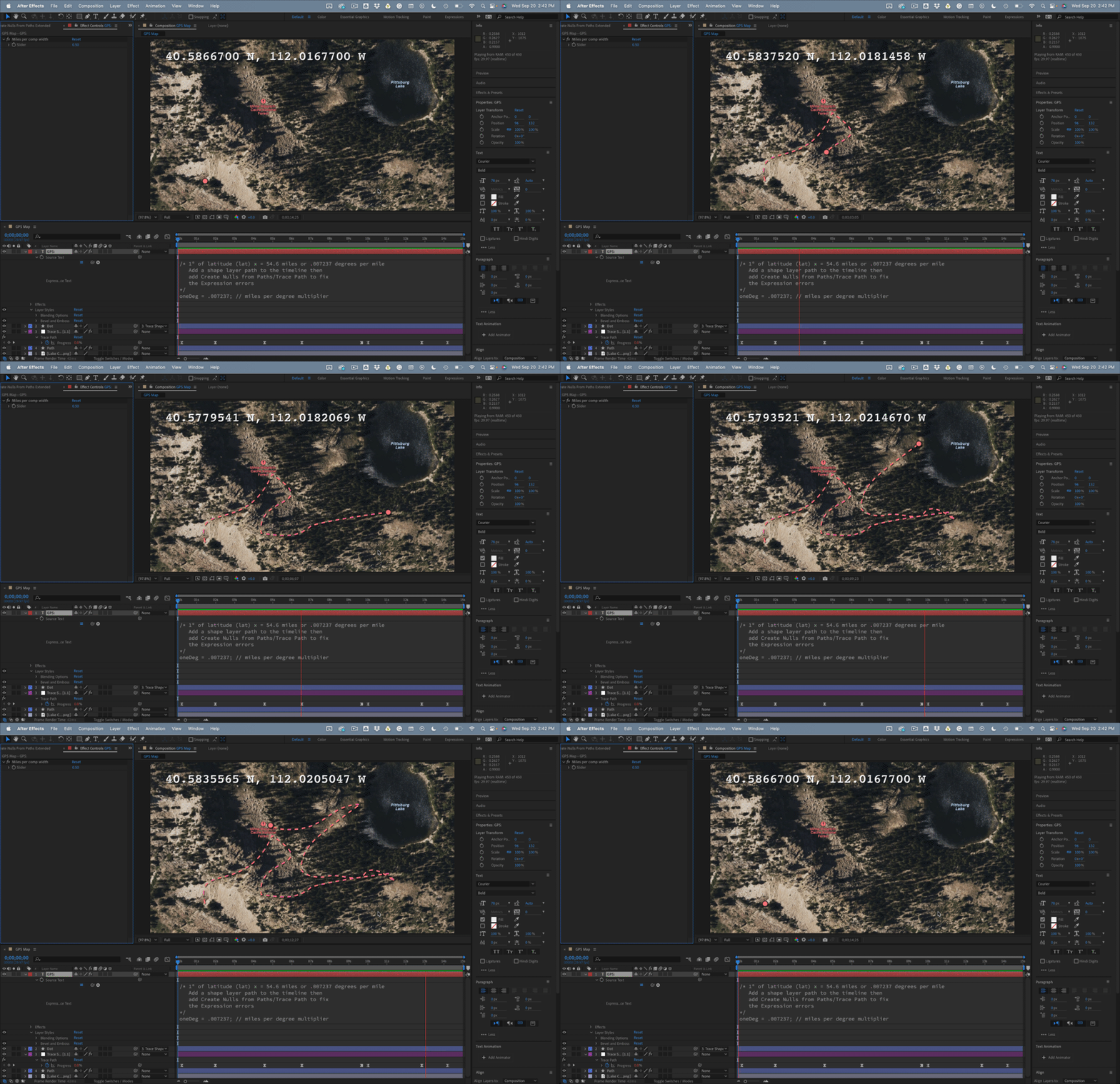
Combine that with a screenshot of a map and a shape layer for a path, and you can get something like this:

The expression is not 100% accurate if the starting and ending positions for the path are exactly the same. Maybe I'll fiddle with it a bit later.


You could add Trim Paths to the path layer, even dashes to give you a dotted line. All you have to do is tie Trim Paths End to the Progress property on the Trace null. 

Drop in your own map and edit the path, and the uploaded comp should give you a starting point.

2 replies

Participating Frequently
June 2, 2025

i also want

Rick GerardCommunity ExpertCorrect answer
Community Expert
September 20, 2023

Your best option would be to use a screenshot from Google Earth or even Google Maps, animate the position of a shape layer ellipse over a path, and then add a simple expression to a text layer that would fake some GPS coordinates from the Position values of the motion path. You can easily get position data by using a shape layer path on a hidden or guide layer, selecting Content/Shape 1/Path 1, Path, and then using the Window/Create Nulls From Paths/Trace Path tool. Then Shift + Parent the Dot shape layer to the Null to get the null to follow the motion path.


The last step would be to convert the position value to GPS values using an expression on a text layer (make sure you use a monospaced font like Courier). If you add an Expression Control Slider to the text layer and name it "GPS Scale" this expression should get you close. All you need is a starting GPS Array:


strtGPS = [40.586001, -112.009114];
scl = 1 + effect("GPS Scale")("Slider")/100
ref = thisComp.layer("Trace Motion Path: Path 1 [1.1]");
refP = ref.position;
t = ref.effect("Trace Path")("Progress")/100;
pAdj = [thisComp.width * t, thisComp.height * t] + [thisComp.width, thisComp.height]; 
xM = refP[0] / pAdj[0];
yM = refP[1] / pAdj[1];
v = [xM * t * scl, yM * t * scl] + strtGPS;
lat = v[0].toFixed(6);
lon = v[1].toFixed(6);

value + "\r" + lat + "\r" + lon


Combine that with a screenshot of a map and a shape layer for a path, and you can get something like this:

The expression is not 100% accurate if the starting and ending positions for the path are exactly the same. Maybe I'll fiddle with it a bit later.


You could add Trim Paths to the path layer, even dashes to give you a dotted line. All you have to do is tie Trim Paths End to the Progress property on the Trace null. 

Drop in your own map and edit the path, and the uploaded comp should give you a starting point.

Community Expert
September 20, 2023

Second Edit:

I revisited the project today and figured out how to take an initial GPS coordinate and come up with an accurate display of a tracked motion path. It took a couple of extra layers, one with an expression to measure the x position of a layer that is rotated to match the Latitude angle, then the Trace Path Null was added to the path, and the following expression was added to a Text layer to generate the animated coordinates. I'm not going to go into the details, but I'll share the file and the screenshot of the Map if anyone is interested in digging into the code. 

// Start GPS 40.92104° N, 112.51005° W
GPS = [40.92104, 112.51005];
latComp = thisComp.layer("Longetude Factor");
latAngl = latComp.toWorld(anchorPoint)[0]-1-thisComp.width/2;

// Route Route
rtePath = thisComp.layer("Trace Path: Path 1 [1.1]");
strtTime = rtePath.effect("Trace Path")("Progress").key(1).time;
strtPos = rtePath.position.valueAtTime(strtTime)-rtePath.position;
xPosFix = strtPos[0] / thisComp.height;
pathScale = effect("distanceScale")("Slider")/5/thisComp.height * thisComp.width;
newX = - xPosFix * pathScale/10;
yPosFix = strtPos[1] * latAngl / thisComp.width;
newY = yPosFix * pathScale;
gpsFinal = [GPS[0] - newX, GPS[1] - newY];

value + "\r"
+ gpsFinal[0].toFixed(5) + "° N, " + gpsFinal[1].toFixed(5) + "° W"

Here's the result: