
garyf61225094
Participating Frequently
June 3, 2021
Answered

Open and Edit my Mogrt files in Library

  • June 3, 2021
  • 3 replies
  • 4817 views

Hi Folks, 


I have a couple of mogrt video titles in my library and I'd like to edit one to add some additional controls to it. 


Problem is, I can't find the files anywhere. I was hoping I could do to the library panel in AFX, find the item I want to edit, then right click and hit 'edit', but this is only available on .ai files and images etc..


Its the same on the online CC file browser, you can only 'right-click -> download' image assets but not mogrt assets.


Am I missing something? 


Thanks in advance

Gary
This topic has been closed for replies.
Correct answer Justin Taylor-Hyper Brew

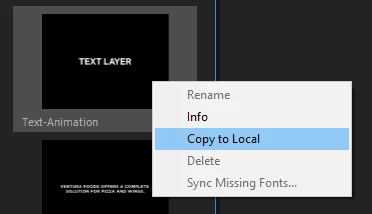
If it's only in your cloud library, then you need to copy it to disk first. In Premiere, you can do this by finding it in your Essential Graphics panel and selecting "Copy to Local", then it'll appear in the MOGRT folder:
C:\Users\[username]\AppData\Roaming\Adobe\Common\Motion Graphics Templates


3 replies

Community Expert
June 3, 2021

If you lost them then you did not pay attention to where your MOGRT files were saved. If you did not pick a specific location, creating a new MOGRT and saving it should take you to the right directory.


I save them in my Library folder in the CC folder so they can always be found. I also have a specific system for saving the AEP or the Premiere Pro project file I used to create the MOGRT.  If I have mogrts for specific clients I save them in folders dedicated to those clients. 

garyf61225094
Participating Frequently
June 3, 2021

I haven't lost them, the save dialog box has two options, save to local location or save to a library. I saved to a library, but I wish I had saved to a local location because once you save to a library it doesn't seem like you can access the base file in order to edit it. 


Justin Taylor-Hyper Brew
Community Expert
Community Expert
June 3, 2021

Check the motion graphics folder:

C:\Users\[username]\AppData\Roaming\Adobe\Common\Motion Graphics Templates

garyf61225094
Participating Frequently
June 4, 2021

Doesn't work I'm afraid, as I saved them to library rather than local folder. 

Justin Taylor-Hyper Brew
Community Expert
Community Expert
June 4, 2021

If it's only in your cloud library, then you need to copy it to disk first. In Premiere, you can do this by finding it in your Essential Graphics panel and selecting "Copy to Local", then it'll appear in the MOGRT folder:
C:\Users\[username]\AppData\Roaming\Adobe\Common\Motion Graphics Templates


Roland Kahlenberg
Legend
June 3, 2021
Very Advanced After Effects Training | Adaptive & Responsive Toolkits | Intelligent Design Assets (IDAs) | MoGraph Design System DEV