

PREVIEW pane all black. Many attempted remedies were unsuccessful.
NUTSHELL PROBLEM:
Preview screen is black.
AFTER EFFECTS VERSION:
After Effects 2020
18.41 (Build 4)
SYSTEM INFO:
<<Note: I am running After Effects in Windows. However, I’m running Windows on a ‘Bootcamped’ environment on an iMac computer. Not sure if this coud be the culprit. I have not had trouble with other video editing attempts.>>
Processor Intel(R) Core(TM) i5-4690 CPU @ 3.50GHz 3.50 GHz
Installed RAM 24.0 GB
Device ID 760176FE-0E76-4467-97E5-C877A598F7A0
Product ID 00330-80000-00000-AA402
System type 64-bit operating system, x64-based processor
Pen and touch Pen support
Windows Info
Edition Windows 10 Pro
Version 21H1
Installed on 6/13/2020
OS build 19043.1288
Experience Windows Feature Experience Pack 120.2212.3920.0
GPU Info
Draft 3D: Available
Texture Memory: 811.00 MB
Graphics Card
Vendor: ATI Technologies Inc.
Device: AMD RADEON R9 M290X
Version: 3.0.13476 Compatibility Profile Context 22.19.170.1536
Total Memory: 1.98 GB
Shader Model: 4.0 or later
PROBLEM DETAILS:
(>>To see a list of remedies already attempted, see “Remedies Already Attempted” below<<)
- I can successfully import an AI document into AE.
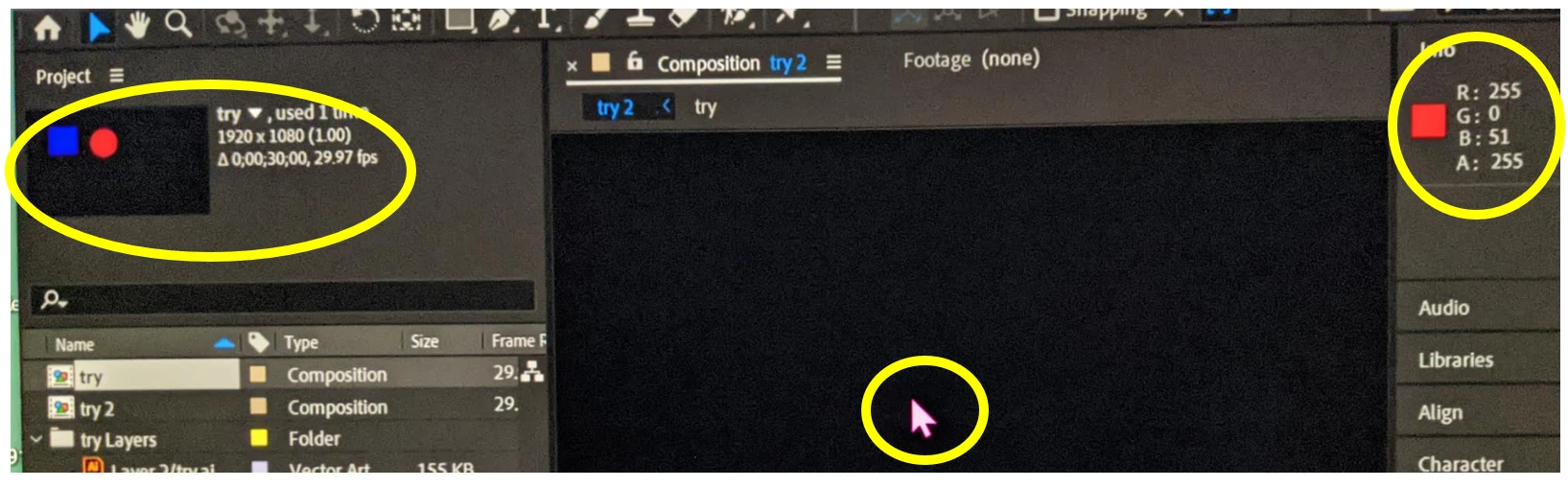
- In After Effects, the thumbnail shows properly in the PROJECT pane, but the PREVIEW pane is entirely black (see image).
- Here’s were things get strange… In After Effects, I unfurl the INFO panel. Then, I move my cursor over the PREVIEW pane to a location where I would expect to see the red circle (from my Illustrator file), the cursor registers the color red in the INFO pane. So, according to the INFO panel, the features from my Illustrator document are present in the PREVIEW panel, but they’re not showing up. Everything is just black (see image below).
REMEDIES ALREADY ATTEMPTED:
I attempted a very long list of fixes and reviewed many posts on the Adobe Support Community. Although I cannot recall every remedy I attempted, I’ll try to recite the most commonly cited fixes which did not work for me.
- Toggle capslock (apparently that’s actually a problem)
- In Illustrator, I ensured that: …
- had only one artboard
- had all features were on their own layer.
- had an RGB color palette
- saved as PDF compliant
- In After Effects, I ensured that…
- Imported AI as ‘Composition’ (sometimes as ‘Composition – Retain Layer Sizes) and ensured the checkbox called “Create Composition” was checked.
- All layers were visible (eyeball icon), and not hidden (not ‘shy’).
- Toggled the Transparency Grid
- Ensured that I wasn’t zoomed in too close / too far away
- Attempted to save the the Illustrator document in an older (legacy) version.
- Re-installed an older version of After Effects
- In the MS Windows System, I made recommended adjustments to various graphic settings (e.g., Mercury software only, etc.).
- In After Effects, I even created a “solid” feature, but it didn’t show up in the PREVIEW pane either. However, when I placed the cursor over the area where I created the 'solid,' it would register the color in the INFO pane.
- Installed an older version of After Effects.
 AdChoices