
Participant
October 22, 2018
Question

Problem Adobe Media Encoder CC 2019

  • October 22, 2018
  • 20 replies
  • 15280 views

Hello, I have a small problem with After effects CC 2019 and Adobe Media Encoder CC 2019.

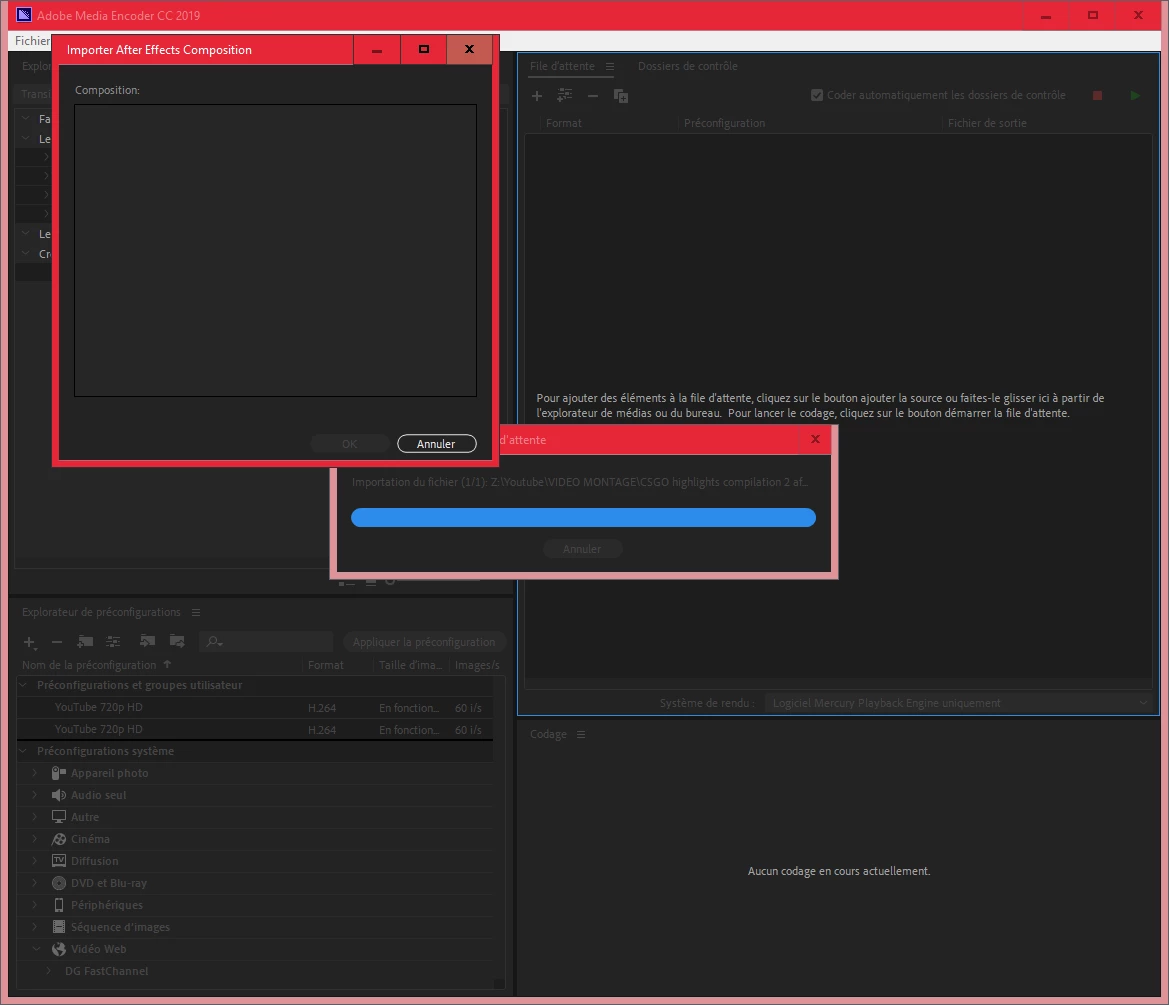
in after effects: "Composition --> Add to Adobe Media Encoder Queue", my project is not in the queue.

When I drag my.aep file (after effects) into Media Encoder there is nothing in "Composition"

I want to put my file in H.264.

Sorry, I speak French.

Please help me.
This topic has been closed for replies.

20 replies

Participant
September 16, 2020

Hi I have kind of similar problem but more extensive, MEdia Encoder doesnt get any file in. Per example, it doesnt react neither import any files from drag and drop, import via menu nor queue from Premiere Pro since yesterday.

Tryied already reboot, make it opens when sending a file for queue and also opening the program before everything. It simple doenst work.

aliciam73468081
Participant
July 17, 2019

Try to select one of the options below at the list on preset, maybe there's some problem using "match source - high bit rate" or some of the first five options at the preset list

curious_MermaidB82A
Participant
June 19, 2019

Guys and girls - this has been driving me nuts and I've just fixed it.

Go to window and on media encoder and ensure 'queue' is open. (Also you can press cmd +1).

It was queueing all along, but somehow it had been hidden.

Hope this helps!

Participant
June 19, 2019

I cannot thank you enough. The computer rage was real.

Participant
January 30, 2019

I fixed it by browsing a file in AME using the Media Browser pane and right clicking on the file and clicking "Import to queue" then after a few seconds my list of previous attempts all appeared in the list.

daniell8888
Participant
January 17, 2019

I am cooking with frustration because I had these and many other issues since I updated to 2019 back in November, it's been months now and still no fix from Adobe. My livelihood is based on this and frankly it's straight out unprofessional by Adobe to release unfinished products. I have been in so much trouble at work because of late deliveries when trying to work around bugs with Media Encoder.....

Remymndow
Participant
December 18, 2018

I had the same problem, got a temporary fix.

In your Adobe creative cloud application, you can revert your after effects and media encoder to one version before this one.

This solves the problem, and there's not a lot of difference in this version.

Participating Frequently
November 30, 2018

Hi Guys! I got my comp queued now in AME directly from AE. Maybe this works for some of you.

This can be done by queueing it in AE (normal Render Queue) and than hitting the 'Queue in AME' next to the 'Render'-button.

But still can't make the connection with the Dynamic Link server, what seems to be the main issue here..

monikar71475481
Participant
November 26, 2018

Same problem here. And even going back to CC2018 didn't help. Looks like AE is no longer connecting to Mediaencoder. If it would be possible to render MP4 / H264 from AE, like it used to be, I wouldn't care... huge disappointment.

Inspiring
November 23, 2018

How bad isn't this!?

Have the same problems. Broke my line of production and I've  wasted a lot of time trying to fix it (unpaid).

Adobe, please test your software before releasing it – this is not a small bug.

Gameboy_DK
Participant
November 15, 2018

I just spoke with Adobe tech support. They are aware of the issue and have their engineers working on it. The problem is hopefully corrected in an upcoming update. In the meantime they recommend rolling back to CC 2018. Guess we just have to be patience.