
Participant
April 16, 2022
Question

PTI (red current time indicator) is not moving

  • April 16, 2022
  • 2 replies
  • 814 views

Hello, I have a frustrating bug on the latest after effects version 22.3
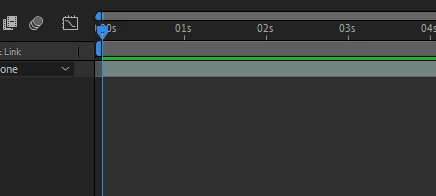
Everything works fine until I close the tab of after effects. When I return to the program, the time indicator becomes static and doesn't move during the video preview, the video is playing perfectly by the way but the frustrating part is that you can't see the PTI at all, (the red moving cursor disappears) so you have no idea what timestamp you're previewing. I need to go to Preferences and clear data and cache every time to make it work again, but this is very time-wasting!


These are my PC's specs:

Processor12th Gen Intel(R) Core(TM) i7-12700KF
Video CardNVIDIA GeForce RTX 3070
Operating SystemWindows 10
RAM32 GB


 GPU is working under the latest update.

2 replies

hellopaul4
Inspiring
January 26, 2024

I have the same PTI problem; I updated this old post (I'd reported this problem a few years ago, and it's back for me): https://community.adobe.com/t5/after-effects-discussions/pti-and-cti-not-moving-on-preview/m-p/12337289#M179377


I don't use the disk cache;  Ihave 128GB RAM and rarely have need for disk caching. I regularly clean out all my other (AE and PPro) caches (which live on a dedicated M.2 SSD) but none of this helps.

nishu_kush
Community Manager
Community Manager
April 19, 2022

Hi Layer237504157ceo,


Welcome to the community.

Please try changing the cache location or increasing the Maximum Disk Cache Size in the After Effects preferences.

Let us know if it helps.


Thanks,

Nishu

Participant
April 20, 2022

I tried both , but still not working!