Inspiring
August 20, 2019
解決済み

Time indicator/playhead won't go to last frame of timeline.

  • August 20, 2019
  • 返信数 2.
  • 8014 ビュー

Hi!

I was wondering why the time indicator/playhead won't go to the last frame of the timeline:
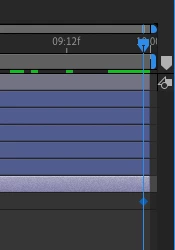
It always blocks one frame before the end...

Thanks!

    このトピックへの返信は締め切られました。
    解決に役立った回答 Dave Merchant

    The current time indicator (CTI) snaps to the start of each frame. Since there is nothing beyond the last frame in a composition, you cannot move to the rightmost edge.

    返信数 2

    Participant
    March 22, 2021

    So what should I do if my compostion is 15 seconds but its stopping at 14:23? How can I make it go until 15 seconds?

    Participant
    November 12, 2022

    I have this same problem - my compostion is 10 seconds but its stopping at 09:23.. and I need to export at 10 seconds but keeps exporting at 09.23, any answers much appreciated

    Community Expert
    November 12, 2022

    Set the composition length to 0:00:15:00 and the frame rate to 24. The last frame will start at 0:00:14:23 and end at 0:00:15:00. The Timeline length and the comp length are correct. The Current Time indicator is always at the start of the current frame. That's how it works in all video apps and media players. 


    In an NLE like Premiere Pro (or any NLE), if you trim the timeline or layer to the current position of the CTI (current time indicator), you will not see any video because the Cut is made at the start of the current frame. Editing a sequence is more intuitive because you can see what is starting at the current time instead of what is ending. 


    In a compositing or 3D app, the CUT is always at the start of the current frame so that you can see what is going on. This lets you know where you need to put the last element and see the position of everything in the current frame. If you want to set the position at the last frame, you need to see it. How frustrating would it be if you were working on a composite or motion graphic in AE, and you set an outpoint, and the composition panel went black? 


    If you want to move the CTI to the end of a timeline, just press Ctrl/Cmnd + right arrow, and you will see black. 

    Dave Merchant解決!
    Legend
    August 20, 2019

    The current time indicator (CTI) snaps to the start of each frame. Since there is nothing beyond the last frame in a composition, you cannot move to the rightmost edge.

    Inspiring
    August 20, 2019

    Wow! Thank you! I appreciate it!