Participant
December 10, 2013
Answered

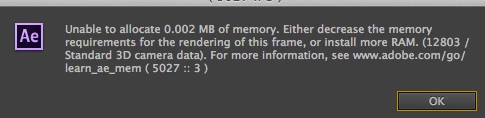
Unable to allocate 0.002MB of memory

  • December 10, 2013
  • 42 replies
  • 52911 views

I have an iMac 3.4GH 16GB of ram. I don't understand why I should suddenly be getting this message. I am using Mavericks 10.9. I use after effects CC the latest version.

    This topic has been closed for replies.
    Correct answer Todd_Kopriva

    The After Effects CC (12.2) update fixes this.

    Let us know how it works for you after you've installed the update.

    42 replies

    Known Participant
    May 9, 2020

    Hello! 

    I'm getting the same thing when running Auto Trace, tried everything. 

    Running latest AE CC on an iMac Pro 10 core, 64Gb RAM and Vega 56.

    Even tried just exporting the pre-comp as a Prores file, exactly the same problem.

    Please help!!

    Participant
    January 25, 2020


    any solutions on this error ? excluding the adding of RAM 🙂

    Participant
    January 9, 2019

    I'm using After Effects cc2018 and CC2019 on a iMac Pro with the same error, everytime when I save/close a project - See screenshots

    Would be great to get fast reply and a solution for this unbelievable error.

    Kaitlyn Pietras
    Participant
    June 3, 2017

    I am having the same issue.  Very frustrating.  Happens every couple minutes when I am trying to preview simple animations.  I filed a report.

    Known Participant
    May 24, 2017

    Jup same problem here, and my colleague as well by the way. We both run the latest version and are on fast new macs. Pops up 10 times a day. My colleague even needs to force quit half of the time. Really annoying! This problem is there since 2013, come on Adobe!

    Kevin J. Monahan Jr.
    Legend
    May 30, 2017

    Hello Siebe,

    Very sorry for this issue. There is a strong possibility that we will have fix in place here for the upcoming release, however. With that said, if you have time, please file a bug here. We'd like to nail down any issues around this bug and your report would help us a lot.

    Thanks,
    Kevin

    Kevin Monahan - Sr. Community and Engagement Strategist – Adobe Pro Video and Audio
    bmonnone
    Participant
    May 9, 2017

    I get this error all the time too with Trapcode Psunami. Very frustrating. 2015 MBP, 16GB RAM, updated software.

    Kevin J. Monahan Jr.
    Legend
    May 30, 2017

    Hi BMonnone,

    Sorry about this. Can you file a bug? We are working hard on a fix and could use your input. Thanks!

    Kevin

    Kevin Monahan - Sr. Community and Engagement Strategist – Adobe Pro Video and Audio
    bmonnone
    Participant
    May 31, 2017

    Done. Thank you!

    Participant
    December 21, 2016

    no it doesn't fix it

    cam3LD
    Known Participant
    December 21, 2016

    No I have 10GB reserved for applications and 118GB for CC.

    cam3LD
    Known Participant
    December 11, 2016

    I ended up changing my memory to 128GB for another project and the problem went away. Now I'm not sure which comp it was exactly. If it pops up again I'll include project settings with the error.

    Roei Tzoref
    Legend
    December 11, 2016

    ok glad you solved it for now. do you mean you reserved 0gb for other applications  in the memory settings?

    Inspiring
    December 10, 2016

    I had this on CC 2017 14.0, Tried to export from CC 13.1 And the same error.

    Roei Tzoref
    Legend
    December 11, 2016

    I had this on CC 2017 14.0, Tried to export from CC 13.1 And the same error.

    hold on. is this pixel count necessary?

    although Ae is limited to 30k pixels, 20k is VERY big (especially if the width is also very big). unless your are in serious compositing to the very big screen projection that involves connecting about many projectors to be able to play this back at full quality, then this is a workflow mistake and not a software error that is draining your memory. care to tell us more about your setup? what have you got there?

    Inspiring
    December 11, 2016

    Comp settings: 1920X1080, 25 FPS, Exporting to H.264

    I'm making Earth zoom, 3D Astroids "E3D" Followed by 3D Earth "E3D", Light and Flare

    Earth zoom comes after Astroids, 3D Earth Parented to last image of Zoom
    Is that parented Earth the cause of the problem?