Participant
December 10, 2013
Answered

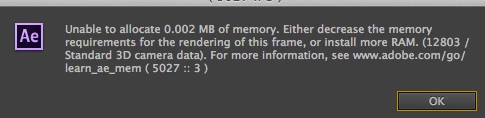
Unable to allocate 0.002MB of memory

  • December 10, 2013
  • 42 replies
  • 52911 views

I have an iMac 3.4GH 16GB of ram. I don't understand why I should suddenly be getting this message. I am using Mavericks 10.9. I use after effects CC the latest version.

    This topic has been closed for replies.
    Correct answer Todd_Kopriva

    The After Effects CC (12.2) update fixes this.

    Let us know how it works for you after you've installed the update.

    42 replies

    Participant
    October 12, 2016

    Same here.......

    JL FILM
    Participant
    September 29, 2016

    I just updated After Effects and all of a sudden I got that message too. Update hasn't come out yet but is there anything I can do? It's never happened to me until this new update.

    Thanks

    Szalam
    Community Expert
    Community Expert
    September 29, 2016

    NEWGENl8005491 wrote:

    I just updated After Effects and all of a sudden I got that message too. Update hasn't come out yet but is there anything I can do? It's never happened to me until this new update.

    Thanks

    What, exact, version of AE did you update to?

    Clear your cache and see if it behaves.

    Participating Frequently
    September 29, 2016

    Nope, it won't work.

    Cleared all caches, purged the memory, made restarts.

    Nothing helps.

    Please have a look at my issue above for more information about my current System and version of AE.

    Many thanks!

    LibertyTalk.fm
    Participant
    June 29, 2016

    Update: Fixed via update to 13.8.0.144 on 06/29/2016 @ 3:29pm ET

    Restarted the machine and the CC app indicated an additional update to AE, seems to have resolved both memory leak error and failed playback of audio.

    ORIGINAL POST

    Newest update, same issue....

    OS:               Windows 7 SP1 x64

    Processor:    i7-2600L @ 3.4 Ghz

    Memory:       24 GB

    Video Card:  GeForce GT 610

    • Client requested a re-edit from a composition created earlier in January 2016. (same machine -no audio/memory issues in Jan.)
    • First issue, no audio during preview in full composition, but audio plays fine on its own layer????
    • Manually upgraded this morning to 13.7.6.1 via the CC app in task bar.
    • Still no audio in full composition, and now receiving "unable to allocate 0.002MB of memory." during preview.
    • Click "OK" and the error immediately reappears, thus requiring a forced exit out of After Effects.
    Participating Frequently
    September 12, 2016

    Got still the same issue!

    It's getting annoying!

    After Effects tells me that is uses all of my 32 GB of Memory.

    I already have an external Harddrive wich I use for the Disk cache with 93 GB allocated.

    And in Fact AE uses not even 9GB of RAM!

    PLEASE fix this issue!!!!

    I'm not using third Party Plugins.

    Just Rotoscoping some Footage.

    Every five minutes After Effects is crashing!

    OS:               OSX Yosemite 10.10.5

    Processor:    3.5 GHz Intel Core i7

    Memory:       32 GB

    Video Card:   GeForce GTX 780

    marcop43612916
    Participant
    June 14, 2016

    I was in a seperate chat before and I was told to update from the buggy 13.5 to 13.7.2 and I just did but still nothing is working please someone help!!!

    marcop43612916
    Participant
    June 14, 2016

    It's also not only doing 0.002mb its doing 0.00mb and 0.137mb

    tonycomley
    Known Participant
    April 26, 2016

    Szalam:

    Dude. the first piece of advice you should lead with is; "Install CC2014". It takes a lot of time to re-encode all footage to a more AE friendly codec, especially if it's not guaranteed to solve the problem.

    CC2015 is so buggy that it really shouldn't be released and sold yet. I work freelance and I've been to several studios who have major issues with 2015. One lost a day's work re-installing 2014 and another struggles on with it despite preview not working properly and the same memory issue as this thread.

    Adobe is reluctant to draw attention to this, which is understandable from a shareholder's point of view, but is less acceptable from the point of view of a paying customer.

    Szalam
    Community Expert
    Community Expert
    April 26, 2016

    tonycomley wrote:

    Szalam:

    Dude. the first piece of advice you should lead with is; "Install CC2014".

    I did! Well, not at first (since this thread began in 2013), but my first post in this thread after CC 2015 was released was to use CC 2014.

    tonycomley
    Known Participant
    April 26, 2016

    Szalam and markusf:

    The memory issue is a known problem that's not at all specific to H.264. My project had no H.264 content and was mostly png sequences.

    It's very typical of Adobe to blame something else (In this case another company's codec). I had a string of defensive claims from tech support that I was able to prove wrong (they blamed everything from my RAM to the amount of pre-comps in the project). Eventually they owned up to the fact that CC2015 is very buggy and refunded me three months subscription.

    Szalam
    Community Expert
    Community Expert
    April 26, 2016

    I know that it's not always H.264, but sometimes it is. I've seen this solve the problem Markus was experiencing more times than not.

    But yes, CC 2015 has some issues. That's why I have both CC 2014 and CC 2015 installed on my machine (although, I've had pretty good success with CC 2015).

    For those who aren't aware, AE CC 2015 is the first step in a major re-architecture, separating the renderer from the UI for the first time in AE's 20+ year history. This is a big job and it's clearly still in progress. It's a necessary step for improving After Effects performance, but it's taking a while (and multiple versions) for them to get through it. So, during this time of transition as they're introducing elements of the new architecture, sometimes it may be easier to use the older version to get a job done. Your CC subscription includes versions CS6, CC, CC 2014, CC 2015, and whatever version comes next.

    Participant
    April 25, 2016

    I am having this problem, updated to the latest version of AE CC 2015 as of April 25, 2016 while trying to stabilize video.

    Szalam
    Community Expert
    Community Expert
    April 25, 2016

    r91947762 wrote:

    I am having this problem, updated to the latest version of AE CC 2015 as of April 25, 2016 while trying to stabilize video.

    Double-check that you are running AE version 13.7.1 or later.

    Is the video you are trying to stabilize an MP4 (or other flavor of H.264) by chance?

    markusf98621889
    Participant
    April 26, 2016

    In my case, yes.

    markusf98621889
    Participant
    April 1, 2016

    Just to add to this which appears to be rendering AE almost unusable - it does occur on Windows (Win 7 in this case), too!

    ActionCamStudio
    Inspiring
    March 27, 2016

    Aaaarrrghhhhh!!! Why are you updating to 2015 sw? Stay with 2014!!!! Which kind of new functionalities are you using from 2015 versions??? New preview is totally useless, rendering times are sooooooo slow, new panels are totally useless, no multiprocessing is totally useless,new face tracking is totally useless (Mocha is the TOP sw to do roto work or tracking), none of the old bugs have been removed (copy/paste in time multiple keyframes from different layers, mask paths on large 3D layers, expressions errors from different AE language versions and so on...).

    Stay with 2014 if you're in a production environment. Sorry for the bad english.

    tonycomley
    Known Participant
    March 30, 2016

    Yeah, I learned the hard way. Dialled it back to 2014 now and seems to work fine now. Adobe have been profoundly unhelpful. They just blamed my computer, then when proved wrong they blamed the project. They're so defensive. It's driving me mad.

    Participant
    February 27, 2016

    I'm having this exact same problem.

    It appears, for me, that a memory leak occurs when I use Element 3D.  See the attached images takem within minutes of each other.  The first is when I first started.  The second is after I created a solid layer and applied Element 3D using a Element 3D stock model.

    chrisw44157881
    Inspiring
    February 28, 2016

    hold down Shift and go to the Preferences menu and select secret

    purge every x frames