Participant
December 10, 2013
Answered

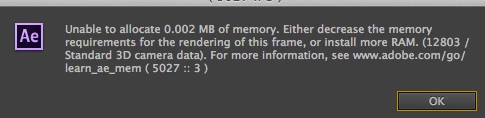
Unable to allocate 0.002MB of memory

  • December 10, 2013
  • 42 replies
  • 52911 views

I have an iMac 3.4GH 16GB of ram. I don't understand why I should suddenly be getting this message. I am using Mavericks 10.9. I use after effects CC the latest version.

    This topic has been closed for replies.
    Correct answer Todd_Kopriva

    The After Effects CC (12.2) update fixes this.

    Let us know how it works for you after you've installed the update.

    42 replies

    davet63466607
    Participant
    February 25, 2016

    I am having this issue now also not just on my GFX machine but when i try to open it on any other machine.  I am on the newest CC 2015 AE version.  I have tried it on 4 systems and get about 5-10 minutes of work done before I get the error.

    Participant
    February 24, 2016

    Yep, I'm now unfortunately getting this message, which won't go away without force quitting AE. I'm trying to stabilize a film. Added an external drive (2tb) to do the processing but still no joy.

    Only did the Adobe update 2 days ago.....

    Participant
    February 20, 2016

    Same issue here... seems that adobe doesn't mind that people cannot get an answer to this issue :/

    Szalam
    Community Expert
    Community Expert
    February 20, 2016

    trentw39109937 wrote:

    Same issue here... seems that adobe doesn't mind that people cannot get an answer to this issue :/

    This error is certainly frustrating, but this forum isn't a way to contact Adobe. You're just talking to your fellow users here. (Sometimes Adobe staff pop in, but it's not common.)

    If you want to hear from Adobe, you should contact Adobe support.

    You could also file a bug report (with as much info as possible). That goes straight to the AE developers. They usually don't communicate back to you on bug reports, but it does really help them get bugs fixed.

    Participant
    February 18, 2016

    I'm running into the same problem but I am trying to use the Liquify Effect.  I just updated AE to version 13.7.0.124 and it's crashing every time.  What can I do?

    Inspiring
    February 18, 2016

    Step back to an older version. 13.6 is stable. In future I'd recommend waiting several months before upgrading.

    Do you have Trapcode installed? A camera in the comp? Any effects that make use of 3D? 3D and effects that use 3D seem to be the root cause a lot, but not all, of the time.

    Participant
    February 19, 2016

    I do have Trapcode installed.  Should I update it or uninstall it?  There's no 3D layers or 3D effects.  I will try and restore a previous version of AE and see if that works.

    fredfx1957
    Known Participant
    February 12, 2016

    I'm having the same problem. This is pretty ridiculous.  It doesn't happen right away, which makes me think there's a memory leak of some sort. Also, it's the first time I'm using a LUT file. Never had this problem prior to that.


    I'm on AE 13.7

    Mac OSX 10.10.5

    This seems to be an ongoing problem. Never had this problem with CC2014.

    Mac Pro (2019) 3.2 GHz 16-Core Intel Xeon W 96 GB 2933 MHz DDR4 AMD Radeon Pro Vega II 32 GB
    Participating Frequently
    February 13, 2016

    ‌I am running into this same problem-doing my first time lapse ever with over 130,000 frames-each one a 4K resolution JPEG that was taken over the course of a 10 month construction project. Maybe I am being too optimistic with the capabilities of my system and/or After Effects, (v13.7.xx), but I figured having the 5K iMac with 64gb of RAM would help. Any recommendations for a first-time timelapse photogapher trying to piece this b@$ch together??

    Inspiring
    February 13, 2016

    I think the above problems are an ongoing memory leak problem. AE being a c++ program the developers need to reclaim memory after they are done with it or it can continue to eat up more and more of your ram (thus a memory leak). The developers have to go back through the program and laboriously try and figure out what bit of memory they forgot to delete. The posters here all seem to revolve around Mac AE using some sort of 3D feature (ie. cameras, Trapcode plugins etc.)

    In your case Aaron I'm not sure that that is the problem. If you have a memory leak when you go to the menu After Effects CC--> About After Effects you're percentage of RAM will start to sky rocket eventually eating up all your RAM even though you aren't doing anything.

    You're problem just sounds like too much data. Have you looked into doing a proxy workflow? Then AE will only access the 4k files when it comes to rendering the main sequence.

    TripleNipple
    Participant
    January 17, 2016

    I´m also having this problem now... Havn´t had it before but since i updated to the latest version of AE CC 2015 it started to come up frequently! Version 13.6.1. Annoying as hell! I also updated to El Capitan so maybe it could be that to?

    Participant
    January 23, 2016

    I am having the same problem

    FrankPostProd
    Participant
    January 6, 2016

    Update since my last post in November!

    Fist off, I've been plagued by this memory issue since updating to CC 2015 on my Mac. I would get random memory error while working on my comps. I notified Adobe and they said that the latest update would fix it. Well it did not, I think it actually made things worst now because it's saying that "AE cannot allocate 0.0010 MB of Ram" or 0.002 MB, and even 0.000 MB of Ram now; at which point I would have to Force Quit the App because the message would cascade indefinitely.

    More recently, during renders, the memory usage would go up to 100% before crashing and giving the same message. I assume that this new behavior is do to the length of the comp I'm working on; used to be about 10sec per comp, but now I am working on comps that are more then 1 min long.

    Some time I'm working in AE without a fuss, and other time I literally cannot get any work done at all. The error can occur once a day or so, not so bad. But sometime it popping up every 2 min!

    I also did some experimentation to find the cause of this issue, or at least some hint has to what is going on:

    -My primary workstation is an iMac 27" late 2013 i7-3.5Ghz, 24GB Ram, 4GB GTX780m, OSX 10.10; and my backup workstation is a custom PC from 2009; i7-940 2.93Ghz, 12 GB Ram, 3GB GTX660, Win 7 OS.

    -Both computer use the latest Adobe CC 2015, have the same plugins installed, all plugins on both sides are on the same version.

    -This week I've been working on a 3min long keying comp (pre-edited sequence rendered out has 1 clip in 1080p ProRes422 - 29.97fps). I was in a rush to get the sequence done asap and half way through the project the memory issue started popping up every 2 minutes or so. I tried purging memory in AE, still happened. Tried purging memory in OS, still happened. I managed to complete the chroma key by working "offline" with "Caps Lock" enable and switching live preview render on and off. Really not an ideal solution but it did the trick.

    -Started to render out my comp and that where the memory would start to build up to 100% and crash the App. Not even a quarter of the way thru the render. I was fed-up so I consolidated the project and switched to my PC. Started AE, setup the render to .mov with Animation codec since no ProRes in PC, hit render and 5h later the job was done with an average of 25% out of 12GB ram used! This is insane! I then tried to render to .mov with Animation on my iMac, memory still happen.

    -Even tried to play with the Secret menu option, no change.

    I usually work with heavy 3D comp inside AE with Element 3D and I can understand that at some point AE can't take it anymore since it's sort of a "hack" of the App that normally can't handle true 3D. But this time it was just a simple chroma key job. I only used three simple 3rd party plugins; Neat video's "Reduce Noise v4" and RedGiant's "Matte Feather Sharp" and "Light Wrap". I used "KeyLight+KeyCleaner+AdvSpillSupp" presets for keyer.

    I have to say that I did found a work around that will probably not work for every one. I was desperate to get this issue out of the way so I started scrubbing thru some old Time-Machine backup, found 1 from late 2014 with AE CC 2014 installed. I simply copied the AE sub-folder from the backup Application folder to my computer main Application folder, updated the plugins for AE CC 2014.... and voila!!! I was able to open my AE CC 2015 project in AE CC 2014, make some changes to it and render it without any memory issue!

    My 2 cents in all this, I think Adobe really dropped the ball on this one. After Effects CC 2015 for Mac is the least stable App Adobe came up with ever, and I've been working in the Adobe verse since 2001 (AE v5). Is it solely Adobe's fault, maybe not. Apple probably bare part of the blame for making new OS every year for the past 3-4 years which can be hard to keep up with on the "dev" side. I can image they're spending more time on maintenance then actual development. But denying the existence of such a clear and pretty bad issue serve no one. Stop arguing and get to work Adobe!... Please.

    tonycomley
    Known Participant
    March 26, 2016

    Not Apple's fault. I have exactly this problem on Windows 10. Same solution as well. Works fine in CC2014. So far Adobe support have been defensive and dismissive. They insist I don't have enough ram (I have 8gb) but AE only uses 2.1 (out of an available 6.4) for the particular project that's causing the error message.

    Known Participant
    November 24, 2015

    Hi there,

    This problem came back with the new update


    I'm working on an animation with imported multipass from c4d.

    I'm working with 16mb Adobe sRGB - linear color space.

    It was pretty heavy but even when I work with proxys with lower res mp4 it happens the same.


    Any suggestions?


    Thanks in advance.

    Joao Monteiro


    ----

    www.joaomonteiro.tv

    Known Participant
    November 24, 2015

    p.s - Sorry can't edit my previous post. I have the latest update installed (13.5.1.48)

    Szalam
    Community Expert
    Community Expert
    December 1, 2015

    mondi studio wrote:

    p.s - Sorry can't edit my previous post. I have the latest update installed (13.5.1.48)

    Try it with the latest update that came out last night: 13.6

    FrankPostProd
    Participant
    November 22, 2015

    Had this issue on AE CC 2014 (was eventually fixed) and 2015 (still happening) on my iMac 2013 - i7 3.5Ghz / 24GB / GTX780 4GB / Fusion drive running Maverick and Yosemite (up to date).

    I worked for several Production Studios over the past 2 years and they also encountered this problem at one point or another.

    I would be interested to know if anyone in the Windows verse encountered this issue? Because all the discussions and threads I read, everyone is on Mac.

    It's getting frustrating to randomly loose work. And it's not even heavy duty stuff, just animating a simple mask on ProRes HD footage make it happen (and i've got nothing else running).

    So if it is not something that plague the Windows version, i'm seriously thinking of switching back to the dark side.

    FrankT.

    Participating Frequently
    November 20, 2015

    I've been getting this error for awhile now. I'm on a Late 2013 Mac with 64GB of RAM, two AMD FirePro D700 graphics cards, and a 500GB Flash drive for cache purposes. This error happens a lot when I use the Primatte Keyer, and I can't render long compositions (10 minutes plus) without the render engine crashing (I have to restart the software and pick up the rendering where it crashed).

    I need the functionality of CC 2015, so I can't revert to 2014. Please fix this!!!

    Jerry MacKay

    Littleflick Pictures