Participating Frequently
May 11, 2014
Answered

WHY AFTER EFFECTS STILLS SO SLOW IN THE NEW MAC PRO?

  • May 11, 2014
  • 51 replies
  • 119683 views

I have the new mac pro with this settings:

3 GHz 8-Core Intel Xeon E5

64 GB 1867 MHz DDR3 ECC

AMD FirePro D700 6144 MB

Software OS X 10.9.2

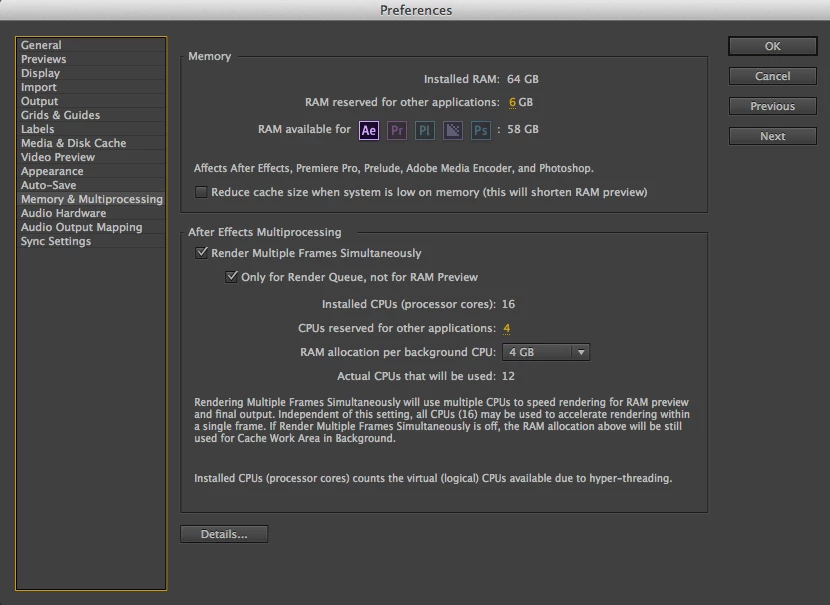
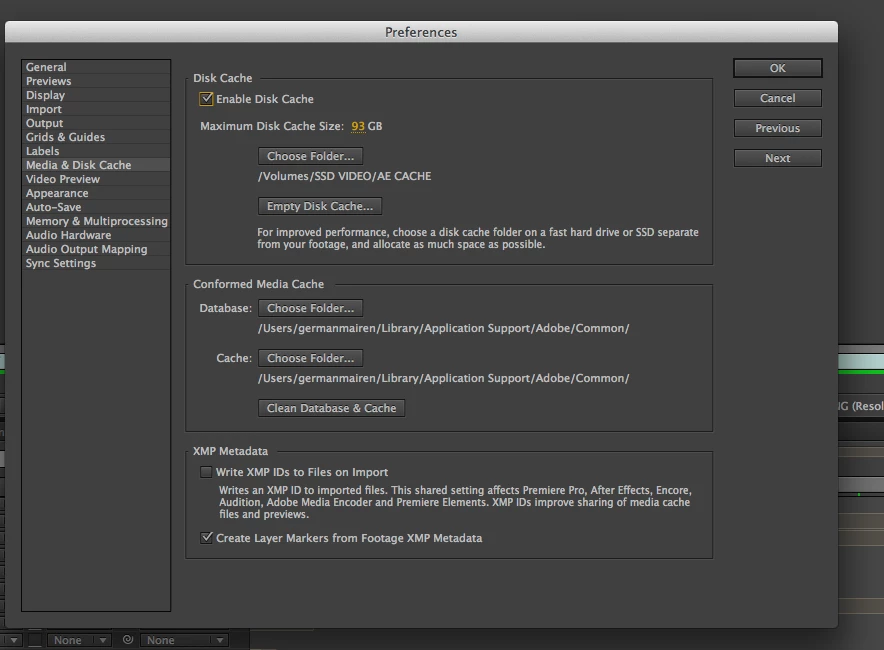
And the AE performs slower than in my old mac pro. I have set the preferences as seen on all those tutorials on this site, I have an SSD external disc for cache files, memory and multiprocessing settings correctly...and previews are very very slow, and I can not even render a single comp without waiting 10 minutes. I am very disappointed and frustrated with this situation...

Am I missing something?

    Correct answer Andrew Yoole

    Without wanting to sound condescending, because I genuinely understand your complaints, I must point out here that some of the onus here belongs to the hardware purchaser.  How carefully did you assess the purchase of the Mac Pro?

    In my own facility, we were torn about which hardware to purchase this year.  After lots of research of available benchmarks, and assessment of what hardware After Effects relies on, we decided not to buy Mac Pros just yet, and bought a bunch of fully specced out iMacs for now.

    The thinking for this:

    • All the benchmarks we found showed AE performance didn't get a significant enough bump to justify Mac Pro expense.  If you're a FCPX editor, Mac Pros are a no brainer -  FCPX is optimised for this hardware.  But AE is not.

    • A significant part of a Mac Pro's cost is in GPUs, which are irrelevant to our main AE use.

    • The cost of one reasonably specced Mac Pro workstation was about equal to two fully specced iMac 27" i7 workstations, with 1TB SSDs and 32GB of RAM.

    • Any new generation tech is fraught with danger.  We decided the 2nd Generation Mac Pro will be a much safer bet, especially since they are manufacturing in an entirely new facility, and the machine itself is a major new design.

    51 replies

    RealSting
    Participating Frequently
    January 9, 2016

    Andrew: In principle I would agree but I don't think the purchase of a MacPro is the argument here. With ALL major software developers the manufacturer has a responsibility (to a lesser or greater extent) to the customer to keep the software up-to-date. Many if not all of the plug-in manufacturers for FCPX updated and some redesigned their software to take full advantage of the the new MacPro. It was a no briner to them because FCP already had a vast following (over 1,000,000), and FCPX and the new MacPro would be taking on much of that. This was also the case with the redesign of the audio/graphics layer(s) (metal) in El Capitan. - So if they can do it, WHY CANT ADOBE?!

    Yes.. Adobe Premiere users are more likely to be using PC's !!

    RealSting
    Participating Frequently
    June 24, 2016

    After much deliberation I have decided NOT to renew my CC subscription. As a FCPX Editor After FX is an unacceptable bottle-neck to my workflow: no real time playback is the biggest issue and the horribly long render times as a result of no graphics card support - Adobe obviously have no interest in the capabilities of the Late 2013 MacPro so consequently I have lost interest in Adobe. There are other more capable (non-subscription based) solutions out there.

    Thank you to all those previous that helped where they could.

    bye!

    mgk132
    Participant
    December 23, 2015

    I found this very helpful.  I have a brand new Laptop with all the bells and whistles - Fastest i7 processor, 32GB Ram, All SSD internal drives (5TB total in 2 stipe sets), GeForce 980 (Desktop Equivalent) - and my Render and Previews were horrible. 

    I looked at all the basic performance settings and had no obvious issues.  Didn't realize some features were grayed-out that I needed, because I expected to have all the options available to me.

    I knew performance needed to be better - because It hadn't been this bad since before they instituted Ram Previews (remember those days!).

    So I searched more and found this Video - How to Enable GPU Acceleration (CUDA) in Premiere Pro or After Effects - YouTube

    And found out that my newer Graphics Card was not listed in AFX device listings (it was recognized in Premiere though!).  I made the suggested Change and now my ram previews are performing as expected.  Not sure if Rendering will be better.  But I'm usually sleeping during those anyway... its the work-a-day preview that I needed to be responsive.

    Anyway hope this helps some of you.

    Participant
    December 30, 2015

    Can you do this with new new Mac Pro (which does not a CUDA card)?

    Dave_LaRonde
    Inspiring
    December 30, 2015

    You can't.  No CUDA?  No hack.

    Herbert2001
    Inspiring
    November 30, 2015

    Yes, Fusion is great. Combine with any 3d application, and learn to fly!

    And don't forget that BlackMagic Davinci Resolve is also free for up to 4k editing and colour grading (it is more or less the industry standard).

    Participant
    December 1, 2015

    New Upadte has been released. Does it solve our Problem? Could anyone please do a test for us?

    Participating Frequently
    December 2, 2015

    I'm continuing a benchmarking project I already had going between a Macbook Pro, a 2009 Mac Pro, a 2013 Mac Pro and a z820. I'm comparing CC 2014 with and without Multiprocessing, the previous CC 2015 and the one released yesterday. I'll report back soon.

    Participating Frequently
    November 29, 2015

    Darn funny part of all male-centred tech forums; watching how quickly ego-fights pulls a topic away from the original question! 

    BIG thanks to whoever the person was who mentioned BM Fusion! I had no idea it was out there.

    It's beautiful and the learning curve is shallow and so we'll be using it this week with AE (2014 of course!) to spit out some shiny, cheesy TV Idents. 


    I know you professionals are already doing this but I always advise keeping the last three devs of every application for a year.

    Going back to AE2014 has been easy for us here.

    I'm sure Adobe will eventually figure out how to leverage the new Mac Pro architecture. In the meantime, there's always a workaround. 
    Or trade that Mac Pro back in on a far faster HP-Z Series: PC's aren't a bad option to consider and it might be a relief to get off this expensive subscription to Apple machines. 

    Pshkkrrrrkkk*** out.  

    Known Participant
    November 29, 2015

    It was me that advised switching to Fusion, I did advise this back in the summer as a fix to this ongoing inability to get AE to work on a Mac. Seems to have been lost in the constant stream of waffle and some users/Adobe to even admit there is an issue!

    Wait until the full version comes out... There will be no need to use AE for anything else than vector animations! Although I have advised Blackmagic to add layered illustrator file support too.

    dissidently
    Inspiring
    November 29, 2015

    Thank you, from the bottom of my cold, furious heart. THANK YOU!!!

    Fusion has been a complete revelation. Like @Bird, I had no idea about Fusion on the Mac. It's a revelation. Though I disagree about the learning curve. It takes a deep dive into nodal thinking to begin understanding its paradigms and processes. I'm struggling, and often baffled, but each new insight brings intense speed in operation and function, then joy.

    I gave up on vector work in AE the moment I tried it. Straight back to doing it in 3D apps. I was under (for a brief while) the misconception that AE might be good at vector animation. It's not. It's more infuriating than Illustrator, which is saying something.

    As to the Mac Pro... yeah. Apple and Adobe have both gone off their original tracks. The loss of Jobs was probably felt strongest in gimping of the iPads and the Mac Pro. There must be some very weird personal issues between the CEOs of Apple and Nvidia to cause the lockdown to ATI/AMD GPUs.

    Participating Frequently
    November 23, 2015

    I'm sure you guys saw that poll that opened up asking how likely you were to recommend AE to a friend when you opened it the other day. I would love to see the results on that one. Perhaps that had something to do with the change in management? Either way I've got one last project where all my assets are in AE so I'm stuck using it for a few more weeks then I'm mothballing it. Canceling CC too. The new spline tools in C4D R17 make illustrator pointless for me and gimp etc works as well as photoshop for what I do. The only thing I'm going to kind of miss is premiere - any suggestions for that one? I havent used Avid in almost 20 years. Fusion has a plugin for Avid so I was thinking of going in that direction.

    Known Participant
    November 23, 2015

    DaVinci Resolve

    Participating Frequently
    November 23, 2015

    Holy crap, DaVinci Resolve is an NLE now? And it's free too?

    Participating Frequently
    November 23, 2015

    Could you report back and let us know if re-encoding improves things on the timeline? That'd be super useful.
    Thnks

    RealSting
    Participating Frequently
    December 23, 2015

    Yes! Encoding to ProRes as greatly improved playback on the After FX timeline. Though I also tweaked settings (mentioned elsewhere on this forum). Thanks.

    RealSting
    Participating Frequently
    November 23, 2015

    ‌I'm unable to playback 25/50fps H.265 low bit rate material on the timeline! Is anyone experiencing the same thing? Using L2013 MacPro 8core/D700/32GB RAM !!! Without RT playback, I'm having to render out everytime.. Super super slow!!

    Known Participant
    November 23, 2015

    Try re-encoding as prores as see if that helps. We have had all kinds of issues with h264 just as you say.

    Participating Frequently
    November 23, 2015

    Hey ya'll. 

    Could ya’ll please start another forum each other if you need to work this out:) 

    It’s really up to you, your studio and your project brief what you work with and how you work in it: Use Anime Studio, a pinhole and boil off a polaroid if you have to. Go for it. 


    Beofore someone trolls us: Sorry I can’t unsubscribe from this as we need to listening in on this issue.

    Thanks! Back to work.  and … Back to AE 2014


    Stephen Barrante
    Inspiring
    November 23, 2015

    My two cents, but... this conversation is straying far beyond it's original purpose which was to discuss why AE may be performing slower on the new MacPro's and if there are solutions that we can share to improve the performance. OR consolidate feedback from Adobe that may include product improvements. I'd kindly request that back and forth conversations be re-directed to private messaging...etc... for the benefit of all subscribed.

    Much thanks!

    Participating Frequently
    November 23, 2015

    "I'd kindly request that back and forth conversations be re-directed to private messaging...etc... for the benefit of all subscribed."

    Yes, please... I agree.  I want to follow this thread, but I'm going to need to unsubscribe if the off topic stuff keeps spamming my inbox.

    Participating Frequently
    November 17, 2015

    ‌Hey guys, im using nvidia Titans on a 14 core PC and when I turn on GPU it speeds up rendering 10 fold. It looks like the Mac Pro is suited for FCP editing but not for adobe products. Apple should warn people of this as the majority of previous Mac Pro (silver) desktop users expect an even better computer than the awesome tower that I previously owned. Now I have had to go to PC which is a shame but at the same time as a professional where time and cost matters Apple have forced my hand(last year). I feel sorry for the loyal Apple users that trusted Apple and by this chain of info I'm suprised that Adobe are getting so much stick!! Maybe the next release AE might accept other GPUS but AE haven't provided a newer product that is slower as I checked that on my old Mac Pro desktop throughout the old and cloud versions.  I do not know where the speed charts have come from on the Apple site but they are not true unless rendering a solid at SD. AE clearly stated that CUDA GPUs from Nvidia are useful to speed things up but Apple have stayed with the GPU that is hardly used in our industry probably due to not being able to come to a costing agreement.  I love Apple and use many products but I would advise to keep with the old Mac Pro and upgrade or switch to a PC if your a creative hard hitter.  There is a new Mac Pro coming out soon that might make me eat my words... Hope this info helps for people who are thinking what new computer to buy that runs great with Adobe products