Participating Frequently
May 11, 2014
Answered

WHY AFTER EFFECTS STILLS SO SLOW IN THE NEW MAC PRO?

  • May 11, 2014
  • 51 replies
  • 119683 views

I have the new mac pro with this settings:

3 GHz 8-Core Intel Xeon E5

64 GB 1867 MHz DDR3 ECC

AMD FirePro D700 6144 MB

Software OS X 10.9.2

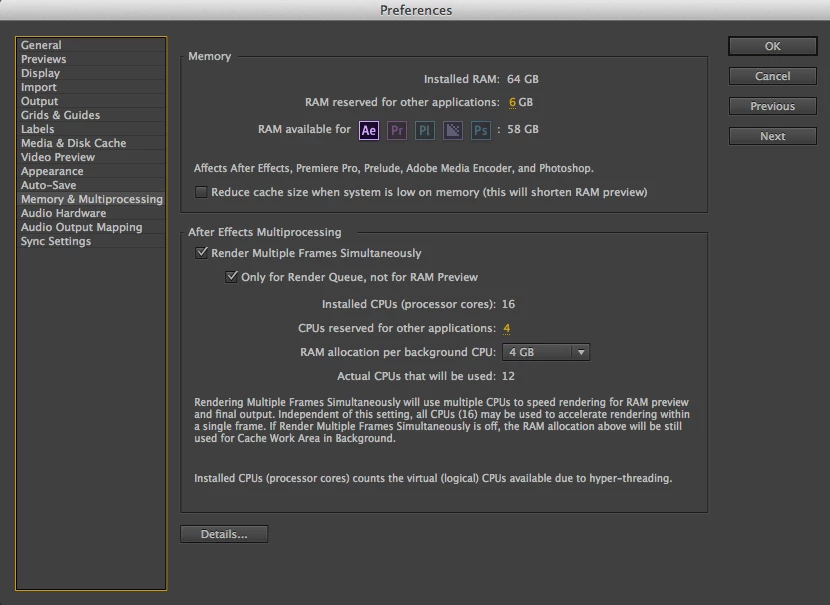
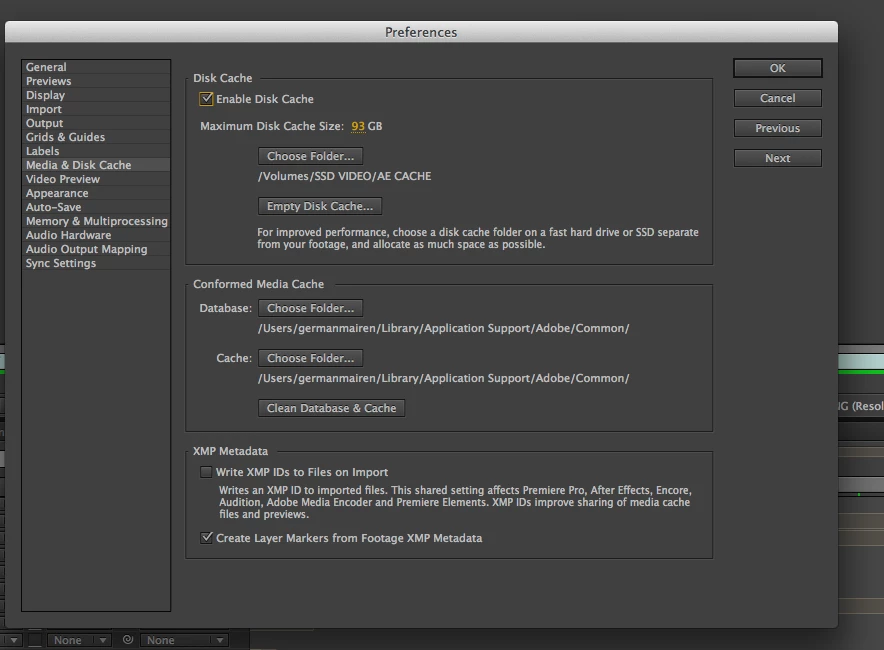
And the AE performs slower than in my old mac pro. I have set the preferences as seen on all those tutorials on this site, I have an SSD external disc for cache files, memory and multiprocessing settings correctly...and previews are very very slow, and I can not even render a single comp without waiting 10 minutes. I am very disappointed and frustrated with this situation...

Am I missing something?

    Correct answer Andrew Yoole

    Without wanting to sound condescending, because I genuinely understand your complaints, I must point out here that some of the onus here belongs to the hardware purchaser.  How carefully did you assess the purchase of the Mac Pro?

    In my own facility, we were torn about which hardware to purchase this year.  After lots of research of available benchmarks, and assessment of what hardware After Effects relies on, we decided not to buy Mac Pros just yet, and bought a bunch of fully specced out iMacs for now.

    The thinking for this:

    • All the benchmarks we found showed AE performance didn't get a significant enough bump to justify Mac Pro expense.  If you're a FCPX editor, Mac Pros are a no brainer -  FCPX is optimised for this hardware.  But AE is not.

    • A significant part of a Mac Pro's cost is in GPUs, which are irrelevant to our main AE use.

    • The cost of one reasonably specced Mac Pro workstation was about equal to two fully specced iMac 27" i7 workstations, with 1TB SSDs and 32GB of RAM.

    • Any new generation tech is fraught with danger.  We decided the 2nd Generation Mac Pro will be a much safer bet, especially since they are manufacturing in an entirely new facility, and the machine itself is a major new design.

    51 replies

    Participating Frequently
    November 12, 2015

    Wide advice on this forum and it's always nice to hear from Todd K!

    So, I have turned up to three agencies this year, all running frustratingly slow New, high spec Mac Pro's with those horrific shiny screens. I use a black jacket over the monitor to help with colour grade. It's pretty horrid.
    But funny I guess cos everyone's open plan these days!

    • In all cases, the GPU's are AMD's, which are "not supported" with AE GPU acceleration and so I guessed that this is what is mainly slowing AE down? 
    • AMD GPU's also don't give us "Fast Render" option (and we've got that horrific "spacebar won't stop RAM Preview" problem) which IT won't let us fix!   

    Please correct me if i'm wrong on these points.


    • I shoved a good NVIDIA GPU in my old, low spec Quad 3Ghz Hackintosh (32Gb Ram) at home and it gives me Fast Render and takes 14 mins less time to render the same composites than on the new 8Core 64Gb Mac Pro here at the agency! 

    ? Are apple's GPU's being used much in AE?  Why is a high spec 2015 Mac so slow compared to a 2013 3Ghz Hackintosh?

    Szalam
    Community Expert
    Community Expert
    November 12, 2015

    Bird™ wrote:

    In all cases, the GPU's are AMD's, which are "not supported" with AE GPU acceleration and so I guessed that this is what is mainly slowing AE down? 

    ...

    Please correct me if i'm wrong on these points.

    ...

    I shoved a good NVIDIA GPU in my old, low spec Quad 3Ghz Hackintosh (32Gb Ram) at home and it gives me Fast Render and takes 14 mins less time to render the same composites than on the new 8Core 64Gb Mac Pro here at the agency!

    ...

    Are apple's GPU's being used much in AE?  Why is a high spec 2015 Mac so slow compared to a 2013 3Ghz Hackintosh?

    Unless you're using the ray-traced renderer, the GPU doesn't do much in AE at all. Details here: GPU (CUDA, OpenGL) features in After Effects CS6 and After Effects CC |

    The reason for the disparity is likely something entirely different. I'd look at what version of the Mac OS is being used as a likely culprit. New Macs seem to struggle to work with AE these days. I don't know if it's Adobe's fault or Apple's since both of them seem to be releasing some buggy products recently (although, at least the After Effects team has a bit of an excuse for CC 2015 since it's an entirely brand new architecture that's not even finished yet...)

    Participating Frequently
    November 12, 2015

    Okay will have a look. I'm on Mav at home and work in Mav and Yosemite with the agencies.  I haven't touched ray tracing yet (is it useful if we're already using C4D and Modo?).

    Whatever the reason, enabling GPU acceleration/ CUDA (unsupported GPU) definitely speeds up the render on our composite from 56 Mins without checking the GPU box and 23mins when the Unsupported GPU is checked.  We're trying to avoid rush hour and also find a way to speed up renders next week on our 
    same spec trusty old 2014 MBP's (Nvidia750M's). 

    It's possible that streaming Robot Chicken might have had an impact.

    raw01
    Inspiring
    November 6, 2015

    Mac Pros are an investment.

    The quad core 2013 mac pro is faster or as fast or only slightly slower than a brand new iMac 5K in a lot of pro app tests. So where if I'd bough an iMac back on 2013 I'd be a lot slower than everything. As it is I'm still as least  as fast and faster in a lot of apps as a new iMac 2 years later. Also the MacPro isn't anywhere as hot or noisy as an iMac in those tests. Read longevity.

    Add to that: Xenon chips have onboard cache, use EEC ram which means a lot more stable system when being pushed. The chip is currently upgradeable, and is built for longevity under heavy loads.

    The dual graphics processors when utilised (OpenCL) as they are by more and more software are extremely fast compared to iMacs, add in software that uses multi cores as well and it's way faster.

    Adobe does take advantage of some of these features and is more and more, also software life Cinema 4D and DaVinci Resolve is to, as well as Motion and FPX. So if you use heavy programs like these, and you want something that's gonna last a long time (for a computer) and still be fast. A MacPro is the way to go. Especially if you don't want that screen because you need Adobe RGB colour space or something like REC709. At which point the iMac screen isn't that useful.

    dissidently
    Inspiring
    November 6, 2015

    I will readily admit that FCPX is fast on most Macs. Surprisingly fast.

    But other than that, it was a cynical mistake to not have a dual CPU Mac Pro for things like Xcode power users and anyone doing anything other than Final Cut editing in a professional capacity.

    Participating Frequently
    October 27, 2015

    Bottom line is that multi core CPUs hit the mainstream about 10 years ago. They've had more than enough time to re-vamp the code. I remember when Apple ditched Shake and it sounded like they were going to make Motion a real AE contender by incorporating robust parts of Shake. I even talked to the Apple reps at NAB years ago and and they said that was the plan - I was so excited! Thank god, I thought, I can finally stop wasting my hardware on the sluggish mess that is AE. Motion was kind of a mess but it was real time! Oh the possibilities! Nope, nope, nope. There just isnt enough competition to light a fire under Adobe's dress to get the job done right. All we can do is post on forums like this and social media to try to shame them into getting their act together but really all that's going to do is make us feel better.

    Oh! I also remember using Vegas video about 15 years ago and those effects were realtime (for the most part, way more than AE is even now). I honestly never thought it would take this long or I would have looked into dealing with the limitations of Motion or invested big in Nuke or something instead of the countless hours I have poured into AE.

    Make me eat my words Adobe.

    Participant
    October 26, 2015

    Not really a solution but hidden in the creative cloud menu you can download an older version. I have done this and it works again with high spec machine. Unbelievable that I should even have to do this though, aren't updates meant to be an improvement?

    Participant
    October 26, 2015

    To camptown ladies:

    "CC15 bites the bone doo dahh do dahh" Tech supports lines five miles long" "Ohhh doo dahh day.


    Ae bites the bone, PPR, AME sets the tone!!!, gotta get that freekn check...tech supports gotta learn what chachings all about that's why most animators, video production guys...HAVE TO... smoke the master bong!!!!""".


    One more TIME!!!!:

    Participant
    October 26, 2015

    I just wanted to bump this thread and add to the list of disdain and utter frustration that many AE power users are experiencing.

    I am completely baffled why AE cc2015 is so bad! It's infuriating!

    Since the Creative Cloud became the platform for distributing Adobe software there had been a steady decline in quality and stability, to the point now where I'm looking at Nuke for the safest 'damage-limitation' to my career.

    I just can't depend on AE any more. It's broken, and as long as the CC model exists I think it will continue to get worse as software is released in little patches and fixes rather than a fully tested, fully functioning product.

    Participant
    October 25, 2015

    I am in the same place as you guys, I feel like I am back in the 90's.

    I have a new xeon workstation (32 logical CPU cores), 128gb matched ECC RAM, SSD cache drive and SSD OS drive with 2 x 980 GTX Ti, and it honesty feels like I am running AE on a 1992 model laptop capable of Windows 3.1 only. Is there a testing program that adobe has to test to see what is causing these bottlenecks? Looking at my performance monitor, NOTHING is being used, it is like it is all looping in latency or something. This is a $20k computer system, running like something purchased on eBay for $20 bucks and I am pretty peaved off. It was working good, with these latest releases it is next to useless.

    dissidently
    Inspiring
    October 25, 2015

    For reasons not explained (and that will likely never be known) Adobe has seen fit to release an alpha build of the 2015 rendering engine, and default to deleting the more fully working 2014 version in a normal "upgrade".

    You really have to go back to 2014 AE to get semi-respectable rendering performance.

    But they don't warn of this during the install process, then point to places in forums and obscure blogs about how you should have read up about not uninstalling 2014, first.

    Which is even further indication of how detached from reality they are.

    Who does that when something is advertised, posited, promoted, named and presented as an "upgrade"?

    Herbert2001
    Inspiring
    October 25, 2015

    Blame Adobe's management, not the developers. I believe if it were up to the AE devs themselves, they would never have had released an alpha version to an unsuspecting user base with these show-stopping  issues.

    I think management is under pressure to release new versions to make headlines and keep higher level management satisfied. Just like before the advent of CC, but in this case, unfortunately the users have become part of Adobe's "beta testing team". This would probably never have happened before Adobe's Digital Serfdom, in my opinion.

    Participating Frequently
    October 7, 2015

    I just wanted to add a bit to the rage. I use c4d quite a bit (slightly more than AE) I have a dual xeon PC with 28 physical cores and it makes me sad to see im using about 5% of my CPU power when I render in AE. CC 2015 isn't ready for prime time, shouldnt have been released. Multithread this renderer Adobe, this is something you guys should have worked out when intel core 2 duo came out a decade or so ago.

    Jonathan Lutjens
    Known Participant
    September 21, 2015

    Well, after much head-scratching and fumbling around, I finally got Windows 8.1 running on this Hackintosh. Side note: if you ever are trying to install Windows (at least version 7 and 8) on a machine with multiple drives, you have to disconnect all drives except the one you're installing on. For some reason, Windows gets confused by the other hds and gives you a variety of error messages as to why it can't be installed (none of them alluding to your other drives). Once you've got only the 1 install drive, you're good.

    Now, on to my results. I was very excited after reading n8ormiston's post showing that he had gotten a huge speed boost when switching to a Windows machine (and a cheaper one, too). I didn't get those same results.

    I used the AE Benchmark test project that you can find here: After Effects Performance Test File on Vimeo

    When I rendered that using Yosemite, I got a 5:40 render.

    Using Windows 8.1, my render time was 4:43. I believe that's about a 16% speed increase. Nice, but for me not worth the trouble of migrating old files and other software over to Windows. Not to mention the installation process reminded me of just how terrible some aspects of the Windows system can be.

    I'm going to continue to test things, but hopefully once CC 2015 gets the updates it needs to really use all my hardware, the OS question will be moot.

    Jonathan Lutjens
    Known Participant
    October 12, 2015

    Update:

    I realized after my last post that I had not overclocked my cpu on the Windows render test. Went back today and pushed my processors to 110% (I think that put them at about 3.08 GHz). Now, the AE Benchmark test renders on Windows with a 55% speed increase over my OSX system boot. That's a pretty big speed increase and worth considering a switch over to Windows in my opinion. I think the only remaining question will be how much do the next improvements to CC 2015 change the rendering speeds on my OSX setup. Migrating everything over to Windows (I have about 6 years of old projects archived) is no small task.

    Participant
    September 8, 2015

    Do yourself a favor and after spending $8k - $10k on a computer (like I did) to help speed this up and just buy a $800 PC.  My 12-Core mac renders a 4 minute video in 4 hours, while my $800 pc renders it in 11 minutes.  I can't even work on Kinetic text on my Mac and have to do all the work on this cheap PC.  I paid more for my video card on my Mac than this entire PC, yet it out performs my mac with only16 MB of ram .. it's unbelievable.  Just get a PC, Adobe After effects is not mac friendly.

    Known Participant
    September 8, 2015

    Amen... But completely denied by Adobe!

    Jonathan Lutjens
    Known Participant
    September 4, 2015

    JUST READ THROUGH THE ENTIRE THREAD. BTW-CAPS ARE BECAUSE I'M CURRENTLY RENDERING A COMP.

    MY PERSPECTIVE IS SLIGHTLY DIFFERENT AS I'M RUNNING A NEWLY BUILT HACKINTOSH. I HAD GREAT LUCK WITH MY LAST ONE SO I DECIDED TO GIVE IT ANOTHER GO. I'M CURRENTLY PRETTY DISAPPOINTED HOWEVER IN HOW AE IS RUNNING ON THE NEW MACHINE. AS SOME OF YOU HAVE NOTED, THE BIGGEST FRUSTRATION IS HOW NEBULOUS ALL OF THIS IS. OVER THE COURSE OF A YEAR, I DON'T WANT TO SPEND HOURS AND HOURS JUST TO RUN RENDER TESTS SO I CAN FIGURE OUT THE BEST SETTINGS FOR A GIVEN PROJECT.

    WHILE I'M NO EXPERT, MY SENSE IS THAT C4D DOESN'T HAVE THAT ISSUE. YOU HAVE THE HARDWARE YOU HAVE, YOU DECIDE HOW NICE YOU WANT THE RENDER TO LOOK AND YOU HIT GO. NO MESSING AROUND WITH MULTIPROCESSING OR RESERVED RAM ETC. THAT'S HOW IT SHOULD BE. HAVING TO ENDLESSLY TWEAK SETTINGS IN ORDER TO GET EFFICIENT SOFTWARE USE OF YOUR HARDWARE IS SOMETHING TO EXPECT FROM A 3-5 YEAR OLD PROGRAM, NOT ONE THAT'S BEEN AROUND FOR 20.

    Below (ah, render complete) are the results of my tests today. This was a fairly simple project, although it used high-resolution photos. The render times were down by a little more than 50% vs my old machine, which is nice. On the recommendation of my friend who actually put together my Hackintosh, I'm going to install AE and Windows 8 on a new drive and see how that fairs on this system. I'll post those results as well. Oh yeah, any other updates concerning CC 2015? I went back to 2014 when I realized that multiprocessing was gone so I haven't been using it...

    Xeon E5 2680

    2.8 GHz (overclocked to 3.18 GHz) 10 core

    64 GB RAM

    NVIDIA GeForce GTX 980 4095 MB

    PROJECT: AA_090315.aep

    MULTIPROCESSING ON

    2 GB RESERVED

    1 CPU RESERVED

    3 GB PER BACKGROUND CPU

    15 USED

    36 MINUTES

    MULTIPROCESSING OFF

    14 GB RESERVED

    89 MINUTES—ESTIMATED: killed render

    MULTIPROCESSING ON

    14 GB RESERVED

    5 CPU RESERVED

    4 GB PER BACKGROUND CPU

    11 USED

    31 MINUTES

    MULTIPROCESSING ON

    14 GB RESERVED

    4 CPU RESERVED

    6 GB PER BACKGROUND CPU

    7 USED

    27 MINUTES

    Szalam
    Community Expert
    Community Expert
    September 4, 2015

    jonathanlutjens wrote:

    THE BIGGEST FRUSTRATION IS HOW NEBULOUS ALL OF THIS IS. OVER THE COURSE OF A YEAR, I DON'T WANT TO SPEND HOURS AND HOURS JUST TO RUN RENDER TESTS SO I CAN FIGURE OUT THE BEST SETTINGS FOR A GIVEN PROJECT.

    WHILE I'M NO EXPERT, MY SENSE IS THAT C4D DOESN'T HAVE THAT ISSUE. YOU HAVE THE HARDWARE YOU HAVE, YOU DECIDE HOW NICE YOU WANT THE RENDER TO LOOK AND YOU HIT GO. NO MESSING AROUND WITH MULTIPROCESSING OR RESERVED RAM ETC. THAT'S HOW IT SHOULD BE.

    And, hopefully, that's how it's going to be in the future. The reason multiprocessing is gone in CC 2015 is that the AE team is working on rewriting the core architecture of AE to make a much improved renderer that does, pretty much what you described.

    CC 2015 is just the first step in that direction. If you got a chance to use it much, you would have noticed that the UI is now running on a different processing thread than the renderer. This makes AE feel a lot snappier when you use it because you don't have to wait for the screen to render for you to do something. In a future version (hopefully soon), they will have a new renderer written that uses all of your computer's processing power.

    Some of this is covered in this page: features not available in After Effects CC 2015 (13.5)

    Now, you don't need to ignore CC 2015 completely while you wait for them to finish the new renderer. You can do what I do - work in CC 2015 to take advantage of the snappier interface (and MUCH improved expression handling) and then open that same project file in CC 2014 to render it with multiprocessing. Or you can just keep using CC 2014 and wait for them to get more work done on the new version - whatever works for you

    Jonathan Lutjens
    Known Participant
    September 21, 2015

    Thanks for the response, Szalam. I'm glad Adobe is reworking things; can't wait to see what it can do once there's more efficient use of hardware. I just wish they would hold off on a "new release" since NOT having multiprocessing is such a big roadblock to post-production. While the other improvements are great, losing that just doesn't warrant calling the current state of CC 2015 an update, in my opinion.