Participating Frequently
May 11, 2014
Answered

WHY AFTER EFFECTS STILLS SO SLOW IN THE NEW MAC PRO?

  • May 11, 2014
  • 51 replies
  • 119683 views

I have the new mac pro with this settings:

3 GHz 8-Core Intel Xeon E5

64 GB 1867 MHz DDR3 ECC

AMD FirePro D700 6144 MB

Software OS X 10.9.2

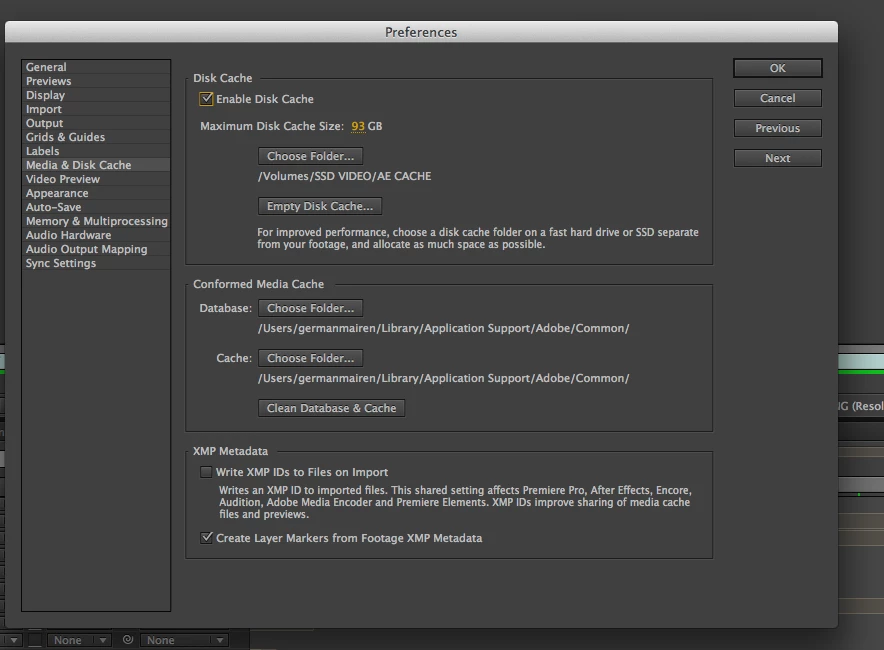
And the AE performs slower than in my old mac pro. I have set the preferences as seen on all those tutorials on this site, I have an SSD external disc for cache files, memory and multiprocessing settings correctly...and previews are very very slow, and I can not even render a single comp without waiting 10 minutes. I am very disappointed and frustrated with this situation...

Am I missing something?

    Correct answer Andrew Yoole

    Without wanting to sound condescending, because I genuinely understand your complaints, I must point out here that some of the onus here belongs to the hardware purchaser.  How carefully did you assess the purchase of the Mac Pro?

    In my own facility, we were torn about which hardware to purchase this year.  After lots of research of available benchmarks, and assessment of what hardware After Effects relies on, we decided not to buy Mac Pros just yet, and bought a bunch of fully specced out iMacs for now.

    The thinking for this:

    • All the benchmarks we found showed AE performance didn't get a significant enough bump to justify Mac Pro expense.  If you're a FCPX editor, Mac Pros are a no brainer -  FCPX is optimised for this hardware.  But AE is not.

    • A significant part of a Mac Pro's cost is in GPUs, which are irrelevant to our main AE use.

    • The cost of one reasonably specced Mac Pro workstation was about equal to two fully specced iMac 27" i7 workstations, with 1TB SSDs and 32GB of RAM.

    • Any new generation tech is fraught with danger.  We decided the 2nd Generation Mac Pro will be a much safer bet, especially since they are manufacturing in an entirely new facility, and the machine itself is a major new design.

    51 replies

    Participant
    December 18, 2014

    Sooo... new to AE... and the entire [CC] suite, though I've been a photoshop/indesign/DW user for years.

    And... frankly... I'm stunned at how sloooowwwww AE is.  I've been trying to render about 15 seconds of AE effects, and it's now been processing for 43 minutes... with an estimated 33 minutes to go. (It's said estimated 33 minutes since it started)

    I haven't gone in and tweaked things... I decided to search for "AE slow on Mac Pro"... and ended up here.

    Like the other posted said... a YEAR of waiting for this problem to be resolved is not asking too much.

    As others noted: Quad nMP with 32gb ram and the dual 300's.  (Seems it doesn't matter what graphic card you use at this point.)  Throwing my hat in the pool to say "Get on it Adobe!  WTH?"

    Participating Frequently
    December 15, 2014

    As I'm sure most of you do, I almost always have Ae and premiere running simultaneously and have noticed that AE seems to be the reason why things (mainly rendering previews in the timeline) tend to grind to a halt. It seems like things work as expected for around 10mins, after which I notice that the CPU starts refusing to do any work. See my screen grab - I tried rendering a preview of a short AE comp (in premiere) and noticed that the CPU remained at 98% idle. After closing AE and rendering the same comp (after deleting the preview files) things flew along and I let a smile creep onto my face!

    That said, this is obviously not the best workaround! Can anyone shed any light onto why this is happening?

    Media is on an External LACIE (RAID0) over thunderbolt

    writing previews to my internal SSD (writing previews to an external Lacie SSD proved dramatically slower!)

    Mac Pro (late 2013)

    OSX 10.10.1

    3Ghz 8 core

    32GB RAM

    Dual AMD D700s

    Thanks in advance!

    Tony

    Participating Frequently
    December 15, 2014

    Thanks a lot for your response.

    I was thinking on purchasing an external disc for the video files and disc caché...can you tell me how did you set up AE? any recommendation regarding external disks?

    Participating Frequently
    December 12, 2014

    BUMP! Some comment from Adobe would be helpful to assure us Mac pro users that AE and Premiere will utilise the full potential of our work tools in the near future please.

    Participating Frequently
    December 11, 2014

    Besides when using Cineware, my new lab of Mac Pros seem to be running AE CC 2014 incredibly fast. We have the 6-core running Mavericks and so far so good, sans Cineware.

    NordicFilmworks
    Known Participant
    December 11, 2014

    Any response from the Adobe team on this?  Or is it still a non-issue, no priority?  Waiting a month or two for a fix is one thing, but this issue is almost a year old.

    Inspiring
    December 11, 2014

    It's safe to say based on public statements here and on their blog that this issue is a priority or the AE team, but it is also pretty clear that they have their work cut out for them, so I, for one, don't expect immediate results.  I am very excited about what I have heard from them on this topic, both publicly and privately, and I genuinely get the sense that they are listening to feedback here and taking it to heart.  I know that doesn't really help folks who need results right now, but I think it's the best answer you can possibly hope to get for now.

    NordicFilmworks
    Known Participant
    December 11, 2014

    Sorry, a year old problem that has not been a priority is not the same as being impatient and asking for an "immediate solution."

    December 10, 2014

    thank you

    [link removed... Mod]

    Participating Frequently
    December 4, 2014

    Can anyone from Adobe chime in and give us a solution or at least a glimmer of hope for using AE effectively on the new mac pro? I too have invested a lot of money into this new machine and am in the same boat. Slow.

    NordicFilmworks
    Known Participant
    December 10, 2014

    Still having this problem with my MacPro.

    Stephen Barrante
    Inspiring
    August 30, 2014

    It's comforting, while also a bit disturbing, to know that I'm not the only one experiencing these issues. But there's that sinking feeling you get after throwing $4k down on a machine and seeing hardly an improvement on the software you use day-to-day.

    @Todd_Kopriva, until recently I've always considered AE to be a rockstar, and I know that's because you have a great team over there. So If there are any opportunities to hand off some updates you are working on to the "power users" so we can put it through some real world testing, I'd be pleased to jump on some pre-release software and do some side-by-side comparisons. Hopefully something constructive can come from all this feedback...

    Steve

    Andrew Yoole
    Andrew YooleCorrect answer
    Inspiring
    August 31, 2014

    Without wanting to sound condescending, because I genuinely understand your complaints, I must point out here that some of the onus here belongs to the hardware purchaser.  How carefully did you assess the purchase of the Mac Pro?

    In my own facility, we were torn about which hardware to purchase this year.  After lots of research of available benchmarks, and assessment of what hardware After Effects relies on, we decided not to buy Mac Pros just yet, and bought a bunch of fully specced out iMacs for now.

    The thinking for this:

    • All the benchmarks we found showed AE performance didn't get a significant enough bump to justify Mac Pro expense.  If you're a FCPX editor, Mac Pros are a no brainer -  FCPX is optimised for this hardware.  But AE is not.

    • A significant part of a Mac Pro's cost is in GPUs, which are irrelevant to our main AE use.

    • The cost of one reasonably specced Mac Pro workstation was about equal to two fully specced iMac 27" i7 workstations, with 1TB SSDs and 32GB of RAM.

    • Any new generation tech is fraught with danger.  We decided the 2nd Generation Mac Pro will be a much safer bet, especially since they are manufacturing in an entirely new facility, and the machine itself is a major new design.
    Known Participant
    September 2, 2014

    Personally all our Macs are on lease. Our IT department automatically upgrades us about once every two years. I guess shame on our IT department for trusting a software company as tiny and unknown as Adobe to make software where they considered some of their Pro users preferred hardware choices?

    Stephen Barrante
    Inspiring
    August 23, 2014

    Was just about to author a very similar post in the interest of find out what settings will allow me to make the most of my new 2013 Mac Pro? Rendering and refresh shouldn't only be marginally better than a 2011 Quad-Core with a 16GB RAM, single 1.3Gig Nvidia GTX570.

    Currently running 2014.0.2 (13.0.2.3), on a 3.5ghz 6-Core, with 32GB of RAM and the dual D500s. All the media is being pulled in off a 12TB Thunderbolt 2 RAID 5.

    Let's push this machine as far as it can go! I want flames coming out the top, right now I probably couldn't keep my coffee warm

    Very interested to see the next update, cheers!

    Szalam
    Community Expert
    Community Expert
    May 20, 2014

    duranduran wrote:

    I have the new mac pro with this settings:

    3 GHz 8-Core Intel Xeon E5

    64 GB 1867 MHz DDR3 ECC

    AMD FirePro D700 6144 MB

    Software OS X 10.9.2

    And the AE performs slower than in my old mac pro.

    What were the specs of your old Mac Pro?

    What (exact, down to the decimal points) version of AE are you using on the old machine and the new machine?

    What are your old machine's memory and multiprocessing settings?

    Are you using the exact same project in both to compare?

    When you say it "performs slower", what do you mean? The interface, creating a RAM preview, rendering, etc.?

    Participating Frequently
    May 21, 2014

    These were my settings on the old machine

    Mac Pro

    Quad-Core Intel Xeon

    2,8 GHz

    4 nucleos

    16 GB de RAM a 1066 MHZ

    8 MB de caché


    When I say it perfoms slower, I mean it takes a lot to render a project (even to start rendering). Much more than in the old one. The version of the software is the last one.

    Todd_Kopriva
    Inspiring
    May 21, 2014

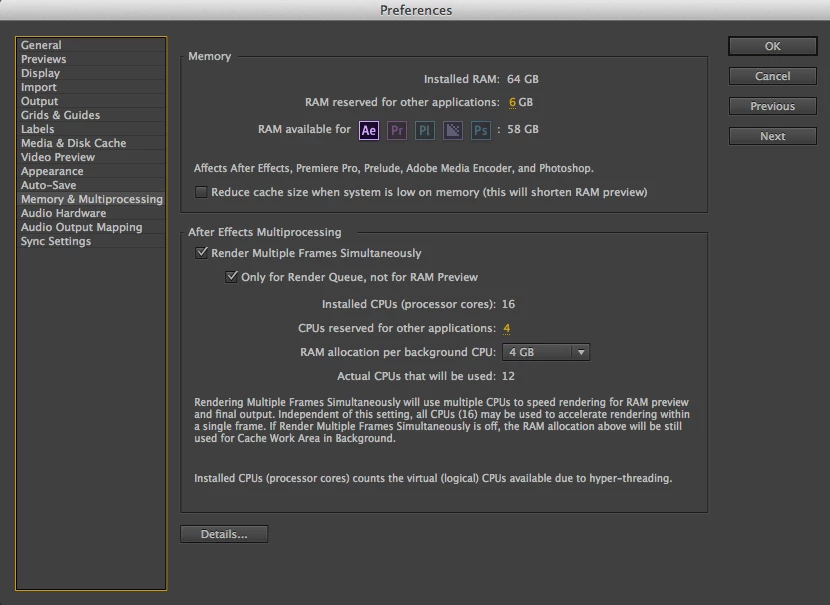
    One reason that it's going to take longer to begin rendering is that you have 12 CPUs that are being used for background rendering, each with its own separate instance of the After Effects application, and each of those needing to load the project. If you have a large project, then loading it into 12 different instances of an application can take a long time. The overhead of Render Multiple Frames Simultaneously is only worth it in some cases; it doesn't always make the overall time to get a final output shorter.

    BTW, your RAM reserved for other applications is much too low. It should be a minimum of 1/4 of your installed RAM.