


Jenkmeister
August 16, 2021
Question

Composition Profiler now available in AE 22.0x56

  • August 16, 2021
  • 11 replies
  • 19916 views

Today, we are excited to announce a new feature in After Effects called the Composition Profiler. The Composition Profiler is visible through a new timeline column, Render Time, that allows you to see how long each layer, mask, layer style, expression and effect took to render for your current frame.


You can enable the Composition Profiler by clicking the snail in the lower left section of the timeline to show the Render Time column. You'll also notice the time taken to render the whole frame is now shown in the footer. You can also right click on the Timeline window column headings and choose Render Time. 
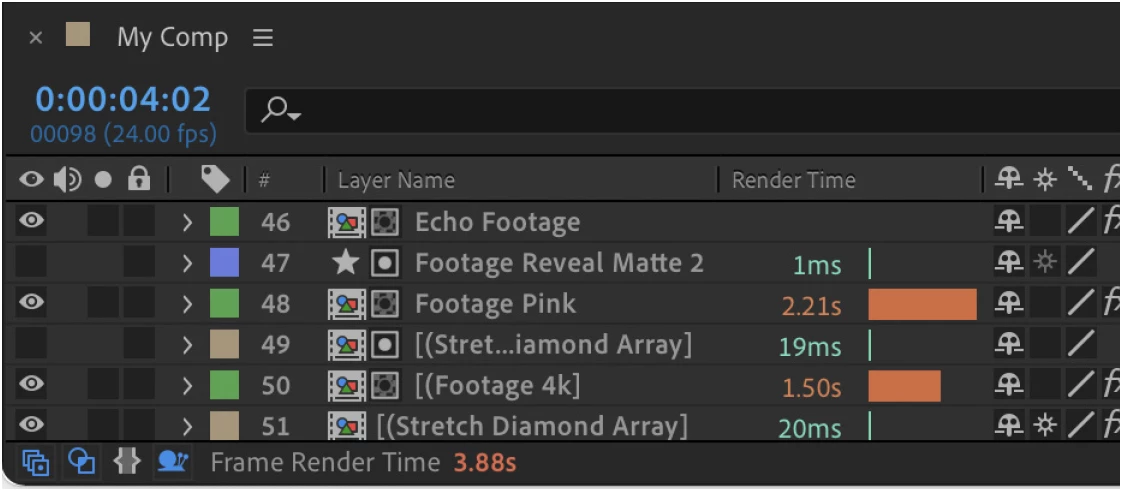


To help you get started with the Composition Profiler we've put together the attached PDF documentation. Please check it out! 


We'd love to hear your feedback and what you learn about your compositions!


Thanks,

Sean

This topic has been closed for replies.

11 replies

Inspiring
September 23, 2021

Fabulous addition - really useful. Thanks guys for making this happen - much more control over decisions on effects etc now.

Paul.
adriennew15332191
Participant
September 17, 2021

This tool has already changed my life.

ReaooVFX
Participating Frequently
August 26, 2021

Such a useful tool, I have a question is adobe going to change the number of version AE (18.4.1) to AE 22.0x 56


Participant
October 18, 2021

Yes, every video app will go p to the version 22 in the next major release. 

Participant
August 24, 2021

This will help a lot!

miguelg37900031
Participant
August 23, 2021

Wow, this is actually real.....


Thank you for this, this WILL BE really useful, can't wait 

Known Participant
August 23, 2021

It's like getting a google map of traffic instad of just sitting in traffic. Thanks!


Participating Frequently
August 20, 2021

This is EPIC!!!

Does it calculate based on the comp resolution, or relative to the previewing res (1/4, 1/3, 1/2...)?

Jenkmeister
August 20, 2021

It calculates based on however the frame was rendered. So if it was interactive frame selection, it will use the preview resolution. If it's from preview playback, it will use the settings as per the preview panel settings (spacebar, etc.). It could also render from the new speculative preview/cache frames when idle. You may find different rendering times for each of those depending upon the settings so you'll want to be consistent in your approach if absolute times matter. 

Participant
August 20, 2021

Hi,

This is great news.

Nevertheless I updated my AE 2021  to the latest version available (18.4.1) and this tool isn't available.


How can I access that release?


Thanks.

Nuno


Jenkmeister
August 20, 2021

The Composition Profiler is available in the AE Beta builds. Open the Creative Cloud Desktop app, look for the Beta section in the left hand navigation column and install After Effects (Beta).

Participant
August 18, 2021

Thank you Adobe, when you realise you needed something that you did not kno'you may need !!

Known Participant
September 10, 2021

Exactly! 🙂 

Community Expert
August 17, 2021

I love that the icon to enable Comp Profiler is a snail!


Szalam
Community Expert
Community Expert
August 17, 2021

The snail's official name is Oscar, by the way. As in "Oscar, go!"


I was so happy when I heard that.