

Community Manager
August 5, 2022
Answered

Feature Focus: Exporting H.264 from the After Effects Render Queue (Now Available in AE 2023!)

  • August 5, 2022
  • 12 replies
  • 27721 views

Starting with Beta build, AE 23.0x11, H.264 is now available as an option in the Output Module Settings dialog allowing you to encode to H.264 directly from the AE Render Queue.
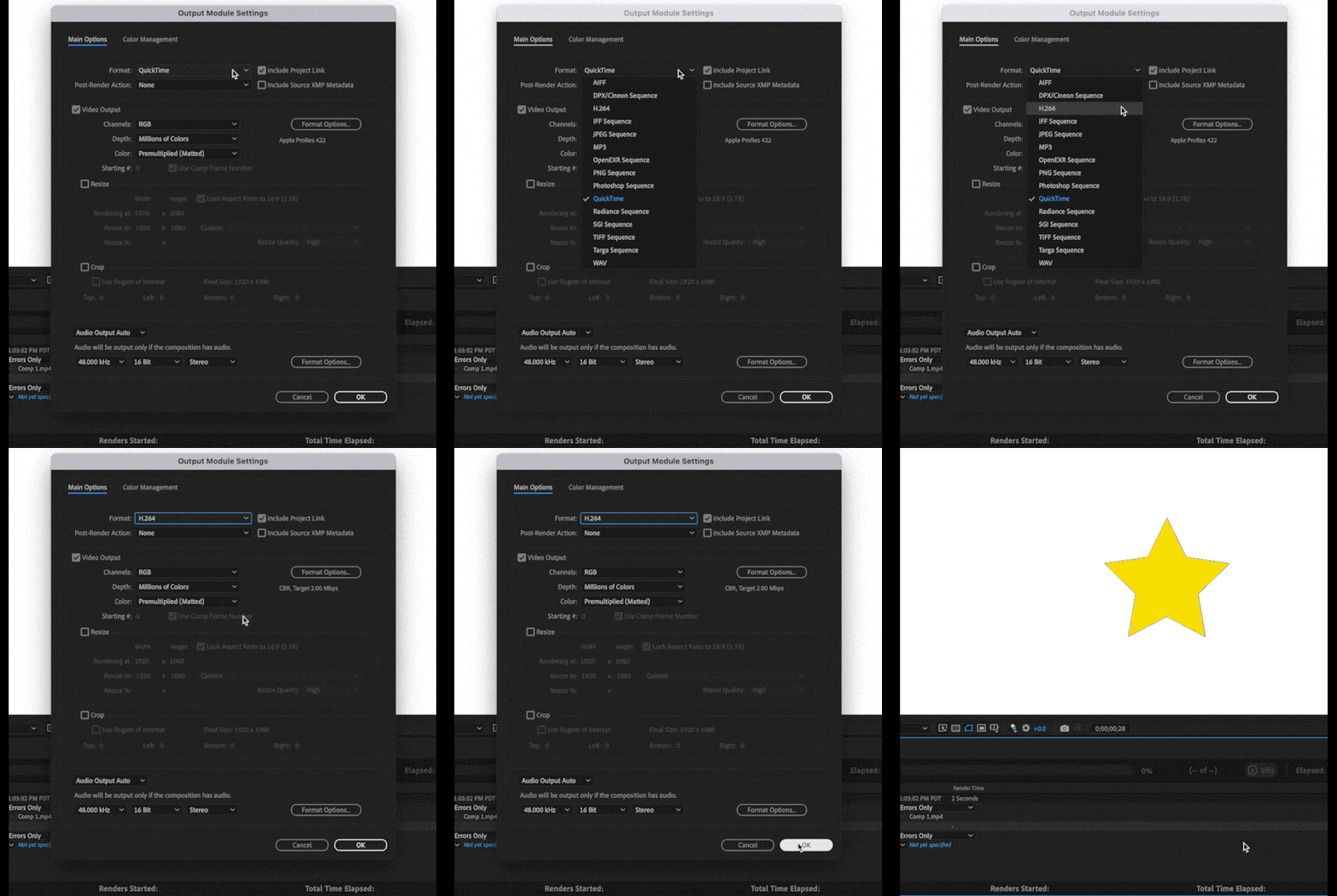


This integration utilizes the Adobe Media Encoder (AME) UI along with AME’s backend encoding system all without leaving After Effects. We have also included 3 H.264 presets to get you started.


If you need more control, you can customize the H.264 settings by clicking on a Format Options button in the Output Module Settings dialog. Not every option that is available in AME is exposed inside AE, and some settings such as resolution, frame rate, color management, are still set from AE’s Render Settings or Output Module Settings, but there should be enough to tweak for most users.


H.264 export also supports both Hardware and Software Encoding modes. The same accelerated export you have in AME and Premiere Pro is now available for H.264 export in AE.


If you need more control or specific settings, you can still use Adobe Media Encoder, via Dynamic Link or transcoding an existing video file.


Selecting the H.264 Exporter and Related Settings

1. Add a composition to be exported to the Render Queue
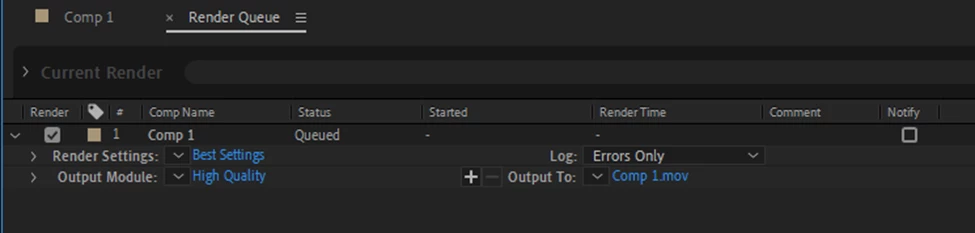


2. Click on the Blue Text (High Quality in the example image) in the Output Module section. This will bring up the Output Module Settings dialog where you can select H.264 from the Format drop-down.
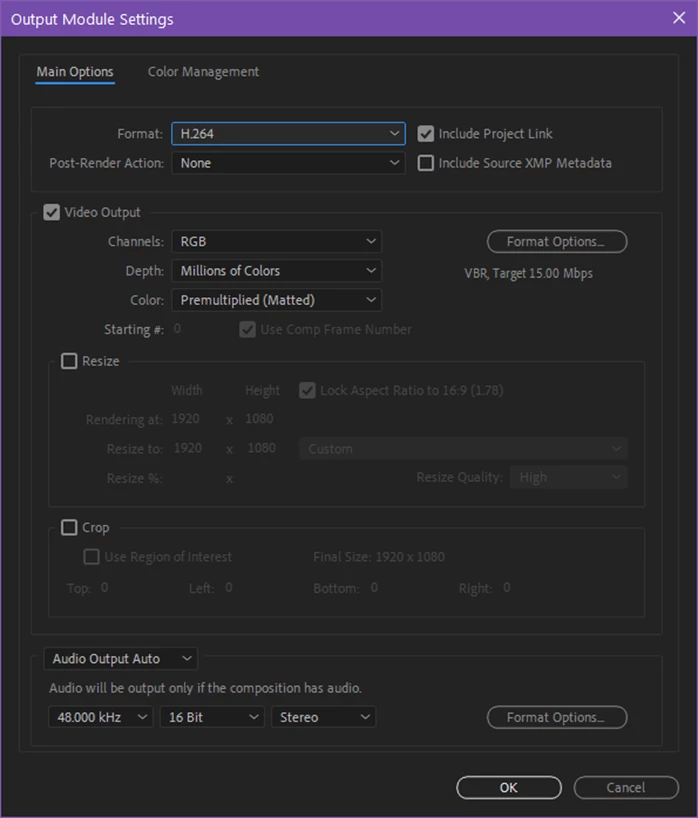


3. Clicking on Format Options in the Video Output section will take you to the available H.264 Options dialog box:
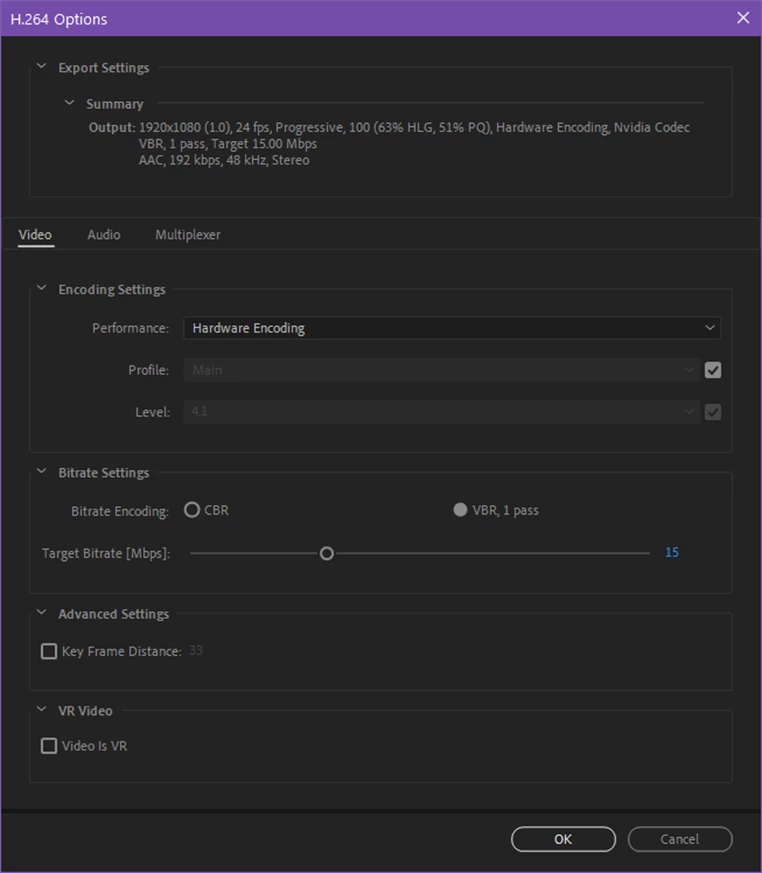


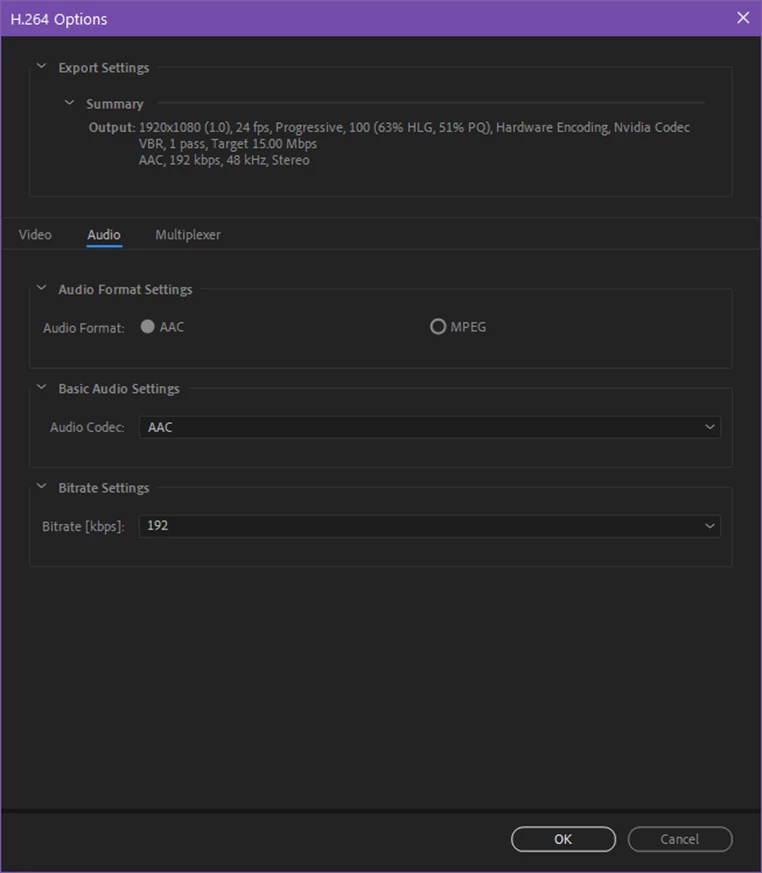
4. Adjust the encoding performance, profile and level of encoding, bitrate and any other settings that are shown as desired.


5. The Audio and Multiplexer tabs are also available for configuring those settings:


6. Click OK when you are happy with the settings.


Settings Mismatch Warning

Sometimes there will be a mismatch between AEs render / output settings and what is supported by the H.264 format. In that case, clicking OK after editing the H.264 settings will result in a warning dialog:
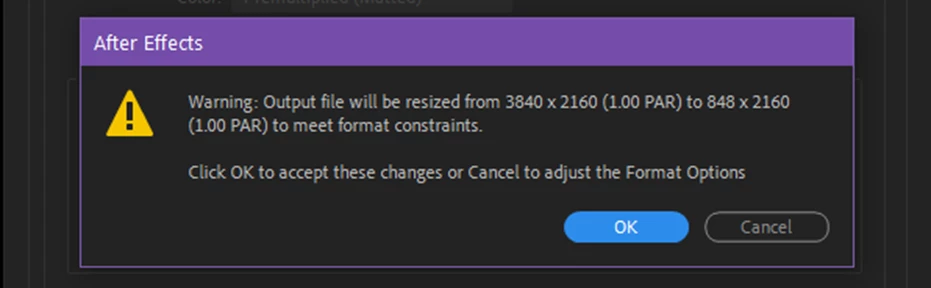


The warning dialog contains the issue and what adjustment will take place. You can click OK to accept the changes or return to the H.264 Options dialog to make any changes.


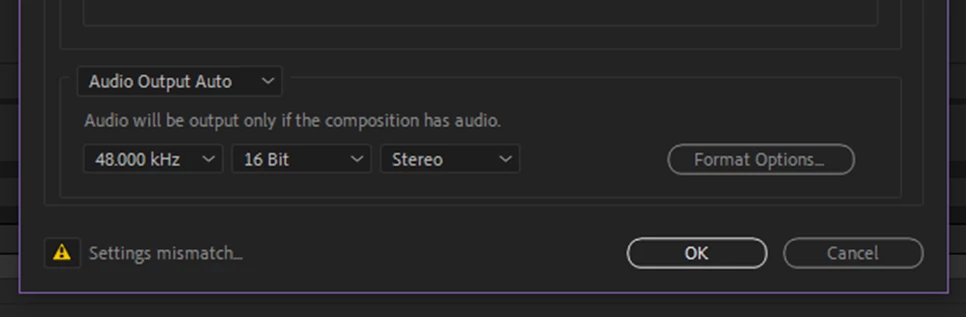
A settings warning will also be visible in the Output Module Setting dialog when a mismatch in settings is configured. Click on the icon to get more information:


H.264 Output Module Presets

For those not familiar with configuring H.264 exports, we have also included 3 presets that you can pick from based on your desired target bit rate. These will automatically set the Profile and Level based on the output resolution of the composition. Depending upon your resolution or render quality required, choose the appropriate bit rate preset from 5, 15 or 40 Mbps.
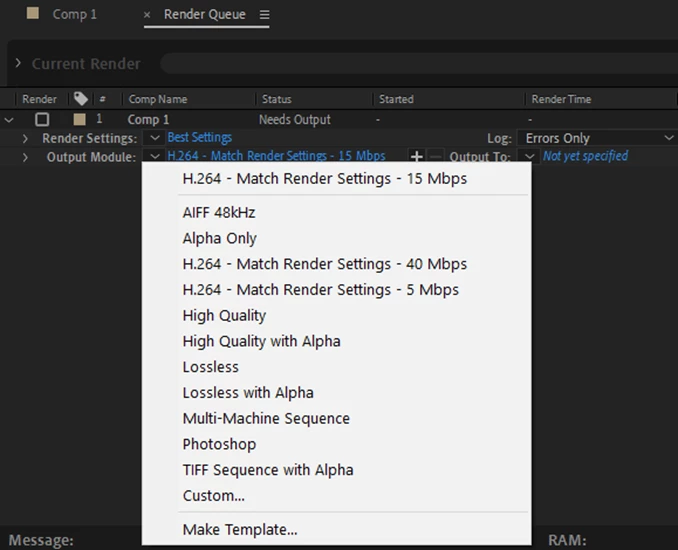


Finally, if you install a fresh copy of AE or clear your output module preferences, the H.264 – Match Render Settings – 15 Mbps preset will be configured as the Movie Default Output Module Template. The next time you add a composition to the render queue, it will be configured for H.264 output automatically. You can adjust the defaults in the Output Module Templates editor (Edit Menu -> Templates -> Output Module…):
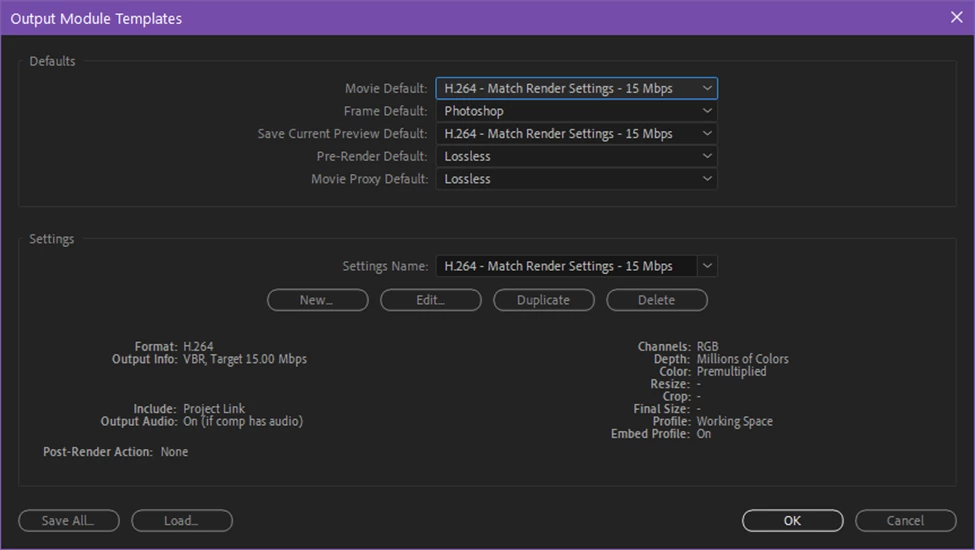


Please try it out and let us know how it works for you. Feedback on the preset settings and names is also welcome.


Thanks,
Sean


This topic has been closed for replies.
Correct answer jenkmeister17177426

We are excited to announce the H.264 in the Render Queue has now shipped as part of After Effects 2023/23.0, now available for all CC customers. Thank you for all the feedback and testing during the beta period. 

12 replies

jenkmeister17177426Community ManagerAuthorCorrect answer
Community Manager
October 18, 2022

We are excited to announce the H.264 in the Render Queue has now shipped as part of After Effects 2023/23.0, now available for all CC customers. Thank you for all the feedback and testing during the beta period. 

New Participant
October 25, 2022

Hardware encoding from AE2023 not working on an M1 Mac Studio Ultra.......

Community Manager
October 25, 2022

Do you have any more details? In what way is it not working? Are there error messages? Or you can't select hardware encoding? or something else?

New Participant
October 14, 2022

This feature would be a game changer for our society. Do you have an idea of ​​when it could be deployed on a stable version?

Petr Holusa
Inspiring
October 14, 2022

There is no stable or fast version. 

JohnColombo17100380
Community Manager
Community Manager
October 14, 2022

@Petr Holusa  This comment isn't helpful or constructive. Per the Community guidelines, please keep the conversation in the forums kind, respectful, and civil.


We on the engineering team are here to help solve issues with stability or performance, but we need actionable data and not snark. If you've got a crashing or slow project, please report a bug with a screen recording, project file, and your system specs and we will investigate what is happening.


Thanks for your cooperation,

- John, After Effects Engineering Team 

moebius90009
Known Participant
October 13, 2022

As much I love to export h.264 out of the Render Queue, I would love to continue working in Ae. Why has the Render Queue blocking whole Ae?

Community Manager
October 13, 2022

It's a bit historical to when AE could only render one frame at a time (so 12 months ago) so it couldn't export and allow interactve editing at once. Now that multi-frame rendering is around, we may be able to remove the modality of export but it will require some more code changes to make that work.

moebius90009
Known Participant
October 13, 2022

Let's do it! What are you waiting for? 😄
Thanks for quick reply. And please bring finally native ACEC to the beta! 🙂

sskaz
Inspiring
September 21, 2022

Why name them with “Match Render Settings” and not simply “H.264 - ## Mpbs”? All output modules already “match render settings” unless you specifically enable custom resize/crop options.

Community Manager
September 21, 2022

The H.264 Profile/Level settings can cause the output resolution to change if you use a setting too low. These presets will adjust the profile and level automatically based on the resolution and bit rate. The existing presets don't have settings that can change the resolution without you knowing, so we chose to label them more directly. If you also use AME, you'll see presets with more descriptive names, so we've also tried to follow suite. 

Szalam
Community Expert
Community Expert
August 23, 2022

I'm loving the convenience of this feature. I think the preset output modules are good too.


...EXCEPT...

This should be named 05 Mbps so it sorts correctly. 


Thank you!

Community Manager
August 24, 2022

Rather than a 05, we can just add a space in front of the 5, which has it sort up. Sound ok? 


Szalam
Community Expert
Community Expert
August 24, 2022

As long as it sorts up, I'm gonna be happy! I think that's more readable than the leading 0.

Participating Frequently
August 15, 2022

A que ponto chegamos em que exportar em H264 vai ser a novidade de 2023, incrível Adobe, incrível.


Participating Frequently
August 17, 2022

kkkk. integração 100% com gpu com certeza será a novidade de 2030.

Felix Dames
Inspiring
August 8, 2022

Applaus, Applaus, Applaus,

Thank you Adobe developers for bringing this basic feature finally back where it belongs after more then 10 years...


New Participant
August 8, 2022

Do you have any plan to enable AE to export Gifs?

Please do it.

moebius90009
Known Participant
August 8, 2022

gifgun is a pretty solid plugin. Do you use that instead?

New Participant
August 8, 2022

A few times yes, but ideally I hope it could become a built-in feature of AE, it seems that making animations into GIFs is a need for many people.

moebius90009
Known Participant
August 8, 2022

when finished rendering: since when it's no more possible to click on the Name to go quickly to the output file in the explorer folder?

Community Manager
August 9, 2022

Right click on the Speichern unter and you should get a pop up menu to go to the destination folder. 

moebius90009
Known Participant
August 10, 2022

right click does nothing: So it works: First you have to click the arrow, then on that tiny (red) box, see attachment, if you don't have a longer subfolder to save the file in it. I mixed the function up with AME (my fault, sorry)

Participating Frequently
August 7, 2022

Damn, you guys are on the ball recently! Multiframe rendering, colored keyframe markers, selectable trackmattes, exporting to H.624 directly in AE? I'm not sure what's started this trend, but I hope it doesn't stop anytime soon - it finally feels like you guys are truly listening to your users! Genuinely excited to see what else you guys have in store (fingers crossed for some form of layer groups 😉🤞)